Easy Clean Pro

5M+
Installs
Limtech Developers
Developer
-
Productivity
Category
-
Everyone
Content Rating
-
theyoungeng@gmail.com
Developer Email
-
https://sites.google.com/view/ecpprivacy
Privacy Policy
Screenshots
editor reviews
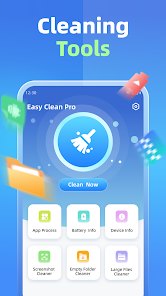
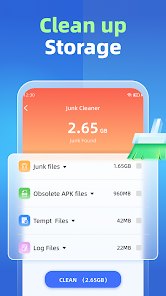
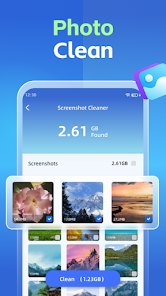
Easy Clean Pro is a phone cleaning and optimization app from Limtech Developers. It falls into the same broad category as other junk-file cleaners and memory boosters, aimed at people who want to clear cache, remove leftover files, and free up storage without digging through system settings themselves. I found it on Google Play, and the listing describes it as free to download, though I could not confirm the exact install count from what was shown. There were also mentions of ads and optional in-app purchases, which is fairly typical for this kind of utility. If you have ever watched your phone storage bar creep toward full and felt a small pang of panic, that is probably the moment you would install something like this. Opening it for the first time, the impression is quick and direct: a scan screen, a big number telling you how much space you can reclaim, and a clean button waiting to be tapped.
The first launch walks you through a short setup, and then the app gets straight to scanning. It checks cache files, residual folders from uninstalled apps, and other clutter, and within a few seconds you get a summary. Tapping the clean button does the obvious thing, and there is a satisfying little animation when the numbers drop. The main screen keeps things simple: a scan area up top, a list of categories below, and tabs for things like a file manager and a battery or memory section. In daily use, the flow is scan, review, clean, repeat, which takes maybe half a minute. One small tip: check the category list before hitting clean the first time, because some items are marked as important and it helps to see what is being removed. The interface is not confusing, but a few labels are vague, and I occasionally tapped into a screen that did not explain itself well.
After using it for a couple of weeks, my take is that Easy Clean Pro suits people who want a no-fuss cleaner and do not care much about fine-grained control. If you enjoy tweaking every setting or already manage storage well through your phone's built-in tools, you probably do not need it. What sets it apart from heavier cleaners is how fast it gets to the point, though apps like CCleaner offer more detailed analysis and cleaner reporting. I kept it installed because it is light and quick when I need a fast cleanup before downloading something big, but if the ads start feeling intrusive or the cleaning results look inflated, it would be one of the first apps I would remove.
features
- 🧹 One-tap scan and clean: the app jumps straight into scanning junk files and cache, so the main action is never more than a tap away.
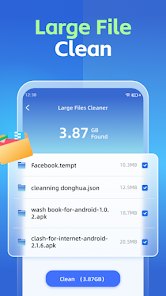
- 📁 Built-in file manager: you can browse and delete large or leftover files without leaving the app, which saves hopping between tools.
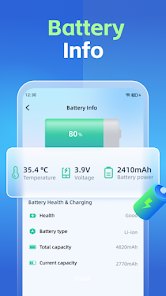
- 🔋 Extra utility sections: battery and memory panels sit alongside cleaning, giving a little more value than a pure junk cleaner.
- ⚡ Light footprint: compared with CCleaner, Easy Clean Pro opens and finishes a scan noticeably faster on modest hardware.
pros
- ✅ Speed: it launches and scans faster than CCleaner, which matters when you just want a quick cleanup.
- ✅ Simplicity: the layout is less cluttered than many competitors, so new users are not overwhelmed.
- ✅ All-in-one feel: cleaning, files, and memory tools live in one place, similar to what Avast Cleanup offers but with less setup.
cons
- ❌ Vague labels: some screens and categories are not clearly explained, which CCleaner handles better with detailed descriptions.
- ❌ Ad presence: ads can interrupt the flow, something paid cleaners like Avast Cleanup avoid.
- ❌ Limited depth: the analysis is shallower than CCleaner's, so power users may find results less trustworthy.
Recommended Apps
![]()
Sam's Club: Shopping & Savings
Sam's Club4.8

![]()
Air Horn - Siren Sounds Prank
BN Infotech4.5![]()
Girly Wallpapers
Wallpaper World Designs4.7![]()
Wise: International Transfers
Wise Payments Ltd.4.7![]()
Boom Chip Blast: 2-Player
Black Pyramid 3D Games Studio0![]()
Love Collage & Picture Frames
eToolkit Inc4.5![]()
Remini - AI Photo Enhancer
Bending Spoons4.3![]()
Bikii Cloud Game
Bikii Game Dev3.5![]()
Meitu- Photo Editor & AI Art
Meitu (China) Limited4.5![]()
Santa's Naughty List App
Steven J Q McAnena3.6![]()
Simple Calendar - easy planner
Komorebi Inc.4.7![]()
Walgreens
Walgreen Co.4.7![]()
GPS Maps Voice Navigation
Green Lines4.8![]()
Zootopia 2 Stickers & Emojis
Disney0![]()
Pandora - Music & Podcasts
Pandora4.1