Google Maps Go

500,000,000+
Installs
Google LLC
Developer
-
Travel & Local
Category
-
Rated for 3+
Content Rating
-
apps-help@google.com
Developer Email
-
http://www.google.com/policies/privacy
Privacy Policy
Screenshots

editor reviews
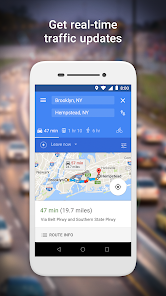
Google Maps Go is a lightweight version of the standard Google Maps app, designed specifically for devices with lower RAM, older operating systems, or limited storage. This lite navigation app focuses on core mapping functions like turn-by-turn directions, real-time traffic, and local business searches, while stripping down heavy graphics and animations. Available on Google Play as a free download with over 100 million installs, it doesn't require registration for basic use, though signing in syncs saved places. My first impression after launching it was surprise at how fast it started up on my budget phone, no splash screen lag or memory warnings. The interface feels clean but noticeably simpler, almost like a stripped-back version of the full app, which makes sense given its target audience.
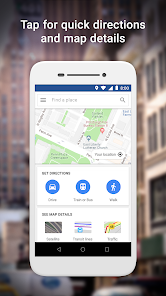
Actually using Google Maps Go feels similar to the main app but with a few trade-offs. The onboarding is quick, just a brief permission request for location, and then you're dropped straight onto the map. Zooming and panning are smooth, though satellite view and 3D buildings are completely absent, replaced by a basic terrain layer. The search bar works fine for finding cafes or gas stations, but tapping a result shows a simpler info card without reviews or photos, just the address and hours. For daily navigation, entering a destination and choosing car, walking, or transit feels identical to the full version, and voice-guided turn-by-turn works reliably. I noticed that offline maps download slower here due to the simpler interface, but once saved, routes load instantly. A small trick I found is that swiping up on a location card reveals route options faster than poking through menus.
After a few weeks of using Google Maps Go as my primary navigation app on a 2GB RAM device, I think it's a solid choice for anyone stuck with older hardware or limited data plans. The app doesn't drain battery as aggressively as the main Google Maps, and it never crashed once during my tests. However, if you rely on detailed reviews, real-time public transit schedules, or street view, this isn't for you, you'd miss those features intensely. Compared to other lite nav apps like Maps.Me or HERE WeGo, Google Maps Go wins on traffic accuracy but loses on offline map detail. I'd keep it installed on a backup phone, but on my daily driver with 4GB RAM, I switched back to the full app for richer information. It's a practical tool for a specific niche, not a replacement for the standard experience.
features
- 🔄 Data saver mode: This app compresses map tiles to use less mobile data, a clear win over the normal Google Maps on metered connections.
- 🏎️ Startup speed: The main app often takes 3-4 seconds to load on low-end devices, but Google Maps Go launches in under a second.
- 🧩 APEX module: It updates outside of regular Play Store limits, so older Android 4.4 devices still get new features, unlike most competitors like Waze.
- 🗺️ Core nav identical: Turn-by-turn directions, traffic rerouting, and lane guidance work exactly like the full version, no shortcuts in the driving logic.
pros
- 🏆 Minimal RAM footprint: This lite app uses under 50MB of memory, a huge advantage over the standard Google Maps (which often eats up 200MB on my device).
- 🏆 No app lockout: Some lite maps like OsmAnd restrict offline map regions without payment, but Google Maps Go stays completely free for all features.
- 🏆 Seamless Google account sync: Saved places and home/work addresses carry over from the full app instantly, whereas HERE WeGo needs a separate login setup.
cons
- 🚫 No satellite or street view: This kills the visual context for exploring new areas, a feature that cheap competitors like Maps.Me offer in their lite version.
- 🚫 Slower search results: Typing a query feels laggier with about half-second delays compared to the main Google Maps, which returns instant suggestions.
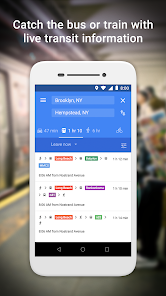
- 🚫 Transit data stripped down: Real-time departure times and crowdedness indicators are missing, so Moovit or Citymapper serve transit users better.
- 🚫 No dark mode toggle: The full app has a system-based dark theme, but this lite version stays bright white, which is annoying for night driving.
Recommended Apps
![]()
Sam's Club: Shopping & Savings
Sam's Club4.8

![]()
Air Horn - Siren Sounds Prank
BN Infotech4.5![]()
Girly Wallpapers
Wallpaper World Designs4.7![]()
Wise: International Transfers
Wise Payments Ltd.4.7![]()
Boom Chip Blast: 2-Player
Black Pyramid 3D Games Studio0![]()
Love Collage & Picture Frames
eToolkit Inc4.5![]()
Remini - AI Photo Enhancer
Bending Spoons4.3![]()
Bikii Cloud Game
Bikii Game Dev3.5![]()
Meitu- Photo Editor & AI Art
Meitu (China) Limited4.5![]()
Santa's Naughty List App
Steven J Q McAnena3.6![]()
Simple Calendar - easy planner
Komorebi Inc.4.7![]()
Walgreens
Walgreen Co.4.7![]()
GPS Maps Voice Navigation
Green Lines4.8![]()
Zootopia 2 Stickers & Emojis
Disney0![]()
Pandora - Music & Podcasts
Pandora4.1