Miga Town: My World

50M+
Installs
XiHe Digital (GuangZhou) Technology Co., Ltd.
Developer
-
Simulation
Category
-
Everyone
Content Rating
-
https://miga-kids.com/privacypolicy
Privacy Policy
Screenshots


editor reviews
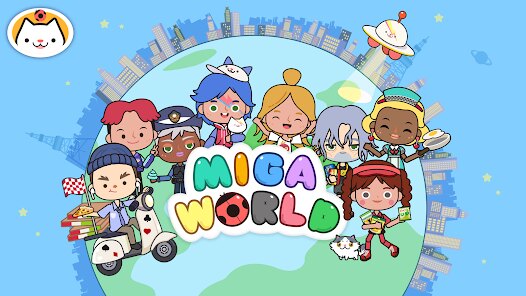
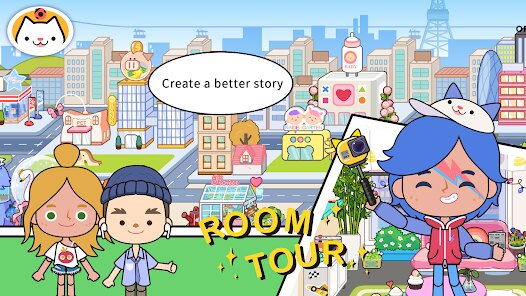
Miga Town: My World is a sandbox exploration game that's basically a digital dollhouse for your Android or iOS device. It first launched on Google Play and the App Store a few years back, and it's been racking up over 100 million installs on Google Play alone, which shows how popular it is with kids and casual players. The game is free to download and play, but it does have in-app purchases—think expansion packs for different locations like a hospital, school, or airport, which usually cost a couple of bucks each. There are also in-app ads, but they're not too intrusive; you can watch them to get rewards like new items. It's a pure mobile game—no PC or console versions—so you're stuck with your phone or tablet, but that's fine for a game that's all about touch controls.
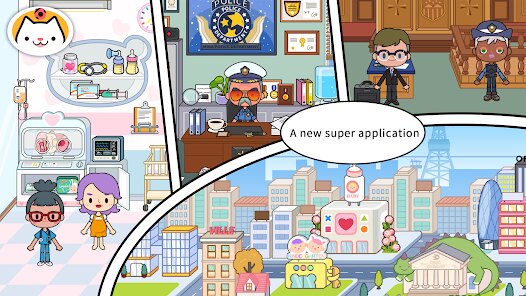
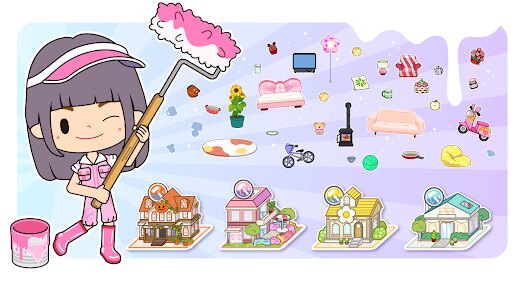
When you install the app and jump in, you start in a small town with a few buildings and a set of characters. The best part of Miga Town: My World is how open-ended it is—there are no rules, no goals, no time limits. You just drag and drop characters, furniture, and objects to create your own stories. I love that I can set up a birthday party in the house, take my character to the park for a picnic, or explore the hospital to pretend I'm a doctor. The controls are super intuitive—just tap on a character to move them, tap on an item to pick it up, and place it anywhere. The graphics are colorful and cute, with a simplistic 3D style that reminds me of a toy set. My favorite part is the endless creativity; every session feels different because you're not following a script.
Compared to other sandbox games like Toca Life World or My Town: Family, Miga Town: My World stands out because it's more focused on community and sharing—you can download custom maps and rooms made by other players online, which adds a ton of replay value. Toca Life World has a similar concept but feels more polished with more animations, but Miga Town's simpler design makes it faster to load on older Android phones. I'd recommend this over other games because the in-app purchases are reasonable—you're not bombarded with ads or forced to buy packs to enjoy the base town. It's a great app for kids who love imaginative play, and the download size is small, so it won't hog your storage. If you're looking for a low-stress, creative game for your Google Play library, this is a solid pick.
features
- Open-World Sandbox 🏠: Unlike linear games like The Sims Mobile, Miga Town: My World gives you total freedom—no quests or energy systems. You can mix and match items from different packs to build unique scenes, like putting a pool in the schoolyard or a bed in the park.
- Custom Multiplayer Options 👥: You can play offline solo or connect with up to four friends on the same device via split-screen. That's rare for sandbox games; Toca Life World only allows single-player, so Miga Town's local co-op is a unique feature for group play on Android.
- User-Created Content Hub 🎨: The app has a built-in platform where players upload custom rooms and maps. You can download these for free to expand your town. This community-driven aspect sets it apart from My Town: Family, which relies on official store packs only.
pros
- Simple and Intuitive Controls 🎮: The drag-and-drop interface is perfect for younger gamers on Google Play. You don't need tutorials—just tap to explore. Compared to Roblox, which has complex building tools, Miga Town's ease of use makes it accessible to anyone new to sandbox games.
- No Pressure Gameplay 😌: There are no timers, score meters, or failure states. You can spend hours setting up a scene without worrying about losing progress. This is a huge plus over free-to-play titles like My Life on Android, where ads often interrupt play.
- Affordable Expansion Packs 💰: The base game is free, and additional locations cost less than a coffee—usually $1.99 to $3.99 each. In contrast, Toca Life World's packs sometimes cost $4.99, so Miga Town saves you money while still offering variety.
cons
- Limited Animation Variety 🐢: The characters have basic movements—walking, sitting, and sleeping. There are no detailed interactions like cooking animations or dancing, which similar games like Toca Life World do better. This makes the gameplay feel flat after a while on Android.
- No Online Multiplayer 🌐: The split-screen local co-op is great, but there's no way to play with friends across different devices. My Town: Family offers online connectivity on Google Play, so Miga Town's lack of it feels outdated for a sandbox game with 100 million installs.
- Occasional Performance Drops 📉: On my older Android phone, the app lags when I have too many items in one scene, especially after downloading community content. Games like The Sims FreePlay handle this better with optimized loading, but Miga Town struggles with large builds.
Recommended Apps
![]()
Acrylic Nails!
CrazyLabs LTD4.3
![]()
Test: Angel or Devil
Sopelus Studio4![]()
Sprunki All Phases Beat Maker
Gotstar Studio0![]()
Stealth Master: Assassin Ninja
SayGames Ltd4.3![]()
Avatar World ®
Pazu Games4.8
![]()
Papa's Scooperia HD
Flipline Studios4.5![]()
I Am Cat
Estoty4.5![]()
Halloween Home
CASUAL AZUR GAMES3.8![]()
My Perfect Hotel
SayGames Ltd4.5![]()
Spring Spear: Aim & Snap
FlickFun Studio4.7![]()
Demon Detector : Ghost Radar
Game Palette3.7![]()
Dude Theft Wars FPS Open world
Poxel Studios Games4.3![]()
Satisfying Coloring
Mad1 Games4.5![]()
Papa's Taco Mia To Go!
Flipline Studios4.3![]()
Solitaire - Classic Card Games
Oakever Games4.7










Disclaimer
1.Apklifts does not represent any developer, nor is it the developer of any App or game.
2.Apklifts provide custom reviews of Apps written by our own reviewers, and detailed information of these Apps, such as developer contacts, ratings and screenshots.
3. All trademarks, registered trademarks, product names and company names or logos appearing on the site are the property of their respective owners.
4.Apklifts abides by the federal Digital Millennium Copyright Act (DMCA) by responding to notices of alleged infringement that complies with the DMCA and other applicable laws.
5.If you are the owner or copyright representative and want to delete your information, please contact us [email protected].
6.All the information on this website is strictly observed all the terms and conditions of Google Ads Advertising policies and Google Unwanted Software policy.
7.Apklifts.com is an independent, information-only website which is 100% free to all the users.