Tricky Prank: Annoying Quest

1M+
Installs
HIGAME Studio
Developer
-
Puzzle
Category
-
Everyone
Content Rating
-
store@higame.com.vn
Developer Email
-
https://higame.com.vn/privacy/
Privacy Policy
Screenshots



editor reviews
Tricky Prank: Annoying Quest is one of those hyper-casual puzzle games that you just can't put down once you start it. It's a pure mobile game, meaning you won't find it on Steam, Xbox, or Switch—it's strictly an Android and iOS affair. I first noticed it on the Google Play Store a few months back, and it's already racked up over 10 million installs, which tells you something about its addictive nature. The best part for me? It's completely free to download and play from the Google Play Store or the App Store. Yes, there are in-game purchases and the occasional in-app ad, but they aren't too intrusive. The ads are mostly rewarded video ones, so you can skip them if you want, but if you're like me and want to get past a tricky level without waiting, you might drop a buck or two on the microtransactions. Typically, those purchases range from $0.99 to maybe $4.99, which isn't bad for the amount of laughs you get out of it.
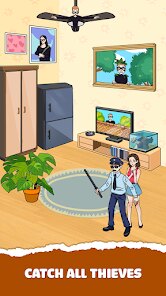
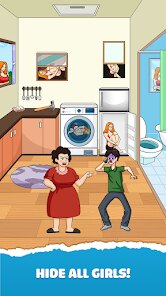
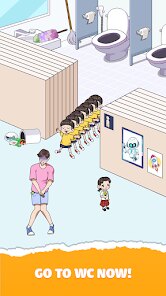
So, how do you actually play Tricky Prank? It's a point-and-click style puzzle game where you navigate through various scenarios to pull off pranks on unsuspecting characters. Each level presents a new environment—like an office, a park, or a classroom—and your goal is to find the right items or solve mini-puzzles to complete the prank. The best part of this game, hands down, is the sense of mischief it gives you. There's something genuinely satisfying about watching the characters react to your pranks, whether it's covering a chair with a whoopee cushion or swapping out someone's drink for a spicy one. My personal favorite part has to be the level where you're in a library and have to set off a series of domino-style pranks. The animations are simple but charming, and the sound effects really sell the comedic timing. It's not a complex game—you just tap around and figure stuff out—but that's exactly why it works so well on Android.
When I compare it to other popular games in the same genre, like "Prank Master" or "Prank Run," Tricky Prank stands out for a few reasons. First, the humor here feels more situational and less forced. In "Prank Master," the pranks can feel a bit repetitive after a while, but Tricky Prank keeps things fresh with constantly changing scenarios and a better variety of items to interact with. Another game, "Prank Run," leans too much into minigame mechanics that distract from the core pranking experience. Here, the focus is purely on solving the puzzle in the most entertaining way possible. I recommend downloading this app because it doesn't take itself too seriously. It's a game you play to unwind, to laugh, and to feel clever for a few minutes. Plus, the install process is smooth and the game runs well on most Android devices, even older ones. If you're looking for a casual prank game that doesn't demand too much brainpower but still gives you a good chuckle, this is your best bet on Google Play right now.
features
- 🃏 Unique Prank Mechanics: Unlike "Prank Master," which often recycles the same prank ideas, Tricky Prank introduces fresh, creative scenarios for each level. For example, you might have to use a remote-controlled spider to scare a coworker or set up a hidden camera to catch someone's reaction—the game constantly surprises you with new ways to cause harmless trouble.
- 🎯 Simple Yet Engaging Puzzles: The gameplay relies on intuitive point-and-click mechanics, but the puzzles gradually increase in difficulty. You won't be stuck scratching your head for hours, but there's enough challenge to keep you engaged. This sets it apart from "Prank Run," where the minigames can feel like tedious chores rather than fun brainteasers.
- 📱 Optimized for Mobile: The controls are perfectly designed for touchscreens, with smooth hitboxes and responsive taps. I've played similar prank games on Android that felt clunky, but Tricky Prank runs flawlessly, even on older devices. Plus, the download size is small, so you can install it without worrying about storage space.
pros
- 🐾 Endless Variety of Pranks: Each level feels like a new mini-story, with different characters and environments. I've played through dozens of levels and I'm still not bored—unlike some other prank games, where you feel like you've seen it all after an hour. The creativity here really shines.
- 😄 Perfect for Quick Sessions: Because each prank level takes just a few minutes to complete, it's ideal for mobile gaming. Whether I'm waiting for the bus or taking a short break, I can open the app, solve a puzzle, and have a good laugh. Other games in this genre, like "Prank Master," often require longer play sessions, which doesn't fit as well into a busy day.
- 👍 Family-Friendly Humor: The pranks are silly but never mean-spirited. This makes it a game you can play around kids or share with friends without worrying about offensive content. The reactions from the characters are always over-the-top and hilarious, but the tone stays light and playful throughout.
cons
- 🔁 Repetitive Puzzle Structure: After the first 20 levels or so, you start noticing a pattern—most puzzles boil down to "find the item, use it on the right target." While the scenarios change, the core loop feels too similar to other prank games like "Prank Master," which also relies heavily on the same formula. I wish the developers had introduced more variety in the puzzle types, like timed challenges or dialogue-based pranks.
- 🎥 Overreliance on Video Ads: The free version throws a video ad at you after almost every level. While you can skip most of them, the frequency can break the flow. Compared to "Prank Run," which has fewer ads per level, Tricky Prank feels a bit too aggressive with monetization. If you don't want to pay for the ad-free version, you'll have to deal with constant interruptions.
- 🔋 Battery Drain on Older Devices: I noticed that the app consumes more battery than I'd like, especially during longer sessions. On my older Android phone, the game heats up after about 15 minutes of play, which is a downside for a hyper-casual game like this. Similar games on Google Play are more optimized in this regard, so it's something HIGAME Studio should look into fixing in future updates.
Recommended Apps
![]()
AFK Arena
LilithGames4.6

![]()
Papa's Cupcakeria To Go!
Flipline Studios4.3![]()
Hair Salon: Beauty Salon Game
Bravestars Games4.5![]()
Merge Race Girl
PixelSeed0![]()
Makeover Queen: Pull the pin
GameeStudio3.3![]()
Escape Tsunami: Find Brainrots
InterLight Corp.0![]()
Brawl Stars
Supercell4.3![]()
Avatar Maker Dress up for kids
Pazu Games2.9![]()
Need for Speed™ No Limits
ELECTRONIC ARTS4.4![]()
Art of War: Legions
Fastone Games HK4.3![]()
Paper Delivery Boy
Supercent, Inc.4.4![]()
Plants Vs Brainrots
Veron Media, LLC4.4![]()
Car Race
iKame Games - Zego Studio4.6![]()
Capybara Go!
Habby4.8![]()
Plonky
Gametornado4.4