Prank Video Call - Fake Chat

10M+
Installs
Bravestars Casual
Developer
-
Action
Category
-
Everyone
Content Rating
-
account@bravestars.com
Developer Email
-
https://publish.bravestars.com/privacy.txt
Privacy Policy
Screenshots

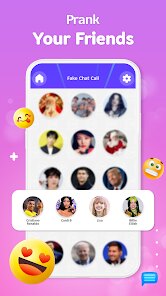
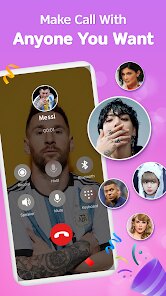
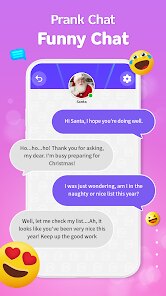
editor reviews
If you're into simulation apps that lean hard into the social media prankster vibe, "Prank Video Call - Fake Chat" from Bravestars Casual is exactly what it sounds like on the tin. This is a pure mobile game, available on both the Google Play Store and the Apple App Store, and it's designed to simulate fake video calls, voice calls, and chat conversations with everything from celebrities to your friends. It first launched a while back and has racked up over 10 million installs on Android alone, which tells you the concept has some staying power. The app is free to download and play, but like most games in this genre, it's loaded with in-app purchases and rather frequent ad pop-ups. You'll commonly see offers to remove ads for a few bucks, or you can buy coins to unlock premium characters and call themes. If you're willing to put up with the interruptions, you can play it without spending a dime, but those in-app purchases usually range from $0.99 to around $9.99 depending on the bundle.
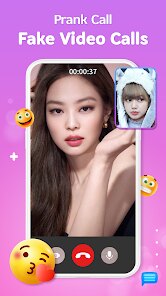
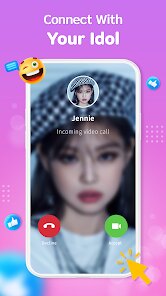
The way you play "Prank Video Call - Fake Chat" is pretty straightforward: you pick a character from a library of fictional celebrities, influencers, or generic contacts, and then you simulate a fake incoming video call or chat message. The best part of this game is definitely the illusion of realism. The video call screen looks legit, with your phone buzzing and a simulated face on the other end, which makes it perfect for recording reaction videos or pulling a quick one on a friend who glances at your screen. What I love most is the "celebrity video call" feature. You can set up a call with a fake pop star or a dramatic influencer, and the game plays pre-recorded video loops with corresponding text captions. It's silly, but the randomness of the conversations keeps me coming back. Whether you're using it for laughs with your buddies or to mess with someone's head, the app delivers exactly what it promises: a convincing prank tool that feels surprisingly polished for a free Android app.
Compared to other similar apps like "Fake Call" or "Prank Caller Pro," this one stands out because of the video call simulation rather than just audio. Most of the older prank call games on Google Play feel super dated with static images and low-quality sound, but Bravestars Casual put some effort into making the fake video calls look crisp and responsive. Another game I've tried is "Fake Call - Prank Call from Girlfriend," which focuses only on audio, but it gets boring fast. The main reason I recommend "Prank Video Call - Fake Chat" over other apps is the variety. You have multiple characters, chat scenarios, and even customizable caller names, so you can pretend you're getting a call from someone specific. It's not a competitive game by any means, but as a pure prank utility that runs smoothly on my old Samsung phone, it's hard to beat. If you download it from Google Play, just be ready for ads, but the core experience is solid and genuinely funny when you use it right.
features
- Fake Video Call Simulation 📹: The standout feature is the realistic incoming video call screen. Your phone vibrates, the caller ID pops up, and a pre-recorded video plays as if it's a live FaceTime or Zoom call. It's way more convincing than just a static image, which is what you get in older apps like "Prank Caller Pro."
- Diverse Character Library 👤: You get a solid roster of fictional celebrities, influencers, and generic contacts to choose from. Each character has their own personality and video loops, so you're not stuck repeating the same boring script. This variety keeps the pranks fresh compared to the limited options in "Fake Call - Prank Call from Girlfriend."
- Customizable Caller Name 🖊️: You can type in any name you want for the incoming call, which makes the prank way more personal. If I want to pretend my boss is calling while I'm in a meeting, I just change the name and let the video play. That flexibility is something many similar Android apps don't offer without a premium purchase.
pros
- User-Friendly Interface 🎮: The app is dead simple to navigate. You pick your character, set the name, and hit the call button. There's no confusing tutorial or cluttered menus, which is a huge plus compared to "Fake Call" where I wasted time figuring out the settings. On Android, it just works.
- High Replay Value 🔄: Because you can mix and match different characters and scenarios, the pranks never feel exactly the same. I've used it for weeks and still find new fake conversations to try out. Games like "Prank Caller Pro" get old after a few uses because they only have audio clips, but this one keeps you coming back for the video surprises.
- Great for Social Media Content 📱: If you record your screen while using this app, you can make hilarious reaction videos or prank clips for TikTok or Instagram. The video calls look real enough to fool viewers, which is a big reason why I keep it installed on my phone rather than deleting it like I did with other similar apps.
cons
- Too Many Ads 🚫: The free version bombards you with pop-up ads after almost every fake call or chat session. It really kills the flow when you're trying to set up a prank quickly. Compared to "Fake Call" which has fewer interruptions, this feels more intrusive, and you might feel pushed to buy the ad removal purchase.
- Limited Offline Functionality 📶: The app requires an internet connection for most features, including downloading character video loops. If you're in an area with spotty data or on airplane mode, you're stuck with a few basic options. Other Android games in this genre, like "Prank Caller Pro," work better offline once downloaded.
- Repetitive Video Loops 🔁: While the concept is great, the pre-recorded video clips for each character are short and loop after a few seconds. After a couple of uses, you notice the same facial expressions and mouth movements repeating. It's not as smooth as a real call, and this breaks the illusion if your victim pays close attention, unlike "Fake Call" which just uses static images that don't move at all.
Recommended Apps
![]()
AFK Arena
LilithGames4.6

![]()
Papa's Cupcakeria To Go!
Flipline Studios4.3![]()
Hair Salon: Beauty Salon Game
Bravestars Games4.5![]()
Merge Race Girl
PixelSeed0![]()
Makeover Queen: Pull the pin
GameeStudio3.3![]()
Escape Tsunami: Find Brainrots
InterLight Corp.0![]()
Brawl Stars
Supercell4.3![]()
Avatar Maker Dress up for kids
Pazu Games2.9![]()
Need for Speed™ No Limits
ELECTRONIC ARTS4.4![]()
Art of War: Legions
Fastone Games HK4.3![]()
Paper Delivery Boy
Supercent, Inc.4.4![]()
Plants Vs Brainrots
Veron Media, LLC4.4![]()
Car Race
iKame Games - Zego Studio4.6![]()
Capybara Go!
Habby4.8![]()
Plonky
Gametornado4.4