

Shot Fx - Super power Video Fx

500K+
Installs
Southern Studio
Developer
-
Video Players & Editors
Category
-
Everyone
Content Rating
-
southernstudiovn@gmail.com
Developer Email
-
http://45.76.210.135/shot_fx_super_power_video_fx.html
Privacy Policy
Screenshots
editor reviews
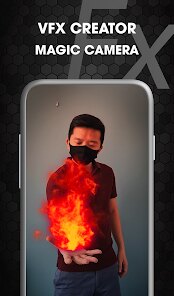
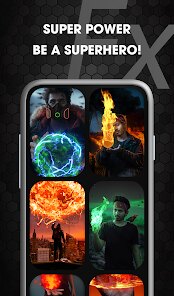
Shot Fx - Super Power Video Fx is a creative mobile app, not a traditional game in the RPG or shooter genre, but rather a video editing and effects tool that lets you add authentic-looking 'superpower' visual effects to your clips. It's a pure mobile app, available exclusively on Android via the Google Play Store, and there's no PC or console version—so you can't find it on Steam, Xbox, or Switch. The app first launched back in 2020 and is free to download and play, meaning you can start messing around with effects right away. As of now, it has over 10 million installs on Google Play, which shows a solid user base. It's free to download and play, but there are in-app purchases, usually ranging from $1.99 to $9.99 for effect packs or ad removal, and yes, there are in-app ads unless you pay to remove them. So, it's a classic freemium model where you can enjoy the basics for free, but the best stuff might cost you a few bucks.
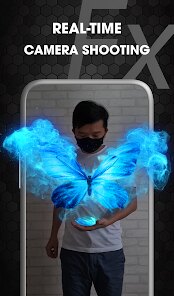
You can jump right in by recording or uploading a video, then selecting from a huge library of effects like fireballs, lightning, telekinesis, or even superhero-style jumps. The best part is how intuitive the editing process is—you just drag and drop the effect onto your clip, adjust the timing, and the app handles the rest. My favorite part of playing with Shot Fx is the sheer fun of making normal videos look like a scene from an Avengers movie. I've recorded myself kicking a soccer ball and added a flame trail to the ball, or filmed a friend walking and made it look like they're floating with telekinesis. The results are hilarious but also surprisingly convincing if you take the time to tweak the settings. For experienced users, the fine-tuning options like scaling, rotation, and integration with the video motion make it feel like a mini VFX studio in your pocket. It's also worth noting that the app doesn't need an internet connection for most effects, so you can edit on the go without data worries.
Compared to similar apps like Action Movie FX or PowerDirector, Shot Fx stands out because of its focus on superpower effects rather than general video editing. While Action Movie FX offers simple one-tap effects, it feels limited and childish after a few uses—Shot Fx gives you more control over how the effect moves and looks. PowerDirector, on the other hand, is a full-blown editor but lacks the specific fun-focused effects you get here. If you're just looking to add some flashy superpowers to your social media clips without learning complex editing tools, Shot Fx is better than those alternatives because it's more specialized and easier to use. The community uploads of effects are also a big plus—you can see what others have made and get inspired. As a real user, I'd say if you love making silly yet impressive videos for friends or TikTok, this app is worth the download. Just be ready to watch a few ads if you don't want to pay for the premium version.
features
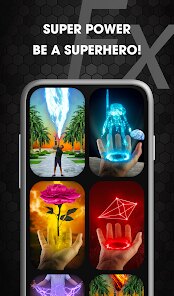
- Extensive Effect Library 🔥: This app packs over 100 different superpower effects, from elemental blasts like fire and ice to sci-fi lasers and magical auras. In comparison, Action Movie FX has only around 20 effects and rarely updates them, so you get way more variety here for the same price (or free).
- Key-Frame Based Editing 🎛️: Unlike simpler apps like PowerDirector's limited effect overlay, Shot Fx lets you set multiple key-frames to control when an effect appears, disappears, or changes size over time. This gives you professional-level control without needing a degree in video editing, and it's a feature that makes your videos look less static and more dynamic.
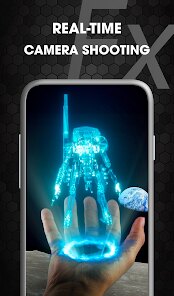
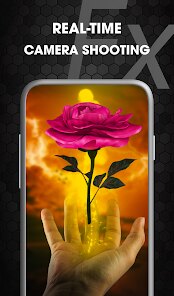
- Real-Time Video Integration 🎥: The app syncs effects to your video's motion automatically. For example, if you move your hand across the screen, the fireball you attach will follow that motion naturally. Most other apps, like Video Star, require manual syncing, which is time-consuming. Shot Fx does this in real-time, saving you hours of adjustment.
pros
- Intuitive User Interface 👌: The layout is clean and straightforward, with clear icons and a step-by-step workflow. When I first downloaded it, I could add an effect to a video within two minutes without a tutorial. Similar apps like FXGuru have cluttered menus that take the fun out of editing—Shot Fx makes it a breeze, even for a beginner.
- Hilarious Results 💥: The best strength is the pure entertainment value. I've made videos where I'm 'shooting lightning' from my fingers or 'blasting fire' from a water bottle, and the reactions from friends are priceless. The effects are well-designed enough to be believable but over-the-top enough to be funny. You don't get this same social media fun from serious editors like Kinemaster, which is too technical.
- Regular Updates with New Content 📅: The developer, Southern Studio, frequently adds new effects based on popular superhero movies or trends. In the past few months, I've seen new cosmic powers and dragon-style attacks added. Action Movie FX hasn't gotten a meaningful update in years, so Shot Fx keeps feeling fresh, which is rare for a free app.
cons
- Watermark on Free Version 💧: The biggest weakness is the watermark that appears on your exported videos if you don't buy the premium version. It's a bit obtrusive and sits in the corner for the entire clip. Apps like PowerDirector offer a smaller, less distracting watermark, and some like InShot don't even require payment to remove it. This makes the free experience feel a bit limited and forced toward a purchase.
- Effect Glitchiness with Fast Motion ⚡: If your video has fast-moving objects or people, the effects don't always track smoothly. I tried adding a telekinesis effect to a friend spinning quickly, and the effect looked like it was floating separately from the frame. Action Movie FX handles this slightly better because of its simpler, less precise system, but for a tool that touts real-time integration, this can be frustrating for action-packed clips.
- In-App Ads Can Interrupt Progress 📺: While you can pay to remove ads, the free version bombards you after every few edits. You might finish one effect and then have to watch a 30-second video or a static ad before you can save or start another project. In contrast, apps like Funimate have less frequent ads that don't break your workflow as much. This can kill your creative momentum when you're just experimenting.
Recommended Apps
![]()
Daily Horoscope
KADO Apps4.4
![]()
FOX Sports: Watch Live Games
Fox Digital Services, LLC3.7
![]()
Fake Call from Santa Claus
ThunderClap4.2![]()
Google Maps
Google LLC4.2![]()
PhotoLayers-Superimpose,Eraser
handyCloset Inc.4.6![]()
Healthy Benefits+
Solutran, Inc.4.5![]()
SuperMe - Avatar Maker Creator
THE.DEMON3.7![]()
Air Horn
Tenoku4.8![]()
Football Wallpaper HD 4K
Orange Infotech Studio4.6![]()
Artplay - AI Photo & Video
Hideaway Technology Limited4.5![]()
Horoscopes – Daily Zodiac Horo
Mail.Ru Group4.1![]()
Passport Parking
Passport Labs, Inc.2.5![]()
ParkMobile: Park. Pay. Go.
Parkmobile, LLC4.3![]()
FestAI: Ghost Detector App
Now Tech3.2![]()
Photo Tool
COLIFER LAB4





























