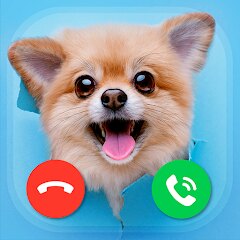

Idol Prank: Video Call & Chat

1M+
Installs
BUGUN SOFTWARE COMPANY LIMITED
Developer
-
Video Players & Editors
Category
-
Everyone
Content Rating
-
thanglvan@gmail.com
Developer Email
-
https://cryptofinancialsolution.com/idol-prank/privacy
Privacy Policy
Screenshots


editor reviews
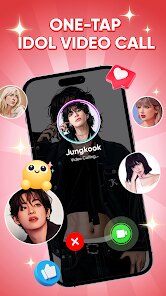
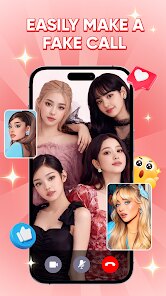
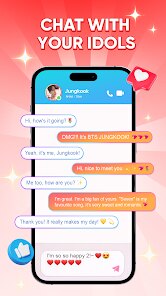
Idol Prank: Video Call & Chat is a prank and entertainment app from BUGUN SOFTWARE COMPANY LIMITED, available on Google Play and the App Store. The idea is simple: you get fake incoming video calls and chat screens that look like they come from a celebrity, so you can fool friends or just mess around. People usually download it for a quick laugh, often before showing a clip to a friend, and the first launch is pretty lightweight, dropping you straight into a list of idols and call screens rather than a long setup. Exact install counts, whether registration is required, and the details of in-app purchases or ads are not clearly confirmed here, so treat those points cautiously.
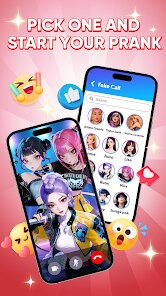
Once inside, you pick an idol, choose a call or chat template, and the app generates a screen that mimics a real incoming call. The interface is easy to read, with big preview buttons and simple navigation. In daily use, the flow is casual: open the app, pick a character, preview the fake call, then hand your phone to a friend. The preview step is the part worth learning first, because it helps you avoid awkward timing when the screen actually appears. Some templates look better than others, and a few screens can feel a bit samey after repeated use, but the main actions are smooth enough for quick pranks. A small tip: test the ringtone and timing before showing anyone, since a badly timed call ruins the joke.
After using it for a while, the app feels like a novelty rather than something you open every day. It works best for people who enjoy lighthearted pranks, celebrity content, or short social media clips. Anyone looking for real communication tools or serious video calling will find little here, and people who dislike ads or limited template variety may uninstall it quickly. Compared with general fake-call apps, it leans heavily on idol-themed content, which gives it a clearer personality. That focus is also its limit, so it tends to stay installed for occasional fun rather than become a daily habit.
features
- 🎭 The idol-focused library stands out: instead of generic fake callers, it offers celebrity-style call and chat screens, which fits prank videos and fan content better than most random fake-call apps.
- 📱 The setup is quick: pick an idol, preview the screen, and you are basically ready, with far less fiddling than apps that make you build a caller profile from scratch.
- 💬 Chat and video call pranks sit in one place, so you do not need separate apps for a fake message thread and a fake incoming call, which is handy when recording a short skit.
- 🎥 It suits short social clips: the screens are designed to look convincing on camera, and the preview step helps you time the reveal before recording.
pros
- ⭐ Compared with generic fake-call apps like Fake Call, the idol theme gives it a clearer identity and makes prank clips feel more specific.
- ⚡ It is faster to start than heavier prank apps such as Prank Dial, since you skip long setup and go straight to a template.
- 🧩 The combined call and chat options make it more versatile than apps that only fake one type of screen.
cons
- 😐 Template variety is limited, and after a few uses the screens start to feel repetitive next to apps like Fake Call with broader caller options.
- 📢 Ads and purchase prompts can interrupt the fun, especially when you are trying to set up a prank quickly.
- 🔍 Some idol content may feel unofficial or generic, so it does not match the polish of fan-made edit tools.
Recommended Apps
![]()
FalFal: Astrology, Tarot, Love
FalFal Team4.8

![]()
Japan Timetable & Route Search
NAVITIME JAPAN CO., LTD.4.3![]()
This Or That Test: Fun Filter
Braly JSC0![]()
FamilySearch Tree
FamilySearch International4.1![]()
Cool Fonts Keyboard & Themes
Art Maker Studio4.3![]()
Idol Prank Video Call & Chat
84devs Studio0![]()
DogTok - Dog Translator
Ai Apps SRL3.1![]()
Quiz Blitz: Test Brain Game
Quiz & Trivia Games by Mno Go Apps4.8![]()
Brain Test: Alzheimer's
Living Maples Healthy Aging0![]()
GroupMe
GroupMe4.5![]()
Vinted - Buy and sell clothes
Vinted4.6![]()
TIME WARP SCAN: Face Scanner
ZipoApps4.3![]()
NCAA March Madness Live
NCAA Digital4.7![]()
Perfect365 Video Makeup Editor
Perfect365, Inc.4.7![]()
Battle Challenge: Funny Filter
Braly JSC0











Hot Apps
-
![]()
Pinterest
Pinterest4.5 -
![]()
Domino's Pizza USA
Domino's Pizza LLC4.7 -
![]()
Google Pay
Google LLC4.4 -
![]()
Google Maps
Google LLC4.2 -
![]()
Venmo
PayPal, Inc.4.2 -
![]()
Uber - Request a ride
Uber Technologies, Inc.4.5 -
![]()
MyFitnessPal: Calorie Counter
MyFitnessPal, Inc.4.3 -
![]()
ParkMobile: Park. Pay. Go.
Parkmobile, LLC4.3 -
![]()
ChatBot - AI Chat
X PhotoKit4.5 -
![]()
PayPal - Send, Shop, Manage
PayPal Mobile4.3 -
![]()
Facebook
Meta Platforms, Inc.4 -
![]()
Waze Navigation & Live Traffic
Waze3.9 -
![]()
Direct Express®
i2c Inc.4.3 -
![]()
Yuka - Food & cosmetic scan
Yuka App4.7 -
![]()
Perplexity - Ask Anything
PerplexityAI4.7 -
![]()
Zoom - One Platform to Connect
zoom.us4.1 -
![]()
ChatGPT
OpenAI4.8 -
![]()
Spotify: Music and Podcasts
Spotify AB4.3 -
![]()
Instagram
Instagram3.9 -
![]()
Uber Eats: Food Delivery
Uber Technologies, Inc.4.6 -
![]()
ChatOn - AI Chat Bot Assistant
AIBY Inc.4.4 -
![]()
Google Gemini
Google LLC4.6 -
![]()
Google Chat
Google LLC4.4 -
![]()
Cash App
Block, Inc.4.6 -
![]()
Ford™
Ford Motor Co.4.7 -
![]()
PayByPhone
PayByPhone Technologies Inc .4.9 -
![]()
OfferUp: Buy. Sell. Letgo.
OfferUp Inc.4.4 -
![]()
WhatsApp Messenger
WhatsApp LLC4.5 -
![]()
Wise: International Transfers
Wise Payments Ltd.4.7 -
![]()
Passport Parking
Passport Labs, Inc.2.5