
Idol Prank Video Call & Chat

Installs
84devs Studio
Developer
-
Video Players & Editors
Category
-
Everyone
Content Rating
-
support@84devs.studio
Developer Email
-
https://www.84devs.studio/idol-prank/privacy-policy.html
Privacy Policy
Screenshots
editor reviews
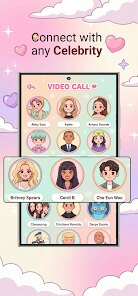
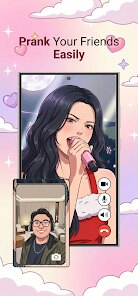
Idol Prank Video Call & Chat is an entertainment app from 84devs Studio that simulates fake video calls and chat conversations with idol characters. You pick a "caller," then act out a scene as if a celebrity is ringing your phone. It falls into the prank and simulation genre, and the main draw is showing friends a fake incoming call from someone famous. If you're curious, it's a free download on Google Play and the App Store, easy to install and quick to launch. The install count isn't something I can confirm, and I'm not sure whether it asks you to register first or offers in-app purchases, so go in expecting a few unknowns. Ads are likely in a free app like this, though I can't say how many. My first impression: the home screen throws character options at you right away, which is fun for about ten seconds, then you start wondering what else there is.
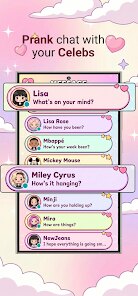
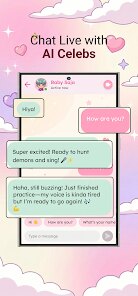
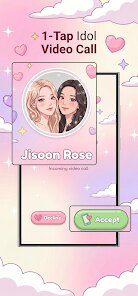
In daily use, the flow is simple. You open the app, scroll a gallery of idol portraits, tap one, and choose between a video call or a chat screen. The call screen looks like a real incoming-call interface, with a ringing tone, a photo, and answer/decline buttons. You answer, a short looping video or static image appears, and you talk into your phone as if the idol is listening. The chat side works like a messaging thread with canned replies that pop in on a timer. Onboarding barely exists, which is fine for a prank tool but leaves you guessing about settings. A practical tip: test the call once alone before pranking someone, because the timing of the fake voice and the video loop takes a moment to feel natural. Another tip is to turn the volume up, since a quiet ringtone ruins the illusion. Nothing crashed on me, though transitions between the gallery and the call screen felt a little stiff.
After using it for a while, my honest take is that this is a one-trick app. It's great for a quick laugh with friends who follow the same idols, and teenagers or K-pop fans will probably get the most out of it. Anyone looking for real interaction with celebrities won't need it, and the novelty wears off fast once your friends catch on. What sets it apart from similar prank-call apps is the focus on idol culture rather than generic scary or celebrity calls, which makes the character selection feel more targeted. I'd keep it installed for parties or group chats, but I can see myself uninstalling it after a few weeks once the jokes run dry. It's harmless fun, not something you'll open daily.
features
- 🎭 The app leans hard into idol culture, with character galleries built around fandom rather than generic celebrity pranks.
- 📞 The fake call screen mimics a real incoming call closely, with ringing, photos, and answer buttons that make the prank convincing.
- 💬 Chat mode adds a second layer, letting you stage message threads that look like a conversation with an idol.
- ⚡ Setup is fast. Compared with Fake Caller, which buries options in menus, this one gets you to a prank in a few taps.
pros
- 🌟 The idol-focused theme gives it a clearer identity than generic prank apps like Prank Dial.
- 🎯 Simple navigation means you can pull off a prank without reading instructions.
- 🆓 Free to download, so trying it costs nothing but a little storage space.
cons
- 😐 The illusion breaks quickly. Friends who know the app will spot it, and the canned chat replies feel robotic next to something like Replika.
- 📉 Limited depth. Once you've tried two or three idols, the experience repeats itself.
- 📢 Ads and unclear extras. Like many free prank apps, it may push ads, and the lack of clear info on purchases is a minor annoyance.
Recommended Apps
![]()
FalFal: Astrology, Tarot, Love
FalFal Team4.8

![]()
Japan Timetable & Route Search
NAVITIME JAPAN CO., LTD.4.3![]()
This Or That Test: Fun Filter
Braly JSC0![]()
FamilySearch Tree
FamilySearch International4.1![]()
Cool Fonts Keyboard & Themes
Art Maker Studio4.3![]()
Idol Prank Video Call & Chat
84devs Studio0![]()
DogTok - Dog Translator
Ai Apps SRL3.1![]()
Quiz Blitz: Test Brain Game
Quiz & Trivia Games by Mno Go Apps4.8![]()
Brain Test: Alzheimer's
Living Maples Healthy Aging0![]()
GroupMe
GroupMe4.5![]()
Vinted - Buy and sell clothes
Vinted4.6![]()
TIME WARP SCAN: Face Scanner
ZipoApps4.3![]()
NCAA March Madness Live
NCAA Digital4.7![]()
Perfect365 Video Makeup Editor
Perfect365, Inc.4.7![]()
Battle Challenge: Funny Filter
Braly JSC0










Hot Apps
-
![]()
Pinterest
Pinterest4.5 -
![]()
Domino's Pizza USA
Domino's Pizza LLC4.7 -
![]()
Google Pay
Google LLC4.4 -
![]()
Google Maps
Google LLC4.2 -
![]()
Venmo
PayPal, Inc.4.2 -
![]()
Uber - Request a ride
Uber Technologies, Inc.4.5 -
![]()
MyFitnessPal: Calorie Counter
MyFitnessPal, Inc.4.3 -
![]()
ParkMobile: Park. Pay. Go.
Parkmobile, LLC4.3 -
![]()
ChatBot - AI Chat
X PhotoKit4.5 -
![]()
PayPal - Send, Shop, Manage
PayPal Mobile4.3 -
![]()
Facebook
Meta Platforms, Inc.4 -
![]()
Waze Navigation & Live Traffic
Waze3.9 -
![]()
Direct Express®
i2c Inc.4.3 -
![]()
Yuka - Food & cosmetic scan
Yuka App4.7 -
![]()
Perplexity - Ask Anything
PerplexityAI4.7 -
![]()
Zoom - One Platform to Connect
zoom.us4.1 -
![]()
ChatGPT
OpenAI4.8 -
![]()
Spotify: Music and Podcasts
Spotify AB4.3 -
![]()
Instagram
Instagram3.9 -
![]()
Uber Eats: Food Delivery
Uber Technologies, Inc.4.6 -
![]()
ChatOn - AI Chat Bot Assistant
AIBY Inc.4.4 -
![]()
Google Gemini
Google LLC4.6 -
![]()
Google Chat
Google LLC4.4 -
![]()
Cash App
Block, Inc.4.6 -
![]()
Ford™
Ford Motor Co.4.7 -
![]()
PayByPhone
PayByPhone Technologies Inc .4.9 -
![]()
OfferUp: Buy. Sell. Letgo.
OfferUp Inc.4.4 -
![]()
WhatsApp Messenger
WhatsApp LLC4.5 -
![]()
Wise: International Transfers
Wise Payments Ltd.4.7 -
![]()
Passport Parking
Passport Labs, Inc.2.5