Pregnancy App & Baby Tracker

10M+
Installs
BabyCenter
Developer
-
Health & Fitness
Category
-
Teen
Content Rating
-
customerservice@babycenter.com
Developer Email
-
http://www.babycenter.com/help-privacy
Privacy Policy
Screenshots

editor reviews
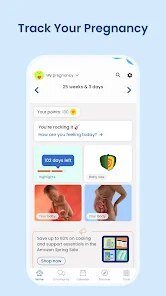
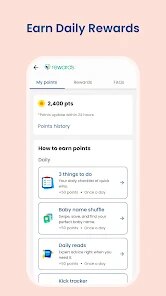
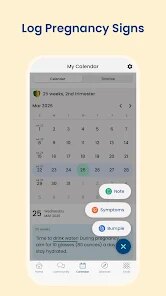
I started using the Pregnancy App & Baby Tracker from BabyCenter mostly because I wanted something that showed me week-by-week what was happening with the baby. It's a typical pregnancy tracking app, so it covers everything from logging symptoms and kick counts to giving daily articles about fetal development. I first downloaded it from Google Play after seeing it had over 10 million installs, and the sign-up was free — no charge to get started. I remember opening it and feeling slightly overwhelmed because the main screen has so much stuff right away: a countdown timer, a tip of the day, and a timeline of what your baby looks like now. But once I figured out I could tap the menu and adjust which modules show up, it became way less chaotic. There are optional in-app purchases if you want extra things like personalized meal plans, but the basic version feels pretty complete without spending anything.
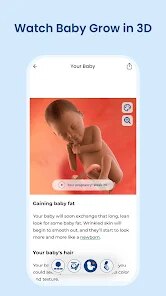
Actually using the app daily has been smoother than I expected. The first thing I do is swipe over to the “My Baby” tab, where there is a 3D model that changes every week. I remember at week 12 it looked like a tiny bean with translucent skin, and by week 20 you could see the little fingers forming. That visual part keeps me engaged more than I thought it would. Logging symptoms is straightforward — you tap the plus icon, pick what you're feeling (nausea, back pain, cravings), and it saves the date. The kick counter is tucked inside the tools section, which took me a few days to discover, but once I found it, it was easy to use: just hit “start counting” and tap each time you feel movement. One small tip: if you have a specific symptom that repeats, you can set it as a quick-log so you don't have to scroll through the whole list every time. The articles are mostly helpful, though sometimes they feel a bit too general, like something you'd find on a parenting blog rather than something tailored to your exact due date.
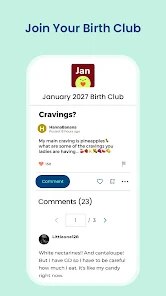
After using it for a few months, I think this app works best for first-time parents who want a mix of medical info and community support. The BabyCenter brand is huge, so you get access to their forums where other parents share experiences, which is nice if you are the type who likes reading birth stories or asking about weird symptoms. But someone who has been through pregnancy before might find it repetitive — the articles repeat a lot of the same advice across weeks. Compared to something like Ovia Pregnancy, which lets you track more granular health data like blood pressure and cervical position, this one feels more focused on emotional support and basic tracking. I keep it installed because the weekly updates make me feel connected to the baby's growth, but I do remove it after giving birth since it doesn't shift into a baby tracker mode unless you install the separate BabyCenter app. For a free tool with no forced ads, it does the job without being pushy about upgrades.
features
- 🔍 The app includes a rotating 3D fetal model that updates every week of pregnancy. Most competitors like What to Expect only show static illustrations, so seeing the baby's form change in real time feels more immersive and helps me visualize development stages more clearly.
- 📅 The timeline view organizes your pregnancy into trimesters and weeks, with daily tips and milestone alerts. This beats apps like Ovia, which bury similar info under multiple menus — here I just scroll down and see what's relevant without extra tapping.
- 👩👩👧👧 The community forums are directly integrated into the app, not a separate website. In apps like Pregnancy+, the community feels tacked on, but here I can open a discussion about first-trimester fatigue and get replies from other users within hours while staying inside the same interface.
pros
- 🆓 The core tracking features are available completely free, with no nagging pop-ups to upgrade. In contrast, apps like Glow Nurture lock basic functions like kick counting behind a paywall unless you subscribe.
- 🔄 The app syncs across devices smoothly — I started on my phone and later opened it on a tablet to show my partner the week 30 scan comparison, and all my logs carried over automatically. Not every pregnancy app handles this well; Ovia sometimes fails to sync if you switch networks.
cons
- 📱 The interface can feel cluttered at first because the home screen loads articles, a countdown, and symptom suggestions all at once. Compared to BabyCenter, an app like Sprout Pregnancy has a cleaner, more minimalist layout that feels less overwhelming during early pregnancy nausea.
- 🔋 The app drains battery noticeably when running in the background, especially if you leave the kick counter active. I have had my phone heat up after letting it run for thirty minutes, whereas similar functions in the What to Expect app use less power because they rely on manual input instead of continuous tracking.
Recommended Apps
![]()
ToonMe - cartoons from photos
Linerock Investments LTD4.5

![]()
Zipper Lock Screen - ZippyLock
EZProducts4.7![]()
Does He Like Me?
KDR Games4.3![]()
Horoscope of Birth
Denimaks4.4![]()
Tripo - AI 3D Model Generator
Tripo AI4.4![]()
Step Tracker - Pedometer
Leap Fitness Group4.8![]()
Photo Editor Picsa: Collage
Lyrebird Studio4.5![]()
Crafto
Kutumb App4.7![]()
Tarot Card Psychic Reading
Innovana Techlabs Limited4.5![]()
Tinder Dating app. Meet People
Tinder4.1![]()
Funny Ranking Filter Challenge
TriverSoft0![]()
ESPN
Disney4.3![]()
Gradient: Celebrity Look Like
TICKET TO THE MOON, INC.4.1![]()
Face Live Camera: Face Filters
Lyrebird Studio4.1![]()
Voice Changer – Voice Effects
All Excellent Apps0













Hot Apps
-
![]()
ChatGPT
OpenAI4.8 -
![]()
Ford™
Ford Motor Co.4.7 -
![]()
MyFitnessPal: Calorie Counter
MyFitnessPal, Inc.4.3 -
![]()
ChatBot - AI Chat
X PhotoKit4.5 -
![]()
Ticketmaster-Buy, Sell Tickets
Ticketmaster L.L.C.3 -
![]()
CapCut - Video Editor
Bytedance Pte. Ltd.4 -
![]()
Wise: International Transfers
Wise Payments Ltd.4.7 -
![]()
Instagram
Instagram3.9 -
![]()
Microsoft Copilot
Microsoft Corporation4.8 -
![]()
Telegram
Telegram FZ-LLC4.2 -
![]()
GroupMe
GroupMe4.5 -
![]()
DoorDash - Food Delivery
DoorDash4.6 -
![]()
Bolt: Request a Ride
Bolt Technology4.8 -
![]()
Perplexity - Ask Anything
PerplexityAI4.7 -
![]()
OfferUp: Buy. Sell. Letgo.
OfferUp Inc.4.4 -
![]()
Cash App
Block, Inc.4.6 -
![]()
ParkMobile: Park. Pay. Go.
Parkmobile, LLC4.3 -
![]()
Signal Private Messenger
Signal Foundation4.5 -
![]()
PayByPhone
PayByPhone Technologies Inc .4.9 -
![]()
Uber Eats: Food Delivery
Uber Technologies, Inc.4.6 -
![]()
Pinterest
Pinterest4.5 -
![]()
Google Pay
Google LLC4.4 -
![]()
Yuka - Food & cosmetic scan
Yuka App4.7 -
![]()
SiriusXM: Music, Sports & News
Sirius XM Radio Inc4.8 -
![]()
Duolingo: Language & Chess
Duolingo4.7 -
![]()
Waze Navigation & Live Traffic
Waze3.9 -
![]()
Google Chat
Google LLC4.4 -
![]()
PolyBuzz: Chat with AI Friends
CLOUD WHALE INTERACTIVE TECHNOLOGY LLC.3.8 -
![]()
FaceApp: Perfect Face Editor
FaceApp Technology Ltd4.4 -
![]()
Passport Parking
Passport Labs, Inc.2.5