
Video Editor & Maker - InShot

500,000,000+
Installs
InShot Video Editor
Developer
-
Video Players & Editors
Category
-
Rated for 3+
Content Rating
-
inshot.android@inshot.com
Developer Email
-
http://inshotapp.com/website/InShotAndroid/privacypolicy.html
Privacy Policy
Screenshots

editor reviews
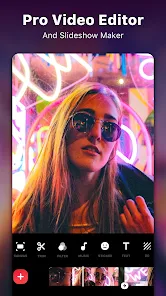
InShot has become one of those go-to apps you see on nearly everyone's phone if they dabble in social media. It's a video and photo editing tool that really aims to make the whole process less intimidating. You can trim clips, merge them together, add music, throw in some text or stickers, and adjust the speed. It's mainly for casual creators who want to post on TikTok, Instagram, or YouTube Shorts without opening up a heavy desktop program. When you first download it from the Play Store or App Store, the install count is massive, and it's free to grab. The first impression after launching is that it feels welcoming, with a clean layout that doesn't scream "professional editor". It guides you straight to the dashboard where you just tap to start a new project, so there's no confusing setup or account registration blocking you. You can use it right away, but you'll quickly notice some features are locked behind the premium version, and there are occasional ads that pop up.
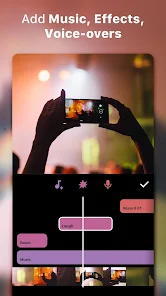
After you jump into a project, the experience stays pretty straightforward. You pick your video from the gallery, and it lands on the timeline, which is the heart of the app. The interface is laid out with all the key tools tabbed along the bottom, so you're not hunting through menus. A common flow would be to trim the fat off your clip first, then swipe over to the music tab to pick a track from their library or your own files. One thing that feels nice is how you can adjust the volume of the original video separately from the added music. There's a bit of a learning curve when you try to sync multiple clips or use the keyframe animation, but it's not wild. A small tip is to use the "Canvas" option to change the aspect ratio quickly for different platforms. Sometimes the app feels a bit sluggish if you're working with a long, high-res video, but it hasn't crashed on me. The auto-captions feature is a lifesaver for adding subtitles, even if it's not always 100% accurate.
After spending a decent chunk of time with InShot, I think it hits a sweet spot for anyone who needs to edit videos on their phone without wanting to become a pro. It's perfect for students making content for class projects, friends putting together vacation compilations, or small business owners who need quick promo clips. If you're someone who already uses CapCut, you'll find InShot does basically the same job, but it feels less cluttered and more focused on the essentials. However, the watermarks on the free version are a bit of a downer, and the premium subscription is pricier than some alternatives like YouCut. I'd keep it installed because it's reliable for quick edits, but I could see someone uninstalling it if they start needing more advanced features like multi-layer timelines or color grading that apps like Kinemaster or PowerDirector offer. It's a solid tool, but it's not for everyone.
features
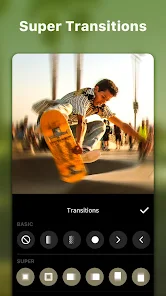
- 🎬 InShot gives you a single timeline for both video and audio, which makes simple edits feel very direct. In contrast, CapCut offers a more layered timeline system that can be overkill for just trimming a clip and adding a song. InShot keeps it simple so you don't get lost in tracks.
- 🎬 The text and sticker library is surprisingly broad, and you can animate both with basic entry and exit effects. This stands out compared to YouCut, which has a much smaller selection of fonts and no sticker library at all. It feels like InShot wants you to have fun without going elsewhere.
- 🎬 One feature that feels unique is the "Glitch" and "VHS" effects built right in. While other apps like CapCut rely on downloading third-party templates for these looks, InShot gives you a one-tap filter that replicates the aesthetic instantly. It's not the most customizable, but it's fast.
pros
- 👍 The app handles export speed well; it usually processes a 60-second 1080p video in under a minute on a mid-range phone. CapCut sometimes takes noticeably longer for the same clip.
- 👍 It offers a free trial of premium features without asking for payment info upfront. That's more generous than apps like PowerDirector, which lock everything behind a paywall from the start.
- 👍 The "Collage" mode works smoothly for combining multiple clips into a single frame, something that YouCut doesn't even include as a built-in option.
cons
- 👎 The free version slaps a watermark on every export unless you pay up, and it's not subtle. CapCut used to be completely watermark-free, though that's changing now with newer updates.
- 👎 There's no option to adjust keyframe curves for custom animations, which limits you when compared to Kinemaster. Your movements always feel a bit linear and robotic.
- 👎 The app lacks a proper audio waveform display on the timeline, making it harder to align cuts to a beat. PowerDirector gives you a full waveform, which makes music syncing way more precise.
Recommended Apps
![]()
ToonMe - cartoons from photos
Linerock Investments LTD4.5

![]()
Zipper Lock Screen - ZippyLock
EZProducts4.7![]()
Does He Like Me?
KDR Games4.3![]()
Horoscope of Birth
Denimaks4.4![]()
Tripo - AI 3D Model Generator
Tripo AI4.4![]()
Step Tracker - Pedometer
Leap Fitness Group4.8![]()
Photo Editor Picsa: Collage
Lyrebird Studio4.5![]()
Crafto
Kutumb App4.7![]()
Tarot Card Psychic Reading
Innovana Techlabs Limited4.5![]()
Tinder Dating app. Meet People
Tinder4.1![]()
Funny Ranking Filter Challenge
TriverSoft0![]()
ESPN
Disney4.3![]()
Gradient: Celebrity Look Like
TICKET TO THE MOON, INC.4.1![]()
Face Live Camera: Face Filters
Lyrebird Studio4.1![]()
Voice Changer – Voice Effects
All Excellent Apps0














Hot Apps
-
![]()
ChatGPT
OpenAI4.8 -
![]()
Ford™
Ford Motor Co.4.7 -
![]()
MyFitnessPal: Calorie Counter
MyFitnessPal, Inc.4.3 -
![]()
ChatBot - AI Chat
X PhotoKit4.5 -
![]()
Ticketmaster-Buy, Sell Tickets
Ticketmaster L.L.C.3 -
![]()
CapCut - Video Editor
Bytedance Pte. Ltd.4 -
![]()
Wise: International Transfers
Wise Payments Ltd.4.7 -
![]()
Instagram
Instagram3.9 -
![]()
Microsoft Copilot
Microsoft Corporation4.8 -
![]()
Telegram
Telegram FZ-LLC4.2 -
![]()
GroupMe
GroupMe4.5 -
![]()
DoorDash - Food Delivery
DoorDash4.6 -
![]()
Bolt: Request a Ride
Bolt Technology4.8 -
![]()
Perplexity - Ask Anything
PerplexityAI4.7 -
![]()
OfferUp: Buy. Sell. Letgo.
OfferUp Inc.4.4 -
![]()
Cash App
Block, Inc.4.6 -
![]()
ParkMobile: Park. Pay. Go.
Parkmobile, LLC4.3 -
![]()
Signal Private Messenger
Signal Foundation4.5 -
![]()
PayByPhone
PayByPhone Technologies Inc .4.9 -
![]()
Uber Eats: Food Delivery
Uber Technologies, Inc.4.6 -
![]()
Pinterest
Pinterest4.5 -
![]()
Google Pay
Google LLC4.4 -
![]()
Yuka - Food & cosmetic scan
Yuka App4.7 -
![]()
SiriusXM: Music, Sports & News
Sirius XM Radio Inc4.8 -
![]()
Duolingo: Language & Chess
Duolingo4.7 -
![]()
Waze Navigation & Live Traffic
Waze3.9 -
![]()
Google Chat
Google LLC4.4 -
![]()
PolyBuzz: Chat with AI Friends
CLOUD WHALE INTERACTIVE TECHNOLOGY LLC.3.8 -
![]()
FaceApp: Perfect Face Editor
FaceApp Technology Ltd4.4 -
![]()
Passport Parking
Passport Labs, Inc.2.5