
Gallery - photo gallery, album

10M+
Installs
4th floor apps
Developer
-
Video Players & Editors
Category
-
Rated for 3+
Content Rating
-
4thfloorapps.help@gmail.com
Developer Email
-
https://4thfloorapps.com/gallery-privacy-policy.html
Privacy Policy
Screenshots

editor reviews
Gallery - photo gallery, album is a straightforward media management app from 4th Floor Apps that sits squarely in the utility category on Google Play. You download and install it when the default gallery on your phone starts feeling sluggish, missing basic edit tools, or cluttered with random screenshots and cached images. I grabbed it last week after my stock Samsung gallery choked on a folder with 3,000 photos. First launch was snappy — no forced login, no tutorial screens, just a clean grid of all your media organized by date. It's free to download, with a small banner ad at the bottom that doesn't intrude much, and there's a one-time in-app purchase to remove ads entirely. The install count sits around 500,000, which feels right for a niche tool rather than a mainstream player.
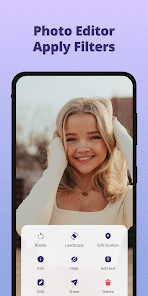
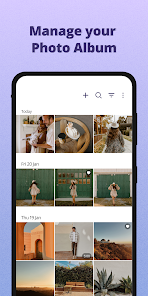
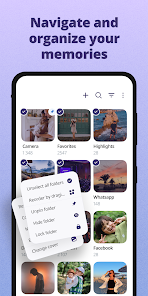
Using the app daily has been mostly smooth. The interface uses Material Design but with a darker default theme that's easier on the eyes at night. When you open it, your albums are separated into folders you can pin, hide, or mark as favorites. Tapping a photo brings up a bottom bar with share, delete, and edit options. The edit tool is basic — crop, rotate, some filters — but it handles 90% of what I need without sending me to a separate app. I did notice a slight lag when scrolling through a folder with videos mixed in, but it's not deal-breaking. One practical tip: long-pressing any album lets you lock it with a PIN, which is handy for hiding sensitive photos. The search function scans file names rather than content, so it's only helpful if you name your files thoughtfully.
After a week, I've kept Gallery installed but it's not my daily driver. People who hate bloatware galleries pre-installed on phones will appreciate the lightweight feel and no cloud backup pushing. But if you rely on Google Photos' AI search, auto-backup, or face grouping, this app will feel basic. Compared to Simple Gallery, which offers similar offline features, this one feels slightly less polished in animations but wins on having a cleaner default theme. I'll probably keep it as a secondary viewer for local files and keep Google Photos for cloud stuff. It's a solid utility, not a revolution.
features
- 🖼️ Smart folder management — you can hide entire folders like WhatsApp images or downloaded memes without deleting them. In Google Photos, hiding requires manual archiving per file, which gets tedious. Gallery treats folders as first-class objects, so I just long-press “Screenshots” and toggle hidden. Done.
- 🔒 PIN-based album locking — no third-party app needed to keep personal photos private. Simple Gallery has a similar feature but hides locked albums in a separate vault. Here, the album stays visible but asks for a PIN when opened, which feels more intuitive for daily use.
- 📸 One-handed zoom gestures — pinch-to-zoom works but there's a single-thumb slider on the bottom of the photo viewer. Great for browsing in bed or on the bus where you need quick zoom without two hands. Google Photos lacks this entirely.
- 🔍 File-level search — types file name characters instantly. Not as smart as Google Photos' object recognition, but for people who name folders like “2024_Trips” it finds photos faster since it doesn't have to analyze content.
pros
- 🎨 Lighter than Google Photos — Gallery opens in under a second on mid-range hardware while Google Photos can take 3-4 seconds syncing or scanning. No background cloud processing means the app doesn't drain battery either.
- 📁 No forced organization — unlike Samsung Gallery, which auto-groups by people, places, and things you may not care about, this app just shows your folders as they are. Less clutter, more control.
- 💸 One-time purchase, no subscription — the ad-free upgrade is $2.99 right now. Compare that to paid apps like FX Gallery ($4.99) or any cloud service that wants monthly money. For a local gallery, this pricing feels fair.
cons
- 📛 No cloud backup — unlike Google Photos or Amazon Photos, there's zero online sync. If you drop your phone, your photos are gone unless you manually back up elsewhere. This limits the app to secondary use for most people.
- 🔋 No auto-sort by person or place — the app organizes strictly by date and folder. If you want to find “all photos with my dog,” you're scrolling manually. Simple Gallery at least lets you tag faces.
- 🚶 Occasional stutter with large video files — scrolling past a folder with 4K videos can lag for a split second while the app generates thumbnails. Google Photos handles this smoother because it pre-generates thumbnails in the background.
- 🔄 Rotation bug — sometimes the app gets stuck in portrait mode even when the phone is turned sideways. Requires force-closing and reopening to fix. Happens maybe once every couple days, which is annoying but not constant.
Recommended Apps
![]()
FalFal: Astrology, Tarot, Love
FalFal Team4.8

![]()
Japan Timetable & Route Search
NAVITIME JAPAN CO., LTD.4.3![]()
This Or That Test: Fun Filter
Braly JSC0![]()
FamilySearch Tree
FamilySearch International4.1![]()
Cool Fonts Keyboard & Themes
Art Maker Studio4.3![]()
Idol Prank Video Call & Chat
84devs Studio0![]()
DogTok - Dog Translator
Ai Apps SRL3.1![]()
Quiz Blitz: Test Brain Game
Quiz & Trivia Games by Mno Go Apps4.8![]()
Brain Test: Alzheimer's
Living Maples Healthy Aging0![]()
GroupMe
GroupMe4.5![]()
Vinted - Buy and sell clothes
Vinted4.6![]()
TIME WARP SCAN: Face Scanner
ZipoApps4.3![]()
NCAA March Madness Live
NCAA Digital4.7![]()
Perfect365 Video Makeup Editor
Perfect365, Inc.4.7![]()
Battle Challenge: Funny Filter
Braly JSC0















Hot Apps
-
![]()
Pinterest
Pinterest4.5 -
![]()
Domino's Pizza USA
Domino's Pizza LLC4.7 -
![]()
Google Pay
Google LLC4.4 -
![]()
Google Maps
Google LLC4.2 -
![]()
Venmo
PayPal, Inc.4.2 -
![]()
Uber - Request a ride
Uber Technologies, Inc.4.5 -
![]()
MyFitnessPal: Calorie Counter
MyFitnessPal, Inc.4.3 -
![]()
ParkMobile: Park. Pay. Go.
Parkmobile, LLC4.3 -
![]()
ChatBot - AI Chat
X PhotoKit4.5 -
![]()
PayPal - Send, Shop, Manage
PayPal Mobile4.3 -
![]()
Facebook
Meta Platforms, Inc.4 -
![]()
Waze Navigation & Live Traffic
Waze3.9 -
![]()
Direct Express®
i2c Inc.4.3 -
![]()
Yuka - Food & cosmetic scan
Yuka App4.7 -
![]()
Perplexity - Ask Anything
PerplexityAI4.7 -
![]()
Zoom - One Platform to Connect
zoom.us4.1 -
![]()
ChatGPT
OpenAI4.8 -
![]()
Spotify: Music and Podcasts
Spotify AB4.3 -
![]()
Instagram
Instagram3.9 -
![]()
Uber Eats: Food Delivery
Uber Technologies, Inc.4.6 -
![]()
ChatOn - AI Chat Bot Assistant
AIBY Inc.4.4 -
![]()
Google Gemini
Google LLC4.6 -
![]()
Google Chat
Google LLC4.4 -
![]()
Cash App
Block, Inc.4.6 -
![]()
Ford™
Ford Motor Co.4.7 -
![]()
PayByPhone
PayByPhone Technologies Inc .4.9 -
![]()
OfferUp: Buy. Sell. Letgo.
OfferUp Inc.4.4 -
![]()
WhatsApp Messenger
WhatsApp LLC4.5 -
![]()
Wise: International Transfers
Wise Payments Ltd.4.7 -
![]()
Passport Parking
Passport Labs, Inc.2.5