
AI Face Swap: MagicFace &Photo

10K+
Installs
Braly JSC
Developer
-
Video Players & Editors
Category
-
Rated for 3+
Content Rating
-
feedback.neo@bralyvn.com
Developer Email
-
https://bralyvn.com/privacy-policy.php
Privacy Policy
Screenshots

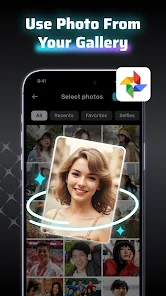
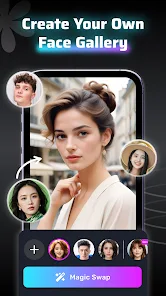
editor reviews
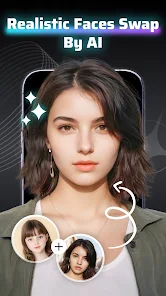
So you've stumbled upon AI Face Swap: MagicFace &Photo by Braly JSC – it's basically a face-swapping tool that sits in the photo editing and entertainment category on both Google Play and the App Store. The idea is simple: you grab a photo of yourself or someone else, pick a target image (like a celebrity or a funny meme), and the app blends faces together using AI. It's the kind of thing you'd download on a whim, maybe after seeing a friend share a hilarious swap on social media. When you first launch it, the interface feels pretty straightforward – there's a big "swap now" button staring at you, and it doesn't demand a login or a subscription right away. It's free to install with optional in-app purchases for extra features and some ads that pop up here and there, which is pretty standard for this kind of app. The initial impression is that it's less intimidating than some of the more complex editing suites out there.
After you get past the splash screen, the actual process is a breeze. You pick a source face and a target face from your gallery, and the app does the heavy lifting in a few seconds. The onboarding is minimal – just a quick tooltip or two – which works because the core action is so straightforward. During daily use, you might find yourself swapping faces into movie posters or group photos, and the AI generally does a decent job with skin tones and lighting, though it can stumble with tricky angles or heavy shadows. One practical tip: use high-res, front-facing photos for the best results, as fuzzy or side-profile shots tend to look wonky. The interface is clean but can feel a bit cluttered with ad banners if you're not using the paid version. It's a fun toy for a lazy afternoon, but not something you'd use for serious photo editing.
After spending some time with it, I'd say it's a solid pick for casual users who want a quick laugh or a social media post without diving into complicated software. It stands out from similar apps like Reface or FaceApp because it feels less focused on polished, professional swaps and more on just having fun, but that also means it lacks some of the refined blending tools you'd find in pricier options. If you're a perfectionist who needs every swap to look seamless, you might get frustrated with the occasional blurry edge or misaligned jawline. People who love making joke photos with friends will probably keep it installed, but anyone looking for serious portrait retouching will likely uninstall it after a week. It's not revolutionary, but for what it costs (free), it delivers exactly what it promises.
features
- ✨ One-click face swap: The main selling point is how quick it is. You pick a source and a target, and the app generates a result in under five seconds. Compared to something like Reface, which focuses on GIFs and videos, MagicFace leans on still images and feels snappier for photo-only edits.
- ✨ Batch swapping for groups: You can swap multiple faces in one photo at the same time. This is handy for group shots where everyone wants to trade faces. Other apps often force you to do one swap at a time, which gets tedious.
- ✨ Built-in templates and filters: It comes with a library of pre-made templates, like famous movie scenes or memes, so you don't always need to upload your own targets. FaceApp has similar templates but feels more curated, while MagicFace's collection is larger but more chaotic.
- ✨ No editing skills needed: The app handles all the heavy lifting – you don't need to manually adjust masks or layers. This makes it more accessible than something like Photoshop Express, which requires some know-how to pull off a convincing swap.
pros
- ⚡ Incredibly fast processing: Even on an older phone, the swap finishes in seconds. Apps like Reface can sometimes take longer or require a strong internet connection, but MagicFace tends to work smoother offline.
- ⚡ Free base version with good output: You can get decent results without spending a dime. FaceApp's free tier feels more limited, with many features locked behind a paywall, while MagicFace gives you more room to experiment before paying.
- ⚡ Simple, no-nonsense interface: There's no complex menu or learning curve. Swapping a face feels intuitive, unlike Zao, which can be confusing with its video-focused workflow.
- ⚡ Works on a variety of image types: Selfies, full-body shots, or even old photos – the app handles them all reasonably well. Some competitors struggle with non-standard angles or lighting conditions, but MagicFace is fairly versatile.
cons
- ❌ Ads can be intrusive: After every two or three swaps, a full-screen ad pops up, which breaks the flow. Reface has ads too, but they're less frequent in comparison, making MagicFace feel a bit spammy during longer sessions.
- ❌ Inconsistent edge blending: Sometimes the neck or jawline looks off, especially with hats or glasses. FaceApp generally nails the blending better, with smoother transitions that hide the swap more convincingly.
- ❌ No video support: If you want to swap faces in a TikTok or a short clip, you'll need another app. Reface and Zao both offer video face swaps, so MagicFeels limited in that regard.
- ❌ Output resolution can be lower: The final images sometimes come out a bit pixelated compared to the originals. Snapseed or other editors don't have this compression issue, so if quality matters, you might notice the difference.
Recommended Apps
![]()
FalFal: Astrology, Tarot, Love
FalFal Team4.8

![]()
Japan Timetable & Route Search
NAVITIME JAPAN CO., LTD.4.3![]()
This Or That Test: Fun Filter
Braly JSC0![]()
FamilySearch Tree
FamilySearch International4.1![]()
Cool Fonts Keyboard & Themes
Art Maker Studio4.3![]()
Idol Prank Video Call & Chat
84devs Studio0![]()
DogTok - Dog Translator
Ai Apps SRL3.1![]()
Quiz Blitz: Test Brain Game
Quiz & Trivia Games by Mno Go Apps4.8![]()
Brain Test: Alzheimer's
Living Maples Healthy Aging0![]()
GroupMe
GroupMe4.5![]()
Vinted - Buy and sell clothes
Vinted4.6![]()
TIME WARP SCAN: Face Scanner
ZipoApps4.3![]()
NCAA March Madness Live
NCAA Digital4.7![]()
Perfect365 Video Makeup Editor
Perfect365, Inc.4.7![]()
Battle Challenge: Funny Filter
Braly JSC0












Hot Apps
-
![]()
Pinterest
Pinterest4.5 -
![]()
Domino's Pizza USA
Domino's Pizza LLC4.7 -
![]()
Google Pay
Google LLC4.4 -
![]()
Google Maps
Google LLC4.2 -
![]()
Venmo
PayPal, Inc.4.2 -
![]()
Uber - Request a ride
Uber Technologies, Inc.4.5 -
![]()
MyFitnessPal: Calorie Counter
MyFitnessPal, Inc.4.3 -
![]()
ParkMobile: Park. Pay. Go.
Parkmobile, LLC4.3 -
![]()
ChatBot - AI Chat
X PhotoKit4.5 -
![]()
PayPal - Send, Shop, Manage
PayPal Mobile4.3 -
![]()
Facebook
Meta Platforms, Inc.4 -
![]()
Waze Navigation & Live Traffic
Waze3.9 -
![]()
Direct Express®
i2c Inc.4.3 -
![]()
Yuka - Food & cosmetic scan
Yuka App4.7 -
![]()
Perplexity - Ask Anything
PerplexityAI4.7 -
![]()
Zoom - One Platform to Connect
zoom.us4.1 -
![]()
ChatGPT
OpenAI4.8 -
![]()
Spotify: Music and Podcasts
Spotify AB4.3 -
![]()
Instagram
Instagram3.9 -
![]()
Uber Eats: Food Delivery
Uber Technologies, Inc.4.6 -
![]()
ChatOn - AI Chat Bot Assistant
AIBY Inc.4.4 -
![]()
Google Gemini
Google LLC4.6 -
![]()
Google Chat
Google LLC4.4 -
![]()
Cash App
Block, Inc.4.6 -
![]()
Ford™
Ford Motor Co.4.7 -
![]()
PayByPhone
PayByPhone Technologies Inc .4.9 -
![]()
OfferUp: Buy. Sell. Letgo.
OfferUp Inc.4.4 -
![]()
WhatsApp Messenger
WhatsApp LLC4.5 -
![]()
Wise: International Transfers
Wise Payments Ltd.4.7 -
![]()
Passport Parking
Passport Labs, Inc.2.5