

Messenger

5,000,000,000+
Installs
Meta Platforms, Inc.
Developer
-
Social
Category
-
Rated for 12+
Content Rating
-
https://m.facebook.com/policy.php
Privacy Policy
Screenshots

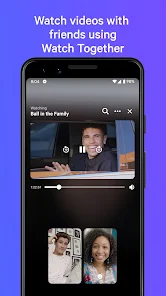
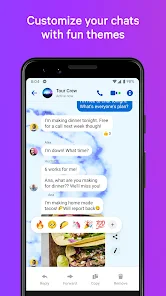
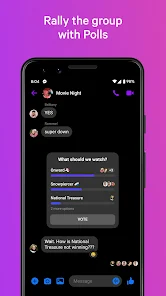
editor reviews
Messenger is Meta's dedicated chat app that split off from the main Facebook app years ago. It's basically a full-on messaging hub where you can text friends, make voice and video calls, send photos, and even play games inside chats. A lot of people download it because they already use Facebook, but it's also a solid standalone option if your contacts are already on it. The first time you open Messenger, you'll notice it's pretty polished but also a bit cluttered—there's a chat list, a stories section at the top, and a bunch of tabs at the bottom for calls, people, and games. It's free to download and install from both Google Play and the App Store, with over a billion installs easily. You don't need to register separately if you have a Facebook account, just log in and your existing contacts sync right up. There are in-app purchases for things like stickers and games, and ads do pop up occasionally in the chat list, which can be a little annoying.
Once you start actually using Messenger, it feels smooth for the most part. The onboarding is minimal since it pulls your info from Facebook, so you're thrown straight into your conversations. The main actions are obvious: tap a chat to open it, hit the camera icon to send a photo, or press the phone icon for a call. I found the voice and video call quality to be pretty reliable, even on slower connections, which is a big plus. One confusing moment for me was the "Vanish Mode"—it's hidden in the chat settings and not super intuitive to turn on or off. A practical tip: you can pin important chats to the top by long-pressing them, which saves time if you talk to the same people daily. The app has a lot of extra fluff like games and chatbots, which can make it feel bloated compared to something simpler. But for everyday stuff like sending a quick message or sharing a laugh with a friend, it gets the job done without much hassle.
After using Messenger for a while, I think it's best for people who are already deep in the Facebook ecosystem—if all your friends and family use it, there's really no reason to switch. But if you're not on Facebook or prefer a cleaner, more privacy-focused app, you might find Telegram or Signal better suited. What sets Messenger apart is how tightly it ties into Facebook groups and events, making group chats super easy to set up. I could see someone keeping it installed just for those group conversations, but the ads and constant feature bloat might push others to uninstall it. Compared to something like WhatsApp, Messenger feels more playful with its AR effects and games, but less secure. It's a solid app if you don't mind the extra noise.
features
- 🎮 Integrated games: You can play games like Pool or Uno right inside a chat without leaving the app, which is something WhatsApp doesn't offer at all.
- 📸 Camera effects and AR: Messenger has tons of filters, masks, and augmented reality effects for photos and videos, making it feel more fun and creative than iMessage's limited options.
- 💬 Vanish Mode: This feature lets messages disappear after they're seen, similar to Snapchat's ephemeral chats, but it's a bit hidden in the settings and not as smooth to activate.
- 🔗 Facebook integration: The app syncs directly with Facebook friends, groups, and events, so you don't need to add contacts manually—a big time-saver compared to Signal or Telegram.
pros
- 📞 Reliable call quality: Voice and video calls are consistently clear, even on slower data connections, which is better than what I've experienced with Skype or even FaceTime at times.
- 🎨 Fun extras: The ability to add stickers, GIFs, and custom reactions makes chats feel lively in a way that WhatsApp's more reserved design doesn't match.
- 🌐 Cross-platform support: Messenger works smoothly on Android, iOS, and desktop, so you're not locked into one device like you are with iMessage.
cons
- 📢 Too many ads: Ads pop up in the chat list regularly, which feels intrusive and unlike Telegram's ad-free experience unless you pay for premium.
- 🔒 Privacy concerns: Meta's data collection practices are a big red flag compared to Signal's zero-logging policy, so anyone who values privacy might look elsewhere.
- 🎪 Cluttered interface: The app throws in stories, games, and chatbot suggestions that make it feel bloated, while WhatsApp keeps things simple and focused on messaging.
Recommended Apps
![]()
BetterMe: Health Coaching
BetterMe Limited4.3
![]()
Walli - HD, 4K Wallpapers
Tap AI4.4![]()
Future Self - Old Age Filter
Vidler Koiter1.6
![]()
AI Photo Editor, Collage-Fotor
AI Art Photo Editor | Everimaging Ltd.4.3![]()
AI Face Swap: MagicFace &Photo
Braly JSC0![]()
QR Code Reader: QR Scanner
WECHOICE MOBILE4.3![]()
Lip Fall Challenge: Fun Filter
Braly JSC0![]()
Funny Reverse Audio - Singing
PlayStudioInc0![]()
Birthday Secrets
shasunder4.4![]()
Live Wallpapers HD 4K
Wallpaper app4.4![]()
Find Your Phone By Clap
Trusted App Global4.5![]()
Wizz - Expand Your World
Wizz3.8![]()
NCAA March Madness Live
NCAA Digital4.7![]()
Hulu: Stream TV shows & movies
Disney4.5![]()
Lethal Love: a Yandere game
AniByte!4.4















Disclaimer
1.Apklifts does not represent any developer, nor is it the developer of any App or game.
2.Apklifts provide custom reviews of Apps written by our own reviewers, and detailed information of these Apps, such as developer contacts, ratings and screenshots.
3. All trademarks, registered trademarks, product names and company names or logos appearing on the site are the property of their respective owners.
4.Apklifts abides by the federal Digital Millennium Copyright Act (DMCA) by responding to notices of alleged infringement that complies with the DMCA and other applicable laws.
5.If you are the owner or copyright representative and want to delete your information, please contact us [email protected].
6.All the information on this website is strictly observed all the terms and conditions of Google Ads Advertising policies and Google Unwanted Software policy.
7.Apklifts.com is an independent, information-only website which is 100% free to all the users.














