
Google Calendar

5,000,000,000+
Installs
Google LLC
Developer
-
Productivity
Category
-
Rated for 3+
Content Rating
-
http://www.google.com/policies/privacy
Privacy Policy
Screenshots
editor reviews
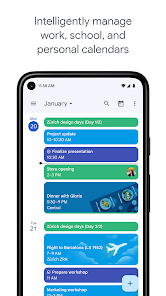
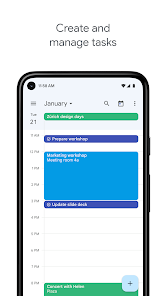
Google Calendar is a time-management app that I use to keep my schedule in check. It's basically a digital planner that syncs across your phone, tablet, and computer, so you can see everything from work meetings to dentist appointments in one place. Most people download it because it comes pre-installed on many Android devices, but you can grab it for free on the Play Store or App Store. With over a billion installs, it's pretty much the go-to for anyone who needs a reliable schedule tool. Once you launch it, the first thing you notice is the clean grid view—your day or month at a glance. It feels intuitive from the start, and signing in with your Google account instantly pulls in any existing events, which is a nice time-saver. There's no forced registration since it ties to your Google account, and while it has optional in-app purchases for things like extra storage, the core features are free. Ads aren't intrusive, but you might see occasional prompts for Google services.
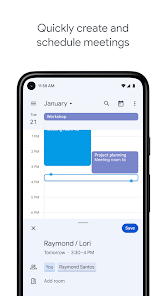
Using Google Calendar daily feels smooth once you get the hang of it. The interface is pretty minimalist, with a menu for switching between day, week, month, or schedule views. I usually start by tapping the plus icon at the bottom to create an event. You can add a title, set time or even make it an all-day activity, and pick colors for different types of tasks—green for work, blue for personal, and so on. Onboarding is brief, but it tells you about smart features like goals, which let you set recurring activities like "exercise three times a week" and the app fits them into your free slots. One small tip: if you swipe up on the month view, you get a quick peek of your upcoming events, which is handy for planning. It's not perfect, though—sometimes the reminders don't pop up if you forget to adjust notification settings, and the layout can feel crowded if you have too many overlapping events.
After using it for a while, I think Google Calendar is a solid choice for anyone who already lives in the Google ecosystem—like if you use Gmail or Google Keep for notes. It's great for students juggling classes and deadlines, or for professionals who need to share schedules with colleagues. But if you only need a simple to-do list without the calendar grid, you might not need it. What sets it apart from similar apps like Apple Calendar or Microsoft Outlook Calendar is the seamless integration with other Google services—like automatically adding flight info from Gmail or setting reminders based on emails. I'd keep it installed because it's reliable and free, but the lack of offline editing on the web version can be annoying. The notification system could be more customizable too, like snoozing alerts for a set time. Ultimately, it's a practical tool that's hard to beat for free scheduling, but it doesn't reinvent the wheel.
features
- 🛠 Smart event creation: You can type natural language like "lunch with John tomorrow at noon" and Google Calendar automatically fills in the details. This beats Apple Calendar, which requires manual input for date and time. It saves me from fumbling with date pickers when I'm on the go.
- 🎯 Goal setting: This feature lets you set recurring activities like "read for 30 minutes daily," and the app intelligently schedules them around your existing events. Compared to Outlook Calendar, which doesn't offer this at all, it's a game-changer for forming habits without manual planning.
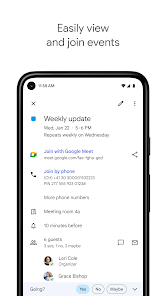
- 🌐 Seamless integration: Google Calendar grabs events from Gmail, like flight bookings or meeting invites, and syncs instantly with Google Meet for video calls. Apple Calendar can also integrate with iCloud, but it lacks the same depth with third-party services like Zoom or Trello, at least out of the box.
pros
- 🔔 Free and ad-light: Unlike apps like Todoist, which pushes premium plans for basic features, Google Calendar keeps core scheduling totally free with no forced ads. You just get occasional prompts to try paid storage, but it's easy to ignore.
- 🔗 Cross-platform sync: It works smoothly on Android, iOS, Windows, and Mac, so I can switch from my work PC to phone without missing a beat. Apple Calendar locks you into the Apple ecosystem, while this app is truly platform-agnostic.
- 📧 Smart suggestions: The app suggests event titles based on your past entries, like "Team Standup" from a previous meeting. This repetitive task gets automated, while apps like Microsoft Outlook Calendar don't offer predictive text for event names.
cons
- 🚫 Offline limitations: On the web version, you can't create or edit events without internet access. Apple Calendar offers full offline editing on iOS, which makes it more reliable when traveling or in low-signal areas.
- 🔒 Privacy concerns: Since it ties directly to Google's data collection, some users worry about how their schedule data is used. Microsoft Outlook Calendar has better enterprise privacy controls, at least for work accounts.
- ⚙️ Customization gaps: You can't set different alert sounds for different calendars, like a chime for work and a buzz for personal events. Apple Calendar allows per-calendar notification settings, which is helpful for separating priorities.
- 📅 Cluttered views: When you have overlapping events from multiple calendars (like work and personal), the schedule view becomes a dense mess. Calendar app like Fantastical handles overlapping events with better visual stacking and readability.
Recommended Apps
![]()
Japevox - Funny Prank Sound
SecureTool4.3
![]()
AstroMatrix Birth Horoscopes
AstroMatrix4.7
![]()
Personalized Call from Santa (
www.PackageFromSanta.com4.3![]()
Prank Call - Fake Call & Chat
Bravestars Casual4.1![]()
Persona: Beauty Camera
TICKET TO THE MOON, INC.4.5![]()
Peacock TV: Stream TV & Movies
Peacock TV LLC4.5![]()
Instant Buttons Soundboard App
Snow Peak Apps2.1![]()
GPS Speedometer: Speed Tracker
SM Infotech3.2![]()
Subway®
SUBWAY Restaurants4.2![]()
Find Your Phone By Clap
Trusted App Global4.5![]()
Gorilla Skins for Monkey Arena
Dumitru Boico4![]()
Vimeo
Vimeo.com, Inc.3.8![]()
Vinted - Buy and sell clothes
Vinted4.6![]()
Galaxy Starry Keyboard Backgro
Fun Keyboard Theme for Android4.7![]()
Chat AI - Ask AI anything
AI Chat Bot, Ask AI4.4















Disclaimer
1.Apklifts does not represent any developer, nor is it the developer of any App or game.
2.Apklifts provide custom reviews of Apps written by our own reviewers, and detailed information of these Apps, such as developer contacts, ratings and screenshots.
3. All trademarks, registered trademarks, product names and company names or logos appearing on the site are the property of their respective owners.
4.Apklifts abides by the federal Digital Millennium Copyright Act (DMCA) by responding to notices of alleged infringement that complies with the DMCA and other applicable laws.
5.If you are the owner or copyright representative and want to delete your information, please contact us [email protected].
6.All the information on this website is strictly observed all the terms and conditions of Google Ads Advertising policies and Google Unwanted Software policy.
7.Apklifts.com is an independent, information-only website which is 100% free to all the users.













