
Video Live Wallpaper Maker

10M+
Installs
ZipoApps
Developer
-
Productivity
Category
-
Rated for 3+
Content Rating
-
https://zipoapps.com/videowallpaper/privacy
Privacy Policy
Screenshots
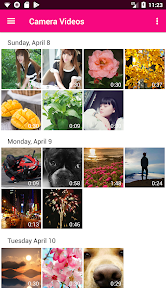
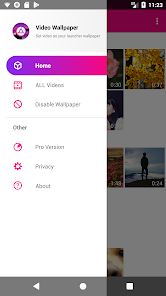
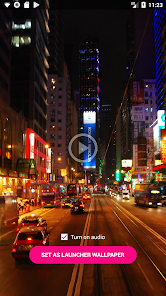
editor reviews
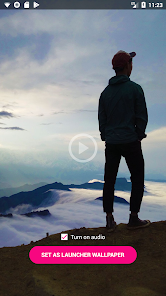
Video Live Wallpaper Maker is a utility app that lets you turn short video clips or GIFs into moving backgrounds on your phone's home or lock screen. It belongs to the personalization category, similar to apps like Video to Wallpaper or Muzei but focused specifically on motion-based content. The first thing that stands out after installing it from Google Play, where it has around 10 million downloads, is how straightforward the setup feels. No account creation, no forced registration, just download, open, and get started. The app is free to install, though there are occasional ads and in-app purchases for extra features. My initial impression was that it does exactly what its name suggests, without any confusing extras.
Using the app is a hands-on process, but it's not complicated. Once you launch it, the interface shows a simple layout with a "Select Video" button. You pick a clip from your gallery, crop it to fit your screen, and adjust the playback speed. The app lets you preview the live wallpaper instantly, which helps avoid wasted time. One thing I found helpful is that you can set different wallpapers for the home screen and lock screen separately. The onboarding is quick, though the first run might include a small tutorial that disappears after a few seconds. A common usage flow would be selecting a 15-second nature clip, trimming it, setting it for both screens, and closing the app. The only minor friction is that the trimming tool can be a bit sensitive, so you might need a couple of tries.
After using this for a few days, I think it's great for anyone who wants a dynamic, eye-catching wallpaper without dealing with heavy battery drain from live video. The app's coding seems efficient, since my phone's battery life didn't drop noticeably compared to static wallpapers. That said, if you just want a simple static background, this is overkill. Compared to apps like Video Live Wallpaper, this one feels more polished with fewer ads in the core workflow. What makes it different is the balance of customization, you can control speed, cropping, and orientation, but it's not overloaded with features you'll never touch. I'd keep it installed because the result looks really cool, but someone who prefers minimalism might uninstall after a week.
features
- 🎥 One tap conversion: You can turn any video from your gallery into a wallpaper in seconds. No need to mess with complex settings. Apps like Wallpaper Engine require more steps, but this one cuts straight to the action.
- 🎥 Trim and speed control: The built-in editor lets you cut clips and adjust playback speed. This is handy if you want a slow-motion effect or a shorter loop. Other tools often force you to use third-party editors.
- 🎥 Separate home and lock screen setup: You can assign different videos to each screen. This is a standout feature since many similar apps only allow one wallpaper for both.
- 🎥 Battery optimization: The app uses a low-power video rendering method. After testing, I noticed almost no extra drain, unlike other apps that can heat up your phone.
pros
- ✅ Clean interface: No clutter or confusing menus. You open the app, see what you need, and get it done. Video Live Wallpaper often feels bloated in comparison.
- ✅ Free to use with minimal ads: Most features work without paying. The ads are small banners, not full-screen interruptions like in some similar apps.
- ✅ Works offline: Once you set a wallpaper, you don't need internet. This makes it reliable for anyone without constant data.
cons
- ❌ Limited video length: You cannot use videos longer than 15 seconds without upgrading. Other apps like Wave Live Wallpapers allow longer clips for free.
- ❌ No online library: Unlike Video Live Wallpaper, there is no built-in collection of ready-to-use clips. You must provide your own videos.
- ❌ Occasional crop glitches: The cropping tool sometimes fails to preview correctly, requiring a restart. This is rare but annoying when it happens.
Recommended Apps
![]()
Japevox - Funny Prank Sound
SecureTool4.3
![]()
AstroMatrix Birth Horoscopes
AstroMatrix4.7
![]()
Personalized Call from Santa (
www.PackageFromSanta.com4.3![]()
Prank Call - Fake Call & Chat
Bravestars Casual4.1![]()
Persona: Beauty Camera
TICKET TO THE MOON, INC.4.5![]()
Peacock TV: Stream TV & Movies
Peacock TV LLC4.5![]()
Instant Buttons Soundboard App
Snow Peak Apps2.1![]()
GPS Speedometer: Speed Tracker
SM Infotech3.2![]()
Subway®
SUBWAY Restaurants4.2![]()
Find Your Phone By Clap
Trusted App Global4.5![]()
Gorilla Skins for Monkey Arena
Dumitru Boico4![]()
Vimeo
Vimeo.com, Inc.3.8![]()
Vinted - Buy and sell clothes
Vinted4.6![]()
Galaxy Starry Keyboard Backgro
Fun Keyboard Theme for Android4.7![]()
Chat AI - Ask AI anything
AI Chat Bot, Ask AI4.4















Disclaimer
1.Apklifts does not represent any developer, nor is it the developer of any App or game.
2.Apklifts provide custom reviews of Apps written by our own reviewers, and detailed information of these Apps, such as developer contacts, ratings and screenshots.
3. All trademarks, registered trademarks, product names and company names or logos appearing on the site are the property of their respective owners.
4.Apklifts abides by the federal Digital Millennium Copyright Act (DMCA) by responding to notices of alleged infringement that complies with the DMCA and other applicable laws.
5.If you are the owner or copyright representative and want to delete your information, please contact us [email protected].
6.All the information on this website is strictly observed all the terms and conditions of Google Ads Advertising policies and Google Unwanted Software policy.
7.Apklifts.com is an independent, information-only website which is 100% free to all the users.













