
Photo Collage Pro

10M+
Installs
Zentertain
Developer
-
Video Players & Editors
Category
-
Rated for 12+
Content Rating
-
Fideoapp@zentertian.net
Developer Email
-
http://getmatchnow.com/policies/privacy.html
Privacy Policy
Screenshots
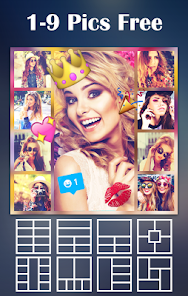
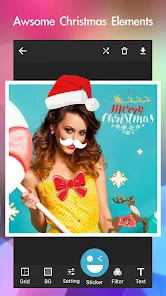

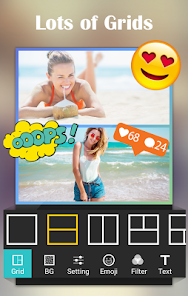
editor reviews
Photo Collage Pro is a collage-making app developed by Zentertain, available for free on both the Google Play Store and the Apple App Store. I downloaded it out of curiosity, thinking it might be useful for quickly stitching together photos for social media stories or event invites. The first impression after launching the app is that it looks clean but somewhat generic, with a layout that feels familiar to anyone who has used other photo editing tools. There is no mandatory registration, which is a relief, though you do encounter occasional ads and prompts for in-app purchases. Overall, it feels like a straightforward utility app that does not overcomplicate things from the start.
Once you start using Photo Collage Pro, the hands-on experience is mostly smooth but has a few rough edges. The interface presents you with a grid of templates right away, so you can pick a layout and drop your photos from the gallery. The onboarding is minimal, which I actually prefer, but some new users might feel a bit lost about where the editing tools are hidden. In daily use, you select a template, tap each cell to add a photo, then adjust borders and backgrounds. The app offers basic editing like filters and text overlays, but applying them can sometimes feel sluggish, especially on older devices. A small practical tip is to use the freeform mode if you want more control over photo placement, though it takes a bit of tapping to get things aligned perfectly.
After using Photo Collage Pro for a while, my personal take is that it serves its purpose for quick, simple collages, but it does not stand out much from other apps in the same category. People who enjoy making photo grids for Instagram stories or casual scrapbooking might find it useful, especially since the free version gives decent options. However, if you already use apps like Canva or PicsArt, this one may feel redundant because those offer more advanced editing. What sets it apart slightly is the variety of festive templates, which feel tailored for holidays or events. Still, the frequent ads and the push to buy the premium version can be annoying. I kept it installed because it gets the job done, but I would not miss it if I switched to a more polished alternative.
features
- 🖼️ Photo Collage Pro offers a vast library of pre-designed templates, which is a bit wider than what you find in apps like PicCollage. The templates are categorized by occasions like birthdays, weddings, or holidays, so you can quickly pick something that fits the vibe.
- 🎨 The app includes a freeform collage mode, which lets you freely resize and rotate photos without being stuck to a grid. This is more flexible than what you get in Layout from Instagram, which only offers fixed grid patterns.
- 📝 Text customization is decent, with multiple fonts and color options, though not as deep as what you get in Canva. You can overlay text on collages, but the controls are a bit clunky when trying to adjust size and spacing.
pros
- ✅ One strength is the offline functionality. Unlike PicsArt, which requires an internet connection for many features, Photo Collage Pro lets you create collages without Wi-Fi, which is handy during travel.
- ✅ The app provides a solid range of free templates without forcing you to pay immediately. Apps like PicPlayPost lock many templates behind a subscription, while this one gives you more upfront.
- ✅ Export options are straightforward, supporting high-resolution images up to 4K, which is better than the limited export quality in many free collage apps.
cons
- ❌ A major weakness is the intrusive ads. Every time you save or edit a collage, an ad pops up, which is more aggressive than what you experience in Canva or Adobe Express, where ads are less disruptive.
- ❌ The editing tools feel dated compared to apps like PicsArt. There is no layer support, and the filter options are limited to basic color adjustments, making it hard to achieve a polished look.
- ❌ Performance can be laggy on older phones, especially when applying effects or dragging photos in freeform mode. PicCollage runs smoother on the same hardware.
Recommended Apps
![]()
My Name Meaning
KDR Games4
![]()
Find my Phone - Clap, Whistle
FunGear inc4.4![]()
Pet To Human - Pet into Human
Applax Pte. Ltd.4.2![]()
Custom Kicks
Sneakerz4.5
![]()
Italian Brainrot: Quiz & Wiki
EDEO TECH LIMITED0![]()
PrankGen - Funny Prank Sounds
DATONG FUN3.8![]()
Opera Mini: Fast Web Browser
Opera4.3![]()
Artimind: AI Art Generator
Apero Vision Lab4.3![]()
Prediction 2026: Savage Reveal
LKPixel0![]()
Ghost detector radar camera
Prank apps & Joke apps - Herdoza Studio3.9![]()
Imagine : AI Art Generator
Vyro AI3.6![]()
BitMind: AI Detector & Creator
BitMindAI2.8![]()
Number Locator - Phone Tracker
Allegany Boys Camp Inc4.6![]()
myChevrolet
General Motors (GM)4.6![]()
Version AI: AI Photo Generator
Apptribe Dijital4.5











Disclaimer
1.Apklifts does not represent any developer, nor is it the developer of any App or game.
2.Apklifts provide custom reviews of Apps written by our own reviewers, and detailed information of these Apps, such as developer contacts, ratings and screenshots.
3. All trademarks, registered trademarks, product names and company names or logos appearing on the site are the property of their respective owners.
4.Apklifts abides by the federal Digital Millennium Copyright Act (DMCA) by responding to notices of alleged infringement that complies with the DMCA and other applicable laws.
5.If you are the owner or copyright representative and want to delete your information, please contact us info@Apklifts.com.
6.All the information on this website is strictly observed all the terms and conditions of Google Ads Advertising policies and Google Unwanted Software policy.
7.Apklifts.com is an independent, information-only website which is 100% free to all the users.