AI Hug Video - Image to Video

10K+
Installs
M-AI Studio
Developer
-
Video Players & Editors
Category
-
Rated for 3+
Content Rating
-
Fifth District, No. 10 Courtyard
Developer Email
-
https://sites.google.com/view/aihug-privacy
Privacy Policy
Screenshots
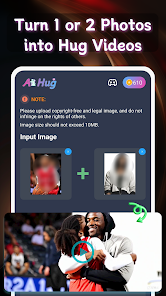
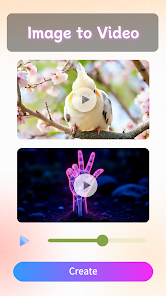
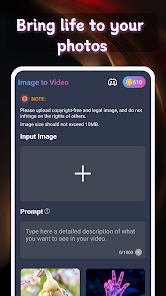
editor reviews
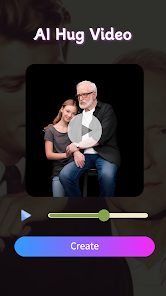
So, AI Hug Video - Image to Video is one of those apps that tries to turn static photos into short, animated clips, specifically focused on generating hug motions between people. It falls squarely into the generative AI media tools category, which has been flooding the app stores lately. The main pitch is straightforward: you upload a couple of photos and the app stitches them together into a video where the subjects appear to embrace. I downloaded it from Google Play mostly out of curiosity, because these apps always look more polished in the screenshots than they feel in real use. The install was quick, and it is free to download, though you quickly realize the real gate is the in-app purchase wall. First impression after launching was honestly a bit cluttered. The main screen throws a bunch of templates and options at you, and it is not immediately obvious which one just gives you a simple hug effect without extra frills. There's no forced registration at the start, which I appreciated, but I could see the subscription popup lurking on the second screen.
Jumping into actual use, the workflow is about what you'd expect. You pick two photos from your gallery, and the app tries to detect the faces and bodies. The interface itself is not terrible, but it is definitely not smooth. The loading spinner hangs around longer than you'd hope, especially when you are just testing the free tier. After selecting the images, the app gives you a few preset hug animations to choose from. I tried it with a couple of selfies, and the result was... mixed. On one attempt, the hug looked somewhat natural, like the arms actually wrapped around. On another, the faces just sort of slid together without any real physical logic. The onboarding is minimal, which is fine if you have used similar AI video generators before, but a new user might feel lost. A small practical tip: stick to photos where the subjects are facing towards each other, or the AI really struggles. The app also lets you tweak the output duration and add background music, but those are mostly just distractions from the core feature.
After spending some time with it, I think the app is a fun novelty, but it is hard to see someone keeping it installed for long unless they are really into making social media content. The hug effect can be surprisingly decent when the source photos cooperate, but the AI is not consistent enough to rely on for anything meaningful. Compared to something like Remini or even the motion features in CapCut, this app feels very narrow in scope. It does one thing and sort of does it, but the free version is heavily restricted, and the subscription cost feels steep for what is essentially a party trick. I can see someone using it for a laugh with friends, maybe for a birthday video, but if you want real quality or more control over the animation, you are better off sticking with a general-purpose AI video tool. The app will probably stay on my phone for a week or two, then get deleted when I run out of free credits.
features
- 😄 The core feature is obviously the AI hug generation, which takes two separate photos and creates a video where the people appear to embrace. It uses facial landmark detection and body segmentation to try and make the movement look natural, but the success really depends on the quality and angle of your original photos.
- 😄 Compared to something like Picsart's AI motion tools, this app is much more focused. Picsart gives you a broad set of generative effects, while AI Hug Video is laser-focused on this one specific animation. That means it can sometimes produce a more convincing hug than a general tool, because the algorithm is trained specifically for that action.
- 😄 The standout feature has to be the template library of hug animations. You are not just getting a single generic motion; there are several preset hug styles, like a side hug, a full embrace, or a more dramatic lifting hug. This variety is not common in other quick AI video apps, which often just apply a one-size-fits-all motion blur effect.
- 😄 The app also offers background music integration and video duration adjustments after generation. These are small touches, but they help the output feel more like a finished video rather than a raw AI artifact, which is nice if you plan to share it directly to social media without further editing.
pros
- 👍 The app is incredibly easy to use for a beginner. Unlike tools like RunwayML or even some features inside CapCut, there is no timeline editing or keyframing here. You just pick photos and get a video in a few taps, which lowers the barrier for casual users.
- 👍 The dedicated focus on a single action (hugging) means the AI model might be slightly better optimized than a general tool trying to do everything. When the photos are good, the result looks more intentional than a generic warp effect you might get from a broader app.
- 👍 No forced sign-up at the start is a big plus for a utility app like this. You can test the core feature immediately without handing over your email, which is not something I can say for most generative AI tools on the Play Store right now.
- 👍 The output resolution is decent for mobile sharing. While it won't win any awards for 4K clarity, the generated videos look fine on a phone screen, which is likely the target viewing platform.
cons
- 👎 The biggest weakness is the inconsistency of the AI. Sometimes the hug looks completely fake, with arms clipping through bodies or faces merging. For a paid app, you expect a higher success rate, especially compared to the more reliable results from established tools like Pixlr's AI suite.
- 👎 The free version is extremely restrictive. You get maybe one or two generations before it asks you to subscribe, and the subscription price is quite high for what is essentially a one-trick pony. Apps like InShot offer more features at a similar price point.
- 👎 There is very little control over the output. You cannot manually adjust the arm positions or the hug intensity. Once the AI decides, you are stuck with it. This is a stark contrast to more mature animation apps where you can at least tweak the motion path.
- 👎 The app feels abandoned in terms of updates. The interface looks a bit dated compared to modern apps, and there are some minor bugs, like the app crashing when you try to quickly switch between the animation templates during preview, that have clearly not been patched.
Recommended Apps
![]()
My Name Meaning
KDR Games4
![]()
Find my Phone - Clap, Whistle
FunGear inc4.4![]()
Pet To Human - Pet into Human
Applax Pte. Ltd.4.2![]()
Custom Kicks
Sneakerz4.5
![]()
Italian Brainrot: Quiz & Wiki
EDEO TECH LIMITED0![]()
PrankGen - Funny Prank Sounds
DATONG FUN3.8![]()
Opera Mini: Fast Web Browser
Opera4.3![]()
Artimind: AI Art Generator
Apero Vision Lab4.3![]()
Prediction 2026: Savage Reveal
LKPixel0![]()
Ghost detector radar camera
Prank apps & Joke apps - Herdoza Studio3.9![]()
Imagine : AI Art Generator
Vyro AI3.6![]()
BitMind: AI Detector & Creator
BitMindAI2.8![]()
Number Locator - Phone Tracker
Allegany Boys Camp Inc4.6![]()
myChevrolet
General Motors (GM)4.6![]()
Version AI: AI Photo Generator
Apptribe Dijital4.5












Disclaimer
1.Apklifts does not represent any developer, nor is it the developer of any App or game.
2.Apklifts provide custom reviews of Apps written by our own reviewers, and detailed information of these Apps, such as developer contacts, ratings and screenshots.
3. All trademarks, registered trademarks, product names and company names or logos appearing on the site are the property of their respective owners.
4.Apklifts abides by the federal Digital Millennium Copyright Act (DMCA) by responding to notices of alleged infringement that complies with the DMCA and other applicable laws.
5.If you are the owner or copyright representative and want to delete your information, please contact us info@Apklifts.com.
6.All the information on this website is strictly observed all the terms and conditions of Google Ads Advertising policies and Google Unwanted Software policy.
7.Apklifts.com is an independent, information-only website which is 100% free to all the users.