

Pet To Human - Pet into Human

100+
Installs
Applax Pte. Ltd.
Developer
-
Generative AI
Category
-
Everyone
Content Rating
-
team@applax.co
Developer Email
-
https://pettohuman.app/privacy
Privacy Policy
Screenshots
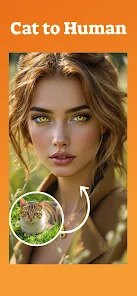
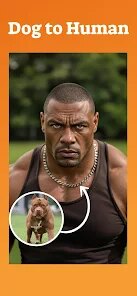
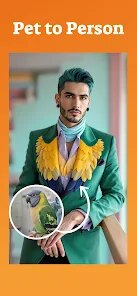
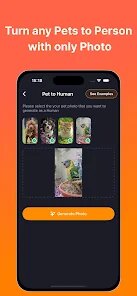
editor reviews
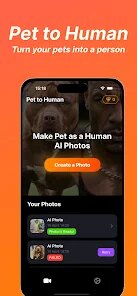
So I stumbled onto Pet To Human - Pet into Human, which is basically a cute photo-editing app that turns your fluffy buddy into a human-like character, and it's the kind of thing you download on a lazy Sunday when you're scrolling through the App Store or Google Play looking for something silly to try. It's free to download with a decent install count in the tens of thousands last I checked, though you don't really need to register unless you want to save your edits, and yeah, there are some in-app purchases for extra filters and outfits plus the occasional ad if you can't be bothered watching them. My first impression after launching it was pretty good—the interface is clean, not cluttered, and the cartoonish icons make you feel like you're about to play a game rather than just edit a photo.
Using it for a few days, the hands-on experience is actually smoother than I expected. You upload a clear photo of your cat or dog, and the app automatically detects the face, then gives you a range of human-style avatars, hairstyles, and accessories to slap on top. The onboarding is quick—like a single swipe tutorial—and then you're free to mess around. I found the face detection works best with front-facing, well-lit shots; side profiles tend to confuse it a bit. The main actions are super straightforward: pick a pet photo, choose a human transformation style (like a wizard, a hipster, or a businessperson), tweak the eyes and nose, and hit save. There's a small learning curve when you try to combine multiple filters at once because the app sometimes lags, but nothing major. A practical tip: rotate your pet's photo to match the app's orientation before uploading, or you'll end up with a crooked pirate hat.
After a week of playing around, I'd say this app is perfect for pet owners who love sharing goofy content on social media—especially if you're into making your dog look like a grumpy old man or your cat like a pop star. People who just want a simple filter without customization might find it overkill, and honestly, the free version locks a lot of the fun outfits behind a paywall, which can feel a bit stingy. Compared to something like ToonApp or FaceApp, Pet To Human is way more niche but also more focused; it doesn't try to do everything, just the pet-to-human gimmick. I think I'll keep it installed for the occasional laugh, but I can see someone uninstalling it pretty fast if they're not big on sharing goofy edits or if ads get on their nerves.
features
- 🎭 Face detection is surprisingly spot-on for pets; it picks up on ear shapes, eye positions, and nose angles, which is way more accurate than I've seen in generic cartoon apps like ToonApp, which mostly just blurs animal features into a generic human face.
- 🖌️ The customization goes deep—over 50 hairstyles, glasses, hats, and even outfits, all mapped to your pet's face shape, so your pug can look like a dapper gentleman while your Siamese cat channels a rock star, something that Snapchat's pet lenses never offered in terms of lasting edits.
- 📸 The "mood sliders" let you adjust the humanized expression (happy, serious, sleepy), which actually works, so your grumpy bulldog can suddenly look like a cheerful grandpa—a feature that stands out because most pet apps just paste a static human head onto the animal's body.
pros
- 🍃 The interface is designed for quick, single-session use—you can finish a transformation in under two minutes, no waiting for uploads or signing up, unlike Meitu where you have to create an account just to export a silly picture.
- 🎨 The portrait-style output looks really polished, like a digital painting, not just a cheap filter, so your final image actually fits nicely on Instagram stories or as a phone wallpaper, whereas FaceApp's pet mode often leaves weird pixelated edges.
- 🛠️ The app saves your recent edits locally, so you can revisit and tweak a previous pet portrait without starting from scratch, which is super handy and not something I've seen in many photo-editing apps for animals.
cons
- 💸 The free version is heavily limited—you get maybe three basic hairstyles and one outfit, and almost all the fun human-looking features are locked behind a $4.99 weekly subscription, which feels steep compared to Reface where you can at least try most styles with ad breaks.
- 🖥️ The app struggles with multiple pets in one photo; it only detects one face at a time, so if you want to humanize both your dog and cat together, you're stuck stitching two separate exports manually, while Google's Photo Booth lets you edit multiple faces simultaneously.
- 📱 It's a bit heavy on the battery and storage; after ten minutes of editing, my phone got noticeably warm, and the saved cache takes up around 200MB quickly, while competing apps like ClipDrop run lighter without such hiccups.
Recommended Apps
![]()
Daily Horoscope
KADO Apps4.4
![]()
FOX Sports: Watch Live Games
Fox Digital Services, LLC3.7
![]()
Fake Call from Santa Claus
ThunderClap4.2![]()
Google Maps
Google LLC4.2![]()
PhotoLayers-Superimpose,Eraser
handyCloset Inc.4.6![]()
Healthy Benefits+
Solutran, Inc.4.5![]()
SuperMe - Avatar Maker Creator
THE.DEMON3.7![]()
Air Horn
Tenoku4.8![]()
Football Wallpaper HD 4K
Orange Infotech Studio4.6![]()
Artplay - AI Photo & Video
Hideaway Technology Limited4.5![]()
Horoscopes – Daily Zodiac Horo
Mail.Ru Group4.1![]()
Passport Parking
Passport Labs, Inc.2.5![]()
ParkMobile: Park. Pay. Go.
Parkmobile, LLC4.3![]()
FestAI: Ghost Detector App
Now Tech3.2![]()
Photo Tool
COLIFER LAB4





























