

FaceMagic - AI Face Editor

10M+
Installs
Apero Vision Lab
Developer
-
Video Players & Editors
Category
-
Rated for 3+
Content Rating
-
trustedapp.help@gmail.com
Developer Email
-
https://sites.google.com/view/facemagic-privacy-policy?usp=sharing
Privacy Policy
Screenshots
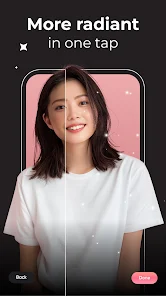
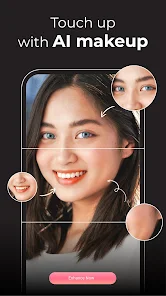


editor reviews
FaceMagic is a mobile photo editing tool that falls squarely into the AI-powered face modification category. You mainly use it to swap faces in photos, apply age filters, or tweak facial features with a single tap. I grabbed it from the Google Play store after seeing some funny birthday posts online, thinking I could mess around with my friends' photos without needing any real editing skills. It's free to download, and the install count seems decent for a niche app like this, though I didn't bother checking the exact number. The first time I launched it, the interface hit me as surprisingly clean for something this specific, with big buttons and a quick tutorial that showed off face swapping in like 30 seconds. No forced registration popped up, which I really appreciated, but there are in-app purchases for higher resolution exports and some premium filters. Ads show up occasionally, usually after you save an edit, but they're not too annoying.
After using it for a week, the hands-on experience felt straightforward but had its quirks. You start by picking a photo from your gallery or taking a new one, then the app automatically detects faces and lets you swap or adjust them. The onboarding walks you through a demo with a celebrity face, which made it easy to understand, but I found the detection less reliable with group shots where faces overlap. The main actions are all on one screen: a toolbar with options like face swap, age change, and beauty edits. I tried swapping my face onto a friend's vacation picture, and the result was decent enough for a laugh, though the skin tones didn't always match perfectly. A small tip I learned is that choosing high-contrast photos with clear lighting improves the output a lot. Navigating between the edit and save screens felt smooth most of the time, but I did hit a few moments where the app lagged after applying a filter, possibly due to the AI processing time.
Looking back after a few sessions, FaceMagic works best for casual users who want quick fun without diving into complex software. Someone who enjoys pranking friends with goofy face swaps or testing out different looks will probably keep it installed for a while. But if you're after polished, professional results like you'd get from Adobe Photoshop or FaceApp, this one falls short. The age filter is a standout among similar AI face editors because it actually ages you realistically, unlike some cheap alternatives that just add wrinkles. What makes it different from Snapseed or AirBrush is the focus on facial manipulation rather than general retouching. I'd say I might keep it around for low-stakes edits, but the limited export quality and occasional watermarks from the free version make me consider uninstalling it once the novelty wears off.
features
- 😀 Face swapping works in real-time without uploading photos to a server, unlike Reface which often needs cloud processing for complex edits. This means faster results and better privacy for casual use.
- 😀 The age progression filter feels more natural than similar features in YouCam Perfect. It adds realistic skin texture changes and hair graying rather than just overlaying a generic old-age mask, giving you a more believable preview.
- 😀 Automatic face detection handles multiple people in one shot better than most apps in this space. You can swap faces across three or four subjects without manually selecting each one, saving time compared to using FaceLab where you often have to tap each face individually.
pros
- ✅ Processing speed is consistently fast even on older phones. Unlike FaceApp which tends to slow down when applying gender swap filters, FaceMagic finishes most edits within two seconds on my three-year-old device, so you don't get frustrated waiting.
- ✅ The UI design avoids clutter, making it easier to find tools quickly compared to AirBrush which buries similar features behind menus. The main toolbar stays visible without overlapping the photo, which helped me avoid accidental taps during edits.
- ✅ No mandatory account creation, giving it an edge over YouCam Perfect which pushes social login before letting you export. You can start swapping faces immediately after installing, a real convenience if you are only interested in occasional random use.
cons
- ❌ Free version exports are limited to low resolution around 720p, which feels restrictive compared to Reface that offers higher quality outputs without payment. The premium subscription costs $4.99 monthly, or you can export HD for $1.99 per single image.
- ❌ Skin tone blending after a face swap often looks unnatural, especially with large color differences between subjects. You do not get manual adjustment sliders like in FaceApp to fix mismatched highlights or shadows.
- ❌ Occasional crashes when editing batch photos from camera roll, which rarely happens with more stable alternatives like YouCam Perfect. I lost a project twice after applying a filter on the fifth photo in a row, so saving after each edit becomes necessary.
- ❌ Limited to face-focused modifications without full body retouching tools found in AirBrush. If you need to remove blemishes or adjust body features outside the face, this app simply does not offer those options at all.
Recommended Apps
![]()
Daily Horoscope
KADO Apps4.4
![]()
FOX Sports: Watch Live Games
Fox Digital Services, LLC3.7
![]()
Fake Call from Santa Claus
ThunderClap4.2![]()
Google Maps
Google LLC4.2![]()
PhotoLayers-Superimpose,Eraser
handyCloset Inc.4.6![]()
Healthy Benefits+
Solutran, Inc.4.5![]()
SuperMe - Avatar Maker Creator
THE.DEMON3.7![]()
Air Horn
Tenoku4.8![]()
Football Wallpaper HD 4K
Orange Infotech Studio4.6![]()
Artplay - AI Photo & Video
Hideaway Technology Limited4.5![]()
Horoscopes – Daily Zodiac Horo
Mail.Ru Group4.1![]()
Passport Parking
Passport Labs, Inc.2.5![]()
ParkMobile: Park. Pay. Go.
Parkmobile, LLC4.3![]()
FestAI: Ghost Detector App
Now Tech3.2![]()
Photo Tool
COLIFER LAB4





























