

SuperMe - Avatar Maker Creator

10M+
Installs
THE.DEMON
Developer
-
Productivity
Category
-
Rated for 3+
Content Rating
-
https://www.supermii.cn/policy.html
Privacy Policy
Screenshots
editor reviews
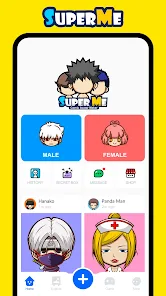
SuperMe - Avatar Maker Creator is a fun app from THE.DEMON that's all about letting people design their own cartoon avatars from scratch. It sits firmly in the creative tools and personalization genre, so if you've ever wanted a unique profile picture that doesn't look like everyone else's, this might be your thing. You mainly use it to mix and match hairstyles, facial features, outfits, and accessories to craft a digital version of yourself or just a fun imaginary character. I stumbled across it on Google Play while looking for something to refresh my social media look, and after seeing it had over a million downloads and was free to install, I figured why not give it a shot. First impressions right after launch were honestly solid — the splash screen is clean, and it doesn't throw ads at you immediately, which is rare these days. There's no mandatory sign-up either, so you can jump straight into the creator without handing over your email, which I appreciated.
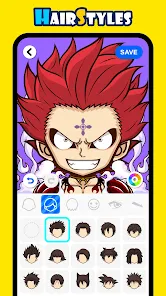
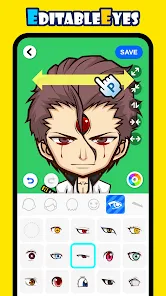
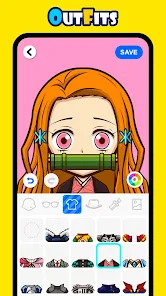
After spending some time with SuperMe, the actual hands-on experience turned out to be pretty straightforward. The interface is bright and colorful, with a big “Create Avatar” button staring you in the face, so you know exactly where to tap. Onboarding is minimal — there's a quick tutorial overlay that highlights the main tabs like “Face,” “Hair,” and “Outfits,” but it doesn't drag on. I started by picking a skin tone, then moved through eye shapes, eyebrows, and nose styles. Each category has a decent variety, maybe 20 to 30 options, though some looked a bit cartoonish for my taste. The flow is smooth: you tap a category, scroll horizontally, and see changes instantly on the preview. One small tip I picked up is that you can pinch to zoom on the avatar to check details, which helps when matching colors. There was one confusing moment when I tried to save my first design — the save button is tucked into a three-dot menu instead of being front and center, so I fumbled for a second. Daily use feels quick once you get the hang of it, though loading times for certain accessory packs lag on older phones.
After using SuperMe for a couple of weeks, my personal take is that it's a solid pick for casual users who want a quick, no-stress avatar maker without diving into complex editors. The main crowd I see enjoying this are younger people or anyone who loves customizing their online identity for gaming forums, Discord, or Instagram. You might not need it if you're after hyper-realistic portraits — apps like ZEPETO or FaceApp offer more detail but come with heavier features and more ad interruptions. What makes SuperMe stand out in a small way is how simple it feels; you don't have to learn any layered editing or masking tricks. On the flip side, the lack of cloud sync means you lose designs if you uninstall, and the free version's ad frequency picks up after a few creations, which made me consider uninstalling. I ended up keeping it because I liked having a quick tool for throwaway profile pics.
features
- 🖌️ The customization depth in SuperMe is decent for a free app — you can tweak everything from cheekbone shape to eyebrow tilt, and it remembers your last selections, so you don't start from scratch each time. Compared to something like Bitmoji, SuperMe gives you more control over facial features instead of relying on a photo snapshot.
- 🎨 The color palette is surprisingly broad across all categories. Hair, skin, and clothing all have at least 40 shades, including neons and pastels. Avatar Maker: Anime & Cartoon often locks fun colors behind a paywall, but SuperMe keeps them accessible from the start without pushing a subscription too aggressively.
- 👕 Outfit layering works smoothly here. You can stack a jacket over a shirt and then add a backpack without clipping issues. In my experience with similar apps like Meiker.io, layers often glitch or force you to choose predefined sets, but SuperMe handles stacking naturally.
pros
- 🌟 The no-registration policy is a huge strength. You can create and download avatars without ever linking an account, which beats ZEPETO's mandatory sign-up hurdle. It feels respectful of privacy and reduces friction for first-time users.
- 🌟 Export quality is surprisingly high — images save at 1080x1080 resolution without watermarks in the free version. Most avatar creators like FaceQ leave a faint logo unless you pay, so this is a nice perk that makes avatars feel usable right away.
- 🌟 Regular offline functionality is a standout. SuperMe lets you tweak saved avatars without any internet connection. Similar apps like Avatoon often require online validation for basic edits, so this is a win for commuters or people with spotty data.
cons
- ⏳ The browsing experience for saved avatars is clunky. There's no folder system or search bar, so if you make more than ten, you're just scrolling through a flat grid. Avatar Maker: Anime has better organizational tags that let you filter by date or style.
- ⏳ Background options are very limited. You only get about eight solid colors and two patterns, while competitors like Pastel Friends offer gradient and scene backgrounds. This makes standalone profile pictures feel less polished without extra editing.
- ⏳ The undo button only goes back one step — if you accidentally remove an accessory, you can't go back three actions without redoing everything. Meiker.io on desktop has a full history panel, but SuperMe lacks that depth, which slows down detailed projects.
Recommended Apps
![]()
Japevox - Funny Prank Sound
SecureTool4.3
![]()
AstroMatrix Birth Horoscopes
AstroMatrix4.7
![]()
Personalized Call from Santa (
www.PackageFromSanta.com4.3![]()
Prank Call - Fake Call & Chat
Bravestars Casual4.1![]()
Persona: Beauty Camera
TICKET TO THE MOON, INC.4.5![]()
Peacock TV: Stream TV & Movies
Peacock TV LLC4.5![]()
Instant Buttons Soundboard App
Snow Peak Apps2.1![]()
GPS Speedometer: Speed Tracker
SM Infotech3.2![]()
Subway®
SUBWAY Restaurants4.2![]()
Find Your Phone By Clap
Trusted App Global4.5![]()
Gorilla Skins for Monkey Arena
Dumitru Boico4![]()
Vimeo
Vimeo.com, Inc.3.8![]()
Vinted - Buy and sell clothes
Vinted4.6![]()
Galaxy Starry Keyboard Backgro
Fun Keyboard Theme for Android4.7![]()
Chat AI - Ask AI anything
AI Chat Bot, Ask AI4.4















Disclaimer
1.Apklifts does not represent any developer, nor is it the developer of any App or game.
2.Apklifts provide custom reviews of Apps written by our own reviewers, and detailed information of these Apps, such as developer contacts, ratings and screenshots.
3. All trademarks, registered trademarks, product names and company names or logos appearing on the site are the property of their respective owners.
4.Apklifts abides by the federal Digital Millennium Copyright Act (DMCA) by responding to notices of alleged infringement that complies with the DMCA and other applicable laws.
5.If you are the owner or copyright representative and want to delete your information, please contact us [email protected].
6.All the information on this website is strictly observed all the terms and conditions of Google Ads Advertising policies and Google Unwanted Software policy.
7.Apklifts.com is an independent, information-only website which is 100% free to all the users.













