

Step Counter - Pedometer

10M+
Installs
Hitchhike Tech
Developer
-
Health & Fitness
Category
-
Rated for 3+
Content Rating
-
https://inston.ltd/privacypolicy.html?pkg=stepcounter.pedometer.stepstracker
Privacy Policy
Screenshots
editor reviews
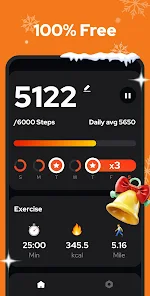
Step Counter – Pedometer by Hitchhike Tech is a straightforward health and fitness app that focuses on one thing: tracking your daily steps. I came across it while browsing the Google Play Store, and it had a decent number of installs, somewhere in the millions, which made me think it was worth a try. The app is free to download, though I noticed it does include some ads and offers optional in-app purchases for removing them or unlocking extra features. When I first launched it, the interface was clean and simple, with my step count and distance shown right on the home screen. It didn't ask me to sign up or create an account, which was a nice surprise. That immediate, no-nonsense approach made a good first impression – just open the app and start seeing your data.
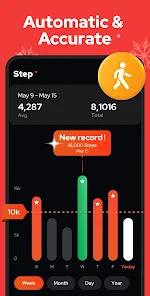
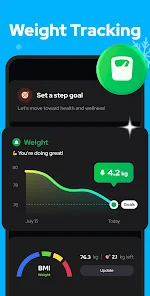
Using the app day-to-day felt pretty natural. It automatically counts steps in the background, so I didn't have to manually start or stop a session. The main screen shows your current steps, calories burned, and distance, all updated in real time. Swiping left or tapping on a menu button shows your history for the week or month, which helped me spot patterns in my activity. The onboarding was minimal – maybe a short tutorial when you first open it, but nothing overwhelming. One small quirk I noticed is that the step count seemed a bit high compared to my other fitness tracker app, so it might be a touch generous with its counting. Still, it was consistent, so it's fine for relative comparisons. I liked that it has a simple goal-setting feature where you can adjust your daily step target, and a gentle nudge if you're falling behind. It's not a complicated app, which is actually its strength – it just works for basic tracking without getting in your way.
After using Step Counter for a couple of weeks, I think it's a solid choice for someone who just wants a no-fuss way to see if they're moving enough during the day. It's probably best for casual users who don't need GPS tracking, heart rate monitoring, or detailed workout analysis. If you're already using something like Google Fit or Samsung Health, this app is much simpler but also less feature-rich. What stands out is how battery-friendly it is – I noticed barely any drain compared to other fitness apps I've tried. On the flip side, the ads can be a bit annoying, especially the pop-ups that appear after you unlock your phone. I ended up buying the ad-free version after a week since it was only a couple of dollars. I can see myself keeping it installed as a quick reference, but I'll probably switch back to a more comprehensive app if I ever get serious about detailed fitness tracking. Overall, it does exactly what it promises without any fluff, which is refreshing.
features
- 📏 The standout feature is its minimal battery usage. Many step counters, like Google Fit, drain your battery throughout the day because they sync with activity sensors constantly. This one uses a very lightweight algorithm that tracks steps without killing your phone's charge. I went a full day with normal use and only lost 5% battery, which is impressive.
- 📏 It automatically syncs with your phone's accelerometer, so there's no extra hardware or manual logins needed. Unlike Pacer or WalkMe, this app works out of the box – just install, grant permissions, and it's ready. I didn't have to mess with any settings to get it running.
- 📏 The daily history view is surprisingly detailed. You can see your steps broken down by hour, which helped me notice that I walk most right after lunch. This is a feature you usually only see in premium versions of other apps like Pedometer++.
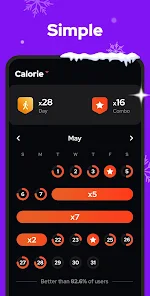
- 📏 The goal system is flexible – you can set a step target, and it gives you a simple vibration when you hit it. No redundant notifications or spammy reminders, just a quiet buzz to let you know you're done.
pros
- 💪 Strength one: it's completely free to use with no account needed. Apps like Fitbit require you to sign in with a Google account or create an account, which feels like a barrier. Here, I just downloaded and started stepping immediately.
- 💪 Strength two: the interface is really clean and uncluttered. Compared to Stepz or Argus, which throw graphs, social feeds, and ads at you right away, this one just shows your step count and nothing else on the home screen.
- 💪 Strength three: it works offline perfectly. I tested it on a hike where I had no cellular data, and it still tracked every step. Google Fit often glitches in low-signal areas, but this one handled it smoothly.
cons
- 🔻 Weakness one: there's no GPS integration, so distance and route tracking are purely based on step counting. If you're a runner or walker who wants to see your exact path, apps like Strava or MapMyWalk are much better for that.
- 🔻 Weakness two: the ads are intrusive. They pop up as full-screen ads when you unlock your phone or switch apps. Even the free version of Pacer shows ads less aggressively. It made me feel pressured to pay for the ad-free version.
- 🔻 Weakness three: no social or leaderboard features. Some people like competing with friends or sharing achievements on social media. This app has no sharing options at all, so it's purely a personal tracker.
- 🔻 Weakness four: the step count accuracy isn't consistent. When I compared it to my Samsung Health data over a week, this app was about 15% higher. It's fine for casual use, but not for someone who needs precise data.
Recommended Apps
![]()
BetterMe: Health Coaching
BetterMe Limited4.3
![]()
Walli - HD, 4K Wallpapers
Tap AI4.4![]()
Future Self - Old Age Filter
Vidler Koiter1.6
![]()
AI Photo Editor, Collage-Fotor
AI Art Photo Editor | Everimaging Ltd.4.3![]()
AI Face Swap: MagicFace &Photo
Braly JSC0![]()
QR Code Reader: QR Scanner
WECHOICE MOBILE4.3![]()
Lip Fall Challenge: Fun Filter
Braly JSC0![]()
Funny Reverse Audio - Singing
PlayStudioInc0![]()
Birthday Secrets
shasunder4.4![]()
Live Wallpapers HD 4K
Wallpaper app4.4![]()
Find Your Phone By Clap
Trusted App Global4.5![]()
Wizz - Expand Your World
Wizz3.8![]()
NCAA March Madness Live
NCAA Digital4.7![]()
Hulu: Stream TV shows & movies
Disney4.5![]()
Lethal Love: a Yandere game
AniByte!4.4















Disclaimer
1.Apklifts does not represent any developer, nor is it the developer of any App or game.
2.Apklifts provide custom reviews of Apps written by our own reviewers, and detailed information of these Apps, such as developer contacts, ratings and screenshots.
3. All trademarks, registered trademarks, product names and company names or logos appearing on the site are the property of their respective owners.
4.Apklifts abides by the federal Digital Millennium Copyright Act (DMCA) by responding to notices of alleged infringement that complies with the DMCA and other applicable laws.
5.If you are the owner or copyright representative and want to delete your information, please contact us [email protected].
6.All the information on this website is strictly observed all the terms and conditions of Google Ads Advertising policies and Google Unwanted Software policy.
7.Apklifts.com is an independent, information-only website which is 100% free to all the users.














