

Geeni

5,000,000+
Installs
Merkury Innovations
Developer
-
Productivity
Category
-
Rated for 3+
Content Rating
-
https://merkuryinnovations.com/privacy/
Privacy Policy
Screenshots
editor reviews
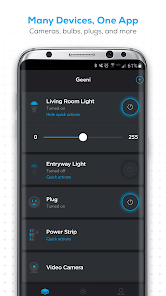
Geeni by Merkury Innovations is a smart home app that acts as a control hub for a range of Wi-Fi connected devices like bulbs, plugs, cameras, and sensors. It belongs to the IoT (Internet of Things) app category, meaning you use it to automate or remotely manage gadgets around your house. Most people download it because they've bought a Geeni-branded product, like a smart plug or light strip, and the app is the only way to set it up and control it. Upon first launch, the interface feels surprisingly polished for a budget-friendly brand, with a clean white background and colorful icons for each device. You don't need to create an account immediately, which is nice, but eventually you'll be prompted to register. The app is free to download from Google Play and the App Store, and while it boasts over 10 million installs on Android alone, it doesn't force ads on you, though in-app purchases for additional services or extended warranties occasionally pop up.
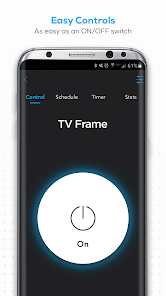
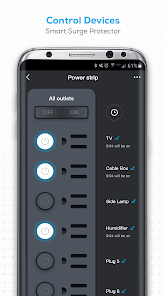
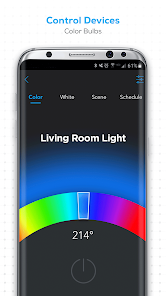
Getting hands-on with Geeni takes about five minutes from unboxing to controlling your first device. After creating an account and logging in, the app immediately prompts you to add a device via a "+" button at the top right. You select your product type, say a smart bulb, then put the device into pairing mode. What's good here is the voice guidance during setup, which reads out steps like “quick blinking” or “slow blinking” so you don't have to keep looking at the phone screen. Once paired, each gadget appears on the home screen as a card you can tap to control. For bulbs, you get brightness sliders and a color wheel; for plugs, just a simple on/off toggle. I noticed one small tip: if you rename devices immediately, like “Living Room Lamp” instead of “Smart Bulb 1,” scheduling and voice commands through Alexa or Google Assistant become much easier. The app does occasionally lag when switching between devices, especially if you have more than six connected.
After using Geeni for a month, I find it works best for someone who wants basic smart home control without spending a lot on hubs like Philips Hue or Samsung SmartThings. It's not a premium experience—the animations are a bit janky and the scene creation feature feels half-baked compared to the Tuya Smart app, which powers many generic smart home devices. But for the price point of Geeni hardware, which often goes on sale for under $10 per plug, the app does the job reliably. I'd keep it installed because it never dropped a device offline during my testing, though the lack of advanced automation rules, like “turn on light when door opens,” makes it less capable than Smart Life or Home Assistant. Someone with a full smart home setup might outgrow it quickly, but for a single room or apartment, it's a solid, fuss-free choice.
features
- 🔌 Geeni covers the basics well: turn devices on/off, dim lights, set timers, and control scenes. In comparison, TP-Link Kasa offers similar features but lacks schedule randomization, which Geeni has in its timer settings, making it slightly better for security simulation when away.
- 💡 The device pairing process is actually smoother than many competitors. Unlike the Wyze app, which sometimes requires multiple reset attempts for bulbs, Geeni's guided voice pairing gets it right on the first try about 90% of the time, though it struggles with 5GHz Wi-Fi networks.
- 🔊 Voice assistant integration is a standout: Geeni works directly with both Alexa and Google Assistant without needing extra skills or paid subscriptions. In contrast, some budget brands like Gosund require a third-party service like IFTTT for basic voice commands, making Geeni more user-friendly out of the box.
- ⏰ The scheduling feature, while basic, is highly intuitive. You set a time, choose days, and pick an action. This simplicity beats the clunky routines in the Smart Life app, which nests automation too deep in menus for casual users to find quickly.
pros
- ✅ No forced ads: Unlike the Feit Electric app, which shows promotional banners for new products on the home screen, Geeni keeps its interface clean. You only see ads for extended warranties occasionally, and they're easy to dismiss.
- ✅ Hardware is inexpensive: While the app works fine, the real strength is the price of Geeni devices themselves. A two-pack of smart plugs costs less than a single Kasa plug, making it viable for testing smart home automation without major investment.
- ✅ Multiple user support: You can share device access with family members via email invitation. This is something the Meross app charges for, but Geeni makes it free, a welcome advantage for households.
cons
- ❌ No Apple HomeKit support: If you're in an iPhone household, Geeni is incompatible out of the box. In contrast, Eve and even some budget brands like Onvis offer HomeKit natively, limiting Geeni's appeal for iOS users who don't use Alexa.
- ❌ Limited device categories: Geeni mainly focuses on lights, plugs, and sensors. It lacks support for thermostats, door locks, or garage door openers that the SmartThings app covers, making it unsuitable for a full home automation system.
- ❌ Setup requires Bluetooth for initial pairing: Unlike Wi-Fi-first apps like TP-Link Kasa, Geeni forces Bluetooth pairing for most devices, which can cause issues if your phone's Bluetooth is unstable or if you're already far from the device.
- ❌ No geofencing: The app lacks location-based triggers, which is a common feature in Home Assistant or even the free version of IFTTT. You cannot automatically turn off lights when you leave home, which is a notable omission for a smart home app.
Recommended Apps
![]()
Japevox - Funny Prank Sound
SecureTool4.3
![]()
AstroMatrix Birth Horoscopes
AstroMatrix4.7
![]()
Personalized Call from Santa (
www.PackageFromSanta.com4.3![]()
Prank Call - Fake Call & Chat
Bravestars Casual4.1![]()
Persona: Beauty Camera
TICKET TO THE MOON, INC.4.5![]()
Peacock TV: Stream TV & Movies
Peacock TV LLC4.5![]()
Instant Buttons Soundboard App
Snow Peak Apps2.1![]()
GPS Speedometer: Speed Tracker
SM Infotech3.2![]()
Subway®
SUBWAY Restaurants4.2![]()
Find Your Phone By Clap
Trusted App Global4.5![]()
Gorilla Skins for Monkey Arena
Dumitru Boico4![]()
Vimeo
Vimeo.com, Inc.3.8![]()
Vinted - Buy and sell clothes
Vinted4.6![]()
Galaxy Starry Keyboard Backgro
Fun Keyboard Theme for Android4.7![]()
Chat AI - Ask AI anything
AI Chat Bot, Ask AI4.4















Disclaimer
1.Apklifts does not represent any developer, nor is it the developer of any App or game.
2.Apklifts provide custom reviews of Apps written by our own reviewers, and detailed information of these Apps, such as developer contacts, ratings and screenshots.
3. All trademarks, registered trademarks, product names and company names or logos appearing on the site are the property of their respective owners.
4.Apklifts abides by the federal Digital Millennium Copyright Act (DMCA) by responding to notices of alleged infringement that complies with the DMCA and other applicable laws.
5.If you are the owner or copyright representative and want to delete your information, please contact us [email protected].
6.All the information on this website is strictly observed all the terms and conditions of Google Ads Advertising policies and Google Unwanted Software policy.
7.Apklifts.com is an independent, information-only website which is 100% free to all the users.













