

iControl: Easy Widgets Themes

10M+
Installs
Fancy keyboard for theme apps
Developer
-
Productivity
Category
-
Teen
Content Rating
-
https://icontrol-themes.web.app/privacy-policy
Privacy Policy
Screenshots
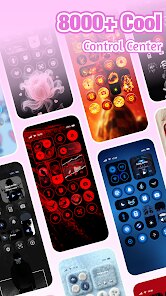
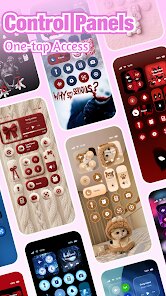
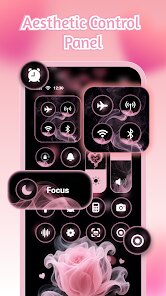
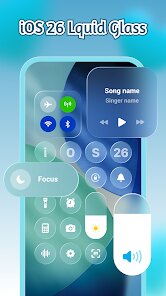
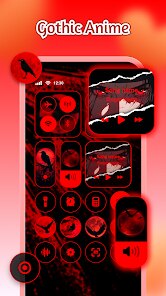
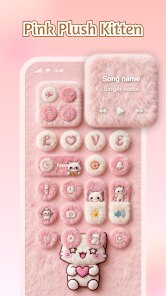
editor reviews
iControl: Easy Widgets Themes is a customization app that lets you change the look of your phone's home screen using ready-made widget packs and themes. It's part of the crowded “launcher replacement” and “icon pack” genre, but instead of swapping the whole system interface, it focuses on adding decorative widgets—clocks, weather panels, battery bars, and photo frames—that sit on top of your existing setup. If you're bored with your stock home screen but don't want to switch to a full launcher like Nova or Action, this app gives you a quick fix. Fancy keyboard, the developer, is known for keyboard themes, so the visual style here leans toward glossy, colorful, and slightly cartoonish. On Google Play, it shows over 10 million downloads and is free to install, though you'll see prompts to buy premium widget packs or remove ads after you start using it. The first impression after launching is a bit overwhelming: there's a long list of widget categories, a “trending” section, and a big banner asking you to grant storage permissions. No registration is required, which is nice, but the ads hit you before you even pick a widget.
Actually using the app is where things get mixed. Once you pick a widget style—say, a neon clock—you tap it, then the app asks you to place it on your home screen through a floating window. This step is clunky; you have to back out to your home screen, hold an empty spot, and find the iControl widget in your phone's widget drawer. For a new user, this might take a few tries. After placing it, you can resize it and adjust transparency, colors, or fonts by tapping the widget itself. The interface inside the app is smooth enough, but loading previews for each theme can be slow, especially if you're scrolling through hundreds of options. A practical tip: preview a widget before downloading it by tapping and holding—otherwise you might waste time installing a pack that looks nothing like the thumbnail. The daily flow feels like a treasure hunt: you browse, test, delete, try another. It's not a set-and-forget tool; you'll spend time tweaking.
After using iControl for a few weeks, I think it's good for people who enjoy changing their phone's look every week but don't want to learn widget maker apps like KWGT. The variety of themes is honestly impressive—there are hundreds, from minimalist black-and-white to anime and gradient splashes. But the app has a cheap feel because of the constant ads and the push to buy premium packs. Compared to something like U Launcher or Hola Launcher, iControl is simpler and less bloated, but also less stable—I've had widgets freeze and need a re-apply. People who just want one nice clock widget might find the app annoying, while theme hoarders will love it. I kept it installed because I like swapping the weather widget every season, but I can see why someone would uninstall it after a week: the ads interrupt the flow, and the free selection feels limited unless you pay.
features
- 🎨 Vast library of premade widget packs—hundreds of themes that cover everything from retro games to sleek modern clocks. You pick one, tap to preview, and apply it in seconds. Compared to apps like KWGT or Zooper Widget, iControl requires zero design skills; it's all drag-and-drop. No need to mess with layers, fonts, or custom scripts.
- 📱 One-tap home screen setup—after downloading a widget, you don't need to go into a separate launcher or root your phone. Just long press your home screen, add the iControl widget, and it loads instantly. This is much simpler than Nova Launcher, where you have to manually create widget sizes and link them to apps.
- 🔄 Live preview before install—you can see how a widget looks on your own wallpaper before committing. Tap the “try” button, and it overlays the widget on your current screen. This saves time compared to Theme Store or old-school widget apps that force you to download blind.
- 📅 Built-in battery and calendar widgets—not just decorative ones. You can place a battery ring or a digital calendar that actually shows your next event. Most themed widget apps skip functional widgets, but this one keeps them usable without extra configuration.
pros
- ⚡ Lightweight and snappy—iControl runs smoothly on older phones, unlike heavy launchers like GO Launcher that hog RAM and battery. You don't feel the phone lag when you switch between widget styles.
- 💎 Huge variety in one app—you get clocks, photo frames, weather, battery, and text widgets all in one download. Other apps like AndroWish or XWidget force you to download separate packs for each type, which clutters your storage.
- 🆓 Free core experience—you can use dozens of widget packs without paying a cent. U Launcher, for comparison, hides most decent themes behind a paywall or forces you to watch video ads for every unlock.
- ✅ Works with any launcher—iControl widgets sit on top of your stock home screen, One UI, or even iOS emulators. Launcher-specific apps limit you to their own interface, but this one stays universal.
cons
- 📢 Too many ads—every few taps, a full-screen video ad interrupts your flow. Even after you place a widget, a pop-up offers you a “free pack” if you watch another ad. This is worse than Top Launcher, which shows only banner ads on the bottom.
- 🐢 Slow preview loading—scrolling through the widget gallery feels sluggish. Each thumbnail takes a second or two to load, which is annoying when you just want to browse quickly. Nova Launcher's widget selection is instant by comparison.
- 🔒 Locked customization—you can't edit individual elements inside a widget. If you want to change the color of the clock hands or the font size, you're out of luck unless you buy a premium version. KWGT lets you edit literally every detail for free.
- 🚫 No backup or cloud sync—reapply your favorite widgets after a factory reset isn't possible. The app doesn't save your configuration. Launchers like Action Launcher support cloud backup, which is miles ahead in convenience.
Recommended Apps
![]()
Japevox - Funny Prank Sound
SecureTool4.3
![]()
AstroMatrix Birth Horoscopes
AstroMatrix4.7
![]()
Personalized Call from Santa (
www.PackageFromSanta.com4.3![]()
Prank Call - Fake Call & Chat
Bravestars Casual4.1![]()
Persona: Beauty Camera
TICKET TO THE MOON, INC.4.5![]()
Peacock TV: Stream TV & Movies
Peacock TV LLC4.5![]()
Instant Buttons Soundboard App
Snow Peak Apps2.1![]()
GPS Speedometer: Speed Tracker
SM Infotech3.2![]()
Subway®
SUBWAY Restaurants4.2![]()
Find Your Phone By Clap
Trusted App Global4.5![]()
Gorilla Skins for Monkey Arena
Dumitru Boico4![]()
Vimeo
Vimeo.com, Inc.3.8![]()
Vinted - Buy and sell clothes
Vinted4.6![]()
Galaxy Starry Keyboard Backgro
Fun Keyboard Theme for Android4.7![]()
Chat AI - Ask AI anything
AI Chat Bot, Ask AI4.4















Disclaimer
1.Apklifts does not represent any developer, nor is it the developer of any App or game.
2.Apklifts provide custom reviews of Apps written by our own reviewers, and detailed information of these Apps, such as developer contacts, ratings and screenshots.
3. All trademarks, registered trademarks, product names and company names or logos appearing on the site are the property of their respective owners.
4.Apklifts abides by the federal Digital Millennium Copyright Act (DMCA) by responding to notices of alleged infringement that complies with the DMCA and other applicable laws.
5.If you are the owner or copyright representative and want to delete your information, please contact us [email protected].
6.All the information on this website is strictly observed all the terms and conditions of Google Ads Advertising policies and Google Unwanted Software policy.
7.Apklifts.com is an independent, information-only website which is 100% free to all the users.













