

Reverse Voice: Flip Singing

1M+
Installs
NindaFuit
Developer
-
Entertainment
Category
-
Everyone
Content Rating
-
http://nindafuit.pro.vn/privacy-policy.html?app=Reverse%20Singing%20Challenge%20Play&store=NINDAFUIT%20STORE
Privacy Policy
Screenshots
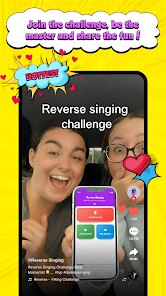
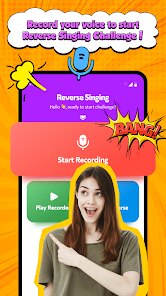
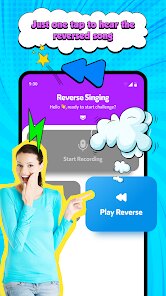
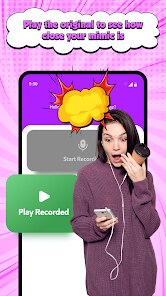
editor reviews
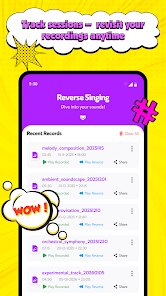
I stumbled upon Reverse Voice: Flip Singing while looking for something weird to mess around with on the Play Store. It's pretty much exactly what the name says — an app that takes any audio clip you throw at it and flips it backwards, turning your spoken words or singing into something that sounds like garbled alien language or a weird instrumental effect. It's a niche utility type of app, not really a full music production tool. The install count is modest, but it's free to download with no forced registration. The first thing that hit me after launching it was how stripped-back the interface is: a dark screen with a big record button and a file import icon. Honestly, my first thought was that it looked like a half-finished project, but it gets the job done fast.
Using it is straightforward, though a bit rough around the edges. You can either record your voice directly inside the app or pick an audio file from your device. Once you load something, you hit the flip button and within seconds it spits out the reversed version. There's no timeline, no waveform editing, no pitch adjustment — just pure backward playback. I tried it with a snippet of me singing a pop chorus, and the output sounded like a creepy, stretched whisper with the melody completely inverted. One thing that tripped me up at first: there's no undo or preview buffer, so if you accidentally overwrite a clip, it's gone. A small tip — keep your source files backed up outside the app. The reverse effect can be surprisingly clean for such a simple tool, but the interface feels clunky when you try to export or share the result.
After playing with it for a while, I feel like this app is a neat party trick more than a serious tool. If you're into audio pranks, making weird soundscapes, or just want to waste 10 minutes hearing how your own voice sounds backwards, you'll enjoy it. But if you're looking for actual music production utility — like reversing stems in a DAW — this is too limited. Compared to something like Voice Changer or AudioLab, Reverse Voice lacks any layering or effects. The main reason I might keep it installed is the instant processing speed. It's zero-fuss and doesn't need an internet connection. But honestly, I can see most people uninstalling after the novelty wears off, because there's nothing deeper to explore here.
features
- 🔊 Instant reverse processing: Unlike AudioLab which requires you to set up a multi-track project, this app flips any audio in under a second. Just pick a file and hit one button — no waiting or exporting steps.
- ✂️ Built-in recording with flip: Most similar apps like Voice Changer only reverse imported files, but Reverse Voice lets you record straight into it then reverse immediately. It's a handy shortcut for quick experiments.
- 🎚️ Clean backward playback quality: The reversed output maintains surprisingly good clarity. Where apps like Flipster sometimes muddy the audio with artifacts, this one keeps the original detail intact, just running backward.
pros
- ⚡ Instant results without loading: Compared to AudioLab's multi-step export process, Reverse Voice gives you the reversed file almost instantly. No waiting for processing bars or rendering.
- 📱 No account or login required: Unlike many free audio tools that force you to sign up or watch ads to save, this app lets you use all features right away. It feels respectful of your time.
- 🧩 Minimal learning curve: The design is so simple that anyone can figure it out in seconds. Apps like Flipster have too many confusing buttons; this one is just record, flip, and share.
cons
- ⏪ No waveform editing or trimming: Apps like AudioLab let you isolate exactly which part to reverse. Here, you either flip the whole file or nothing. No fine control at all.
- 🔄 Cannot undo a flip: If you reverse something and then want the original back, it's gone unless you saved the source separately. Flipster keeps both versions available, which is smarter.
- 📤 Limited export options: You only get one output format, and sharing to apps like WhatsApp or Instagram isn't directly supported. Other tools offer multiple codec choices and direct social sharing.
Recommended Apps
![]()
BetterMe: Health Coaching
BetterMe Limited4.3
![]()
Walli - HD, 4K Wallpapers
Tap AI4.4![]()
Future Self - Old Age Filter
Vidler Koiter1.6
![]()
AI Photo Editor, Collage-Fotor
AI Art Photo Editor | Everimaging Ltd.4.3![]()
AI Face Swap: MagicFace &Photo
Braly JSC0![]()
QR Code Reader: QR Scanner
WECHOICE MOBILE4.3![]()
Lip Fall Challenge: Fun Filter
Braly JSC0![]()
Funny Reverse Audio - Singing
PlayStudioInc0![]()
Birthday Secrets
shasunder4.4![]()
Live Wallpapers HD 4K
Wallpaper app4.4![]()
Find Your Phone By Clap
Trusted App Global4.5![]()
Wizz - Expand Your World
Wizz3.8![]()
NCAA March Madness Live
NCAA Digital4.7![]()
Hulu: Stream TV shows & movies
Disney4.5![]()
Lethal Love: a Yandere game
AniByte!4.4















Disclaimer
1.Apklifts does not represent any developer, nor is it the developer of any App or game.
2.Apklifts provide custom reviews of Apps written by our own reviewers, and detailed information of these Apps, such as developer contacts, ratings and screenshots.
3. All trademarks, registered trademarks, product names and company names or logos appearing on the site are the property of their respective owners.
4.Apklifts abides by the federal Digital Millennium Copyright Act (DMCA) by responding to notices of alleged infringement that complies with the DMCA and other applicable laws.
5.If you are the owner or copyright representative and want to delete your information, please contact us [email protected].
6.All the information on this website is strictly observed all the terms and conditions of Google Ads Advertising policies and Google Unwanted Software policy.
7.Apklifts.com is an independent, information-only website which is 100% free to all the users.














