

ParkMobile: Park. Pay. Go.

10M+
Installs
Parkmobile, LLC
Developer
-
Productivity
Category
-
Everyone
Content Rating
-
+18777275457
Developer Email
-
http://parkmobile.io/privacy-policy
Privacy Policy
Screenshots
editor reviews
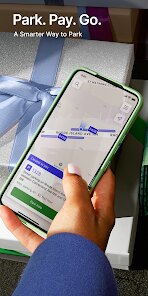
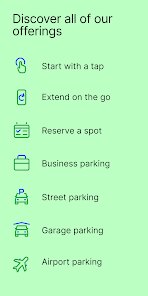
ParkMobile is a parking app that lets you pay for street parking and lots right from your phone. It's basically a digital meter replacement, so you don't have to carry coins or walk back to feed the machine. You download it, create an account, and add your license plate and payment info. The first time you open it, the setup feels a little lengthy because you're entering all that detail, but after that, it's pretty smooth. It's free to download, available on both Google Play and App Store, and has been installed tens of millions of times. You can use it in hundreds of cities across the US, Canada, and Europe. There's no forced registration wall when you first launch, just a straightforward “find parking” button at the bottom.
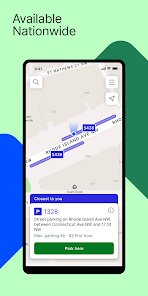
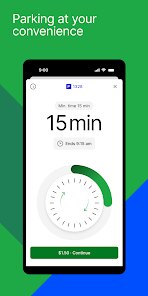
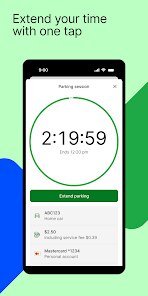
Using the app day to day is where it clicks. You open it, allow location access, and it shows nearby zones with rates and time limits. The map uses colored pins to show available parking, though sometimes the data lags a bit. To start a session, you tap a zone, pick your duration, and confirm. The app charges your card and sends a notification when time's running low. Extending is easy if you're still in the zone—just a couple of taps. The interface is clean but dense; there's a lot of text on each screen. One tip: make sure your phone's GPS is on or it won't find your spot correctly. Also, some cities require you to enter a zone number instead of using GPS, which can be annoying if you forgot to note it.
After using it for a while, I think it's fine for regular street parking in cities where it's supported. Drivers who park daily in metered spots will get the most out of it—no coins, no rushing back. But if you mostly park in garages or lots that have their own automated payment, you probably won't need it. Compared to something like SpotHero, ParkMobile is less about booking ahead and more about paying on the spot. That makes it handier for casual parking but less useful for planned trips. The reminders are helpful, but the app feels a bit corporate and clunky next to sleeker competitors like PayByPhone. I've kept it installed because it saves me from digging for quarters, but I could see someone deleting it if they only need it once a month.
features
- 🔑 Location-based zone detection lets you start a session without typing a zone number, but it only works if GPS is accurate. In some areas, this fails and you have to manually enter the zone posted on the sign.
- ⏱️ Real-time time extension lets you add more time remotely from anywhere, not just at the car. This is way more convenient than traditional meters where you have to walk back, but it's only available if the city allows it.
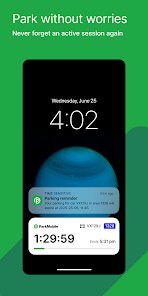
- 📱 In-app notifications keep you from getting tickets. They alert you 15 and 5 minutes before the session ends, which is a nice safety net for distracted drivers. Other apps like PayByPhone do this too, but ParkMobile's timing is consistent.
- 💳 Multi-payment options include credit cards, PayPal, and Apple Pay, so you don't need to store a card on file if you don't want to. Compared to SpotHero, which mostly uses credit cards only, this gives more flexibility.
pros
- ✅ Zone-based simplicity is its biggest strength. Unlike SpotHero that requires pre-booking and garage info, ParkMobile works on any regular metered street spot. You just park, open the app, pay, and go. No reservations needed.
- ✅ Broad city coverage across the US, Canada, and Europe means frequent travelers might already have it installed. PayByPhone covers fewer countries, so ParkMobile wins on geography.
- ✅ No membership fees or subscriptions. You pay only for parking sessions, which makes it ideal for occasional users. Other parking services like ParkWhiz sometimes push monthly plans.
cons
- ❌ Session history and receipts are not easy to export. If you need to track parking expenses for business, you'll have to manually note each transaction. SpotHero provides downloadable PDFs, which is better.
- ❌ The interface feels dated with small fonts and cluttered buttons. PayByPhone's cleaner design and larger tap targets make it easier to use while driving.
- ❌ GPS accuracy can be spotty in dense downtown areas, forcing you to squint at parking signs for zone numbers. When this happens, the main selling point of “no interaction with the meter” is lost.
- ❌ Customer support is email-only and slow to respond. If your payment fails or you get a ticket due to an app error, you're stuck waiting. SpotHero and PayByPhone have live chat, which is faster.
Recommended Apps
![]()
Japevox - Funny Prank Sound
SecureTool4.3
![]()
AstroMatrix Birth Horoscopes
AstroMatrix4.7
![]()
Personalized Call from Santa (
www.PackageFromSanta.com4.3![]()
Prank Call - Fake Call & Chat
Bravestars Casual4.1![]()
Persona: Beauty Camera
TICKET TO THE MOON, INC.4.5![]()
Peacock TV: Stream TV & Movies
Peacock TV LLC4.5![]()
Instant Buttons Soundboard App
Snow Peak Apps2.1![]()
GPS Speedometer: Speed Tracker
SM Infotech3.2![]()
Subway®
SUBWAY Restaurants4.2![]()
Find Your Phone By Clap
Trusted App Global4.5![]()
Gorilla Skins for Monkey Arena
Dumitru Boico4![]()
Vimeo
Vimeo.com, Inc.3.8![]()
Vinted - Buy and sell clothes
Vinted4.6![]()
Galaxy Starry Keyboard Backgro
Fun Keyboard Theme for Android4.7![]()
Chat AI - Ask AI anything
AI Chat Bot, Ask AI4.4















Disclaimer
1.Apklifts does not represent any developer, nor is it the developer of any App or game.
2.Apklifts provide custom reviews of Apps written by our own reviewers, and detailed information of these Apps, such as developer contacts, ratings and screenshots.
3. All trademarks, registered trademarks, product names and company names or logos appearing on the site are the property of their respective owners.
4.Apklifts abides by the federal Digital Millennium Copyright Act (DMCA) by responding to notices of alleged infringement that complies with the DMCA and other applicable laws.
5.If you are the owner or copyright representative and want to delete your information, please contact us [email protected].
6.All the information on this website is strictly observed all the terms and conditions of Google Ads Advertising policies and Google Unwanted Software policy.
7.Apklifts.com is an independent, information-only website which is 100% free to all the users.













