

Photo Blender: Picture Mixer

10M+
Installs
VysionApps
Developer
-
Video Players & Editors
Category
-
Rated for 3+
Content Rating
-
vysionapps@gmail.com
Developer Email
-
https://www.iubenda.com/privacy-policy/7995834
Privacy Policy
Screenshots
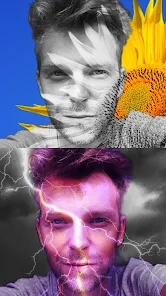
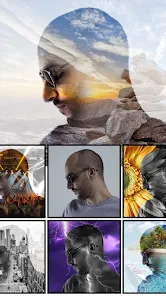
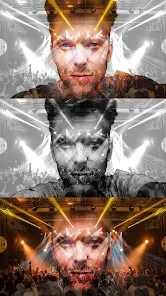
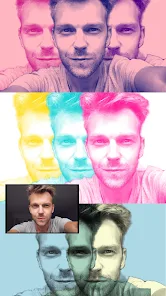
editor reviews
Photo Blender: Picture Mixer is a photo editing tool that focuses on compositing and layering images together. It belongs to the utility category on both Google Play and the App Store, letting users mainly blend two or more pictures to create double-exposure effects, overlays, or mixed collages straight from a phone. For a casual user who isn't into complex software like Photoshop but still wants to try creative photo merging, this app is an easy download. After launching it, the first impression is a clean, ad-supported interface without any clutter — though a full-screen ad pops up right away, which feels a bit aggressive, but the actual editing area looks approachable. The app is free to download and doesn't force registration, which is a relief for anyone who just wants to test it out. It has a decent install count on Android, though not a top-tier one, suggesting it's more of a niche pick than a mainstream hit.
When you actually start using it, the flow is pretty straightforward. The interface shows a workspace where you pick a base photo, then add secondary images on top. You can adjust transparency, change the blend mode, and move or resize each layer with simple touch gestures. Onboarding is minimal — no tutorial walks you through, but the icons are labeled clearly enough that most people will figure it out in a minute. The most common use case is selecting two photos, then sliding the opacity to create a dreamy double exposure effect. One minor hiccup is that the undo button isn't very responsive at times, so you might have to redo an adjustment if you tap too quickly. A practical tip: always save your project before switching photos, because the app sometimes crashes when loading large images. Despite that, the ability to export in high resolution is a solid plus for anyone wanting decent quality for social media or prints.
After using it for a while, my judgment is mixed. People who enjoy quick, stylistic edits and don't need professional precision will find this app handy — it's fast to produce something that looks artistic without effort. But if you're someone who needs advanced masking or layer grouping, this won't cut it. Compared to apps like PicsArt or Snapseed, Photo Blender feels more focused solely on blending, which can be a strength if that's all you want, but also a weakness because you're missing out on wider editing tools. It stands out by being simpler and having better layering controls for pure blending than many all-in-one editors, but the ad frequency and occasional crashes are a turnoff. I'd say most users might keep it installed for occasional creative projects, but after a short time, the novelty wears off, and the lack of updates makes you wonder if it'll ever improve.
features
- 🔄 Blend modes for creativity — Unlike apps like PicsArt, Photo Blender offers a dedicated set of blend modes (multiply, screen, overlay, etc.) that you can preview immediately on your images. No guessing required. PicsArt buries these under layers, making the process slower. The standout here is the real-time preview that updates as you swipe through modes — something Snapseed lacks entirely for double exposures.
- 🔄 Precise opacity slider — The opacity adjustment is smoother and more granular than in many competitors. In Adobe Express, for example, the slider only adjusts in large increments, but this app lets you fine-tune between 1-100% seamlessly. This is crucial for subtle background fades that look natural rather than cut-and-paste.
- 🔄 No registration required — You can just download, open, and start editing immediately. Most similar tools — like Blend Editor or PhotoLayers — push for a free account after a few uses. Photo Blender doesn't lock features behind sign-ups, which is rare for a free app in this category.
pros
- 🟢 Fast export quality — You can save images at full resolution, unlike Canva's free tier which limits export to lower quality unless you pay. For printing or sharing high-res edits, this is a big win — no hidden paywall for the actual output.
- 🟢 Clean layering UI — The layer management is direct and uncluttered, even beating apps like Photopea Mobile. Each layer shows a thumbnail and you can tap to select or delete. No nested menus or hidden settings, which keeps the learning curve shallow.
- 🟢 Completely free for core blending — While some apps like Enlight or Pixlr lock blend features behind a premium subscription, Photo Blender gives you essential blending tools without charging. The trade-off is ads, but that's easier to swallow than a monthly fee.
cons
- 🔴 Frequent intrusive ads — Compared to Snapseed which has zero ads, Photo Blender forces you to sit through a full-screen ad after almost every save or image selection. It kills the flow when you're in the middle of editing and a video ad interrupts, making you want to uninstall quickly.
- 🔴 No undo history — Unlike PicsArt which keeps an undo stack, Photo Blender only lets you undo the very last action. If you make a mistake three steps ago, you're stuck redoing everything from that point. It's frustrating for serious editing where trial and error matters.
- 🔴 Crashes with large photos — If you try to blend two high-resolution images from a modern phone camera, the app often freezes or crashes. This is something apps like Adobe Photoshop Express handle much better, even on lower-end devices.
Recommended Apps
![]()
Daily Horoscope
KADO Apps4.4
![]()
FOX Sports: Watch Live Games
Fox Digital Services, LLC3.7
![]()
Fake Call from Santa Claus
ThunderClap4.2![]()
Google Maps
Google LLC4.2![]()
PhotoLayers-Superimpose,Eraser
handyCloset Inc.4.6![]()
Healthy Benefits+
Solutran, Inc.4.5![]()
SuperMe - Avatar Maker Creator
THE.DEMON3.7![]()
Air Horn
Tenoku4.8![]()
Football Wallpaper HD 4K
Orange Infotech Studio4.6![]()
Artplay - AI Photo & Video
Hideaway Technology Limited4.5![]()
Horoscopes – Daily Zodiac Horo
Mail.Ru Group4.1![]()
Passport Parking
Passport Labs, Inc.2.5![]()
ParkMobile: Park. Pay. Go.
Parkmobile, LLC4.3![]()
FestAI: Ghost Detector App
Now Tech3.2![]()
Photo Tool
COLIFER LAB4




























