

PhotoLayers-Superimpose,Eraser

10M+
Installs
handyCloset Inc.
Developer
-
Video Players & Editors
Category
-
Rated for 12+
Content Rating
-
support_android@handycloset.com
Developer Email
-
https://privacy.handycloset.com
Privacy Policy
Screenshots
editor reviews
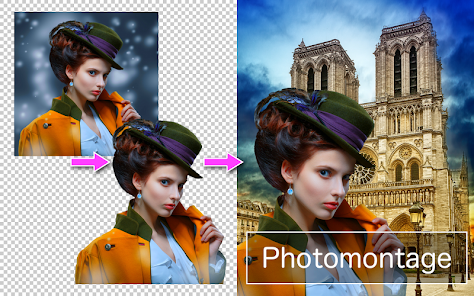
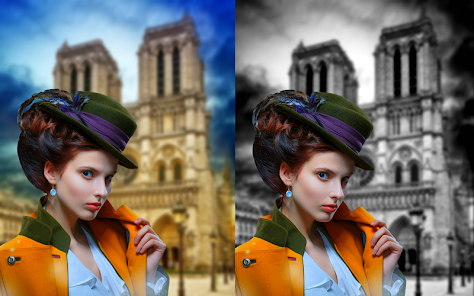
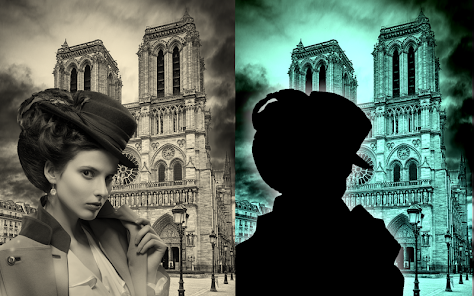
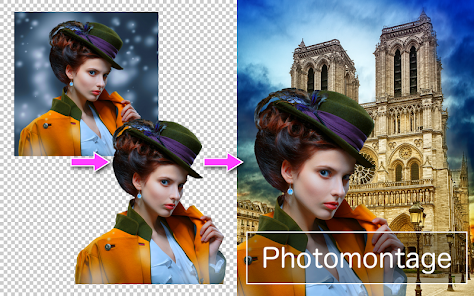
PhotoLayers-Superimpose,Eraser is a photo editing app that focuses on compositing images together. If you've ever wanted to cut a person out of one picture and drop them into another background, this tool is built for that. It's not a full suite like Photoshop; rather, it's a focused utility for layering and erasing parts of photos. I first downloaded it because I kept seeing those fun travel photos where someone looks like they're holding the Eiffel Tower, and I wanted to try making my own. Right after launching it, the app throws you straight into a workspace with a simple grid and a few tool icons at the bottom. There's no tutorial pop-up or account creation wall, which I honestly appreciated. It's free to download from Google Play and the App Store, though it does contain ads and in-app purchases. The install count is decent for a niche tool, so it's clearly found an audience.
When I actually started using it, the process felt straightforward once I got past the first few taps. You add a background photo first, then a foreground photo on top, and then use the eraser tool to remove the unwanted parts of the top layer. The interface is fairly barebones—just a toolbar with options like brush size, undo, and redo. I found myself accidentally erasing parts of the subject I wanted to keep, but the undo button saved me more than once. One small tip: starting with a larger brush for big areas and switching to a smaller one for edges like hair or clothing seams makes the result look much cleaner. There's also a “clone” tool tucked away that lets you sample part of the image to cover unwanted spots, which feels like a hidden gem once you figure it out. The app handles basic edits well, but if your photos are high-resolution, the app can lag a bit when zooming in close.
After a few weeks of regular use, I think this app is great for casual creators who enjoy making silly or creative composites without wanting to learn complex software. It's not something a professional photographer would rely on, but for quick social media posts or making personalized gifts, it works fine. What sets it apart from apps like PicsArt or Snapseed is that it's laser-focused on just this one job—no filters, no text overlays, no social feed. That simplicity can be a double-edged sword; you won't get distracted by extra features, but you'll also need another app for polishing the final look. I kept it installed because it does exactly what it says on the label, and sometimes that's all you really want. If you only need to merge two photos once a month, it's probably not essential, but for frequent tinkerers, it's a handy tool to have around.
features
- 🖼️ Background removal tool: This app's core feature is its eraser and foreground extraction. Unlike Adobe Photoshop Express, which hides its cutout tool behind menus, PhotoLayers puts it front and center. You can zoom into tiny details, like strands of hair, and erase around them with decent precision. It's not perfect for complex hair edges, but for solid backgrounds, it's surprisingly reliable.
- 🔧 Layer-based editing: Instead of a timeline or filter stack, the app works with actual layers—background and foreground. This mimics desktop software like GIMP more than mobile apps like Snapseed. You can move, resize, and rotate each layer independently, which feels very natural if you've used layers before.
- 🎨 Clone stamp tool: This is the standout feature that most similar apps lack. The clone tool lets you sample any part of the image and paint it elsewhere to cover up dust or unwanted objects. In comparison, apps like Remove.bg only remove backgrounds and don't offer any in-painting or healing capability.
pros
- 🚀 Instant start with no tutorials: Unlike PicsArt, which bombards you with templates and ads before letting you edit, PhotoLayers just opens a blank workspace. You can start erasing or layering immediately without watching a video or signing up for anything.
- 🔍 High zoom precision: The app allows pinch-to-zoom far closer than most mobile editors. I can easily get down to single-pixel adjustments, which is rare in free tools. Adobe Photoshop Express limits zoom on free versions, but this app doesn't.
- 💰 Good value for a niche tool: While there are in-app purchases for removing ads or unlocking additional brushes, the free version already gives you all the core editing functions. Snapseed's double exposure feature is nice but less flexible for complex cutouts, making this a better choice for layer-based work.
cons
- 🐌 Performance on large images: Loading a 12MP photo from my phone's camera caused noticeable lag when I tried to zoom and erase at the same time. PicsArt handles larger files smoother overall, which makes this app less ideal for editing high-res DSLR photos.
- ❌ No automatic edge detection: Unlike Remove.bg or Adobe's auto-select tools, this app requires manual erasing for everything. For crisp objects on a white background, it's fine, but for complex shapes like fur or hair, you'll spend a lot of time clean-up. Background Eraser app has a simpler auto-select that works faster in those cases.
- 📱 Outdated interface design: The UI feels like it's from 2015—small icons, no dark mode, and a cluttered layout when tools are active. Apps like Snapseed have much cleaner, more intuitive interfaces, which makes PhotoLayers feel less polished by comparison.
- 📺 Persistent ads: Even if you're in the middle of editing, a video ad occasionally pops up and disrupts your flow. Other free editors, like YouCam Perfect, show ads less intrusively. You can pay to remove them, but it's something to know upfront.
Recommended Apps
![]()
Daily Horoscope
KADO Apps4.4
![]()
FOX Sports: Watch Live Games
Fox Digital Services, LLC3.7
![]()
Fake Call from Santa Claus
ThunderClap4.2![]()
Google Maps
Google LLC4.2![]()
PhotoLayers-Superimpose,Eraser
handyCloset Inc.4.6![]()
Healthy Benefits+
Solutran, Inc.4.5![]()
SuperMe - Avatar Maker Creator
THE.DEMON3.7![]()
Air Horn
Tenoku4.8![]()
Football Wallpaper HD 4K
Orange Infotech Studio4.6![]()
Artplay - AI Photo & Video
Hideaway Technology Limited4.5![]()
Horoscopes – Daily Zodiac Horo
Mail.Ru Group4.1![]()
Passport Parking
Passport Labs, Inc.2.5![]()
ParkMobile: Park. Pay. Go.
Parkmobile, LLC4.3![]()
FestAI: Ghost Detector App
Now Tech3.2![]()
Photo Tool
COLIFER LAB4




























