

Passport Parking

5M+
Installs
Passport Labs, Inc.
Developer
-
Productivity
Category
-
Everyone
Content Rating
-
https://passportinc.com/privacy-policy/
Privacy Policy
Screenshots
editor reviews
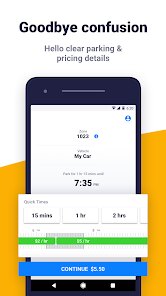
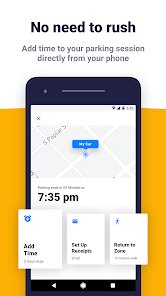
Passport Parking is a payment app designed specifically for managing parking sessions in cities and lots that support it. It is not a navigation app or a general wallet; it is a specialized tool for paying for parking via your phone. Users can find their parking zone, enter their vehicle details, and pay for time directly through the app, often extending sessions remotely without returning to the meter. The main reason a normal user would download it is convenience and to avoid carrying coins or cards. After launching the app for the first time, the impression is fairly straightforward and utilitarian. The interface is clean but not flashy, and it immediately asks for your location or a zone number, which makes sense for the task. There are some account creation steps upfront, and the app uses geolocation to show nearby parking areas. It runs on both Google Play and the App Store, is free to download, and while you don't need to register to make a single payment, having an account saves your vehicle and payment methods for later. It does come with in-app payments for the parking itself, but there are no subscription fees to use the app. Occasional ads appear, but they are not intrusive during the payment flow.
After a few uses, the hands-on experience becomes clear and mostly smooth. The onboarding involves creating an account or proceeding as a guest, then entering your license plate and state. From there, the main action is always the same: you enter the zone number posted on signs, choose how long you want to park, and pay. The app confirms your session with a timer and a countdown. A common usage mistake is not noticing that some cities require you to repark in a new spot after the time expires. A small practical tip is to enable notifications so the app warns you before time runs out. The interface is generally responsive, though sometimes on slower networks, the location lookup lags a bit. Navigating between multiple vehicles is easy once set up, but the menu structure for settings and payment history feels a little buried. Overall, the actual daily use is simple, but the app does not hold your hand through city-specific rules, which can be confusing at first.
After using Passport Parking for a while, it is a reliable but not exciting tool. People who regularly park in participating cities will likely keep it installed, as it beats feeding a meter or digging for change. However, if you rarely park in supported lots, it is probably not worth the space. What sets it apart from generic payment apps or meter apps like ParkMobile is that Passport Parking is often the only option accepted in certain garages or municipal lots, so you have no choice if you park there. The difference is mostly in regional adoption and contract partnerships. Some users may uninstall it because the city they use it in shifts to a different competitor or because the app's notifications are not always consistent on some phones. It does its job, but it does not feel polished or clever like some newly designed competitors. It is a functional utility that would be missed only if you suddenly needed it and did not have it.
features
- ⏱ Real-time session management: Unlike ParkMobile, which shows a basic timer, Passport Parking gives you a live countdown with color-coded warnings and a clear option to extend time directly from the notification without reopening the app.
- 📍 GPS zone detection: The app automatically detects your parking zone through location services in many cities, so you do not need to look up the zone number manually. This is more seamless than what ParkMobile offers in some areas, where you must enter the zone code yourself every time.
- 🚗 Multi-vehicle profiles: You can store multiple license plates and switch between them quickly when paying for a different car. This is easier than the process in some competitor apps, where you have to manually re-enter vehicle info each time.
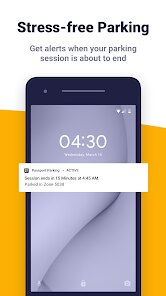
- 🔔 Customizable reminders: The app lets you set how early you want to be warned before your session ends, unlike some apps that only give one fixed alert. This flexibility is helpful for avoiding tickets in high-enforcement zones.
pros
- ⚡ No account required for single use: You can pay for parking as a guest without signing up, which is faster than what ParkMobile requires and saves time in a hurry.
- ⚡ Wide city and lot support: Passport Parking is accepted in many smaller towns and specific municipal garages that other big apps like ParkMobile have not reached, making it a must-have in certain regions.
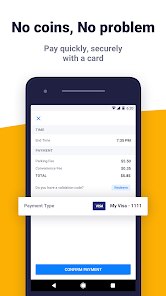
- ⚡ Clean payment flow: The checkout process has fewer clicks than similar apps, with saved payment profiles and auto-fill options that make repeat parking very quick and hassle-free.
- ⚡ Offline session viewing: The app caches your current sessions, so you can still see your remaining time and zone info even without an active internet connection, which is not always available in other parking apps.
cons
- ⚠ Confusing city-specific rules: The app does not clearly explain local parking regulations like time limits or no-return policies, whereas ParkMobile sometimes shows pop-up reminders, leading to accidental tickets for new users.
- ⚠ Occasional GPS inaccuracy: In dense urban areas, the location detection can be off, showing a wrong zone or no results at all, forcing you to manually enter the number, which defeats the convenience.
- ⚠ Notification reliability issues: On some Android models, the reminders do not always fire reliably, especially when the phone is in battery saver mode, while in ParkMobile these alerts tend to be more consistent across devices.
- ⚠ Limited payment options: Unlike some competitors that accept PayPal or Apple Pay, Passport Parking only supports credit/debit cards and its own stored wallet, which can be a hassle if your card is not handy.
Recommended Apps
![]()
Japevox - Funny Prank Sound
SecureTool4.3
![]()
AstroMatrix Birth Horoscopes
AstroMatrix4.7
![]()
Personalized Call from Santa (
www.PackageFromSanta.com4.3![]()
Prank Call - Fake Call & Chat
Bravestars Casual4.1![]()
Persona: Beauty Camera
TICKET TO THE MOON, INC.4.5![]()
Peacock TV: Stream TV & Movies
Peacock TV LLC4.5![]()
Instant Buttons Soundboard App
Snow Peak Apps2.1![]()
GPS Speedometer: Speed Tracker
SM Infotech3.2![]()
Subway®
SUBWAY Restaurants4.2![]()
Find Your Phone By Clap
Trusted App Global4.5![]()
Gorilla Skins for Monkey Arena
Dumitru Boico4![]()
Vimeo
Vimeo.com, Inc.3.8![]()
Vinted - Buy and sell clothes
Vinted4.6![]()
Galaxy Starry Keyboard Backgro
Fun Keyboard Theme for Android4.7![]()
Chat AI - Ask AI anything
AI Chat Bot, Ask AI4.4















Disclaimer
1.Apklifts does not represent any developer, nor is it the developer of any App or game.
2.Apklifts provide custom reviews of Apps written by our own reviewers, and detailed information of these Apps, such as developer contacts, ratings and screenshots.
3. All trademarks, registered trademarks, product names and company names or logos appearing on the site are the property of their respective owners.
4.Apklifts abides by the federal Digital Millennium Copyright Act (DMCA) by responding to notices of alleged infringement that complies with the DMCA and other applicable laws.
5.If you are the owner or copyright representative and want to delete your information, please contact us [email protected].
6.All the information on this website is strictly observed all the terms and conditions of Google Ads Advertising policies and Google Unwanted Software policy.
7.Apklifts.com is an independent, information-only website which is 100% free to all the users.













