

Google Maps

10,000,000,000+
Installs
Google LLC
Developer
-
Travel & Local
Category
-
Rated for 3+
Content Rating
-
apps-help@google.com
Developer Email
-
http://www.google.com/policies/privacy
Privacy Policy
Screenshots
editor reviews
Google Maps is the go-to navigation app developed by Google LLC, essentially a digital map and GPS tool that covers nearly every corner of the world. People mainly use it to get driving directions, check public transit schedules, find nearby restaurants or gas stations, and even explore streets with Street View. I first downloaded it from the Play Store because my phone didn't come with it pre-installed, and honestly, it's free with no registration required to start using it. As soon as I launched it, the interface felt familiar—there's a search bar on top, a map that zooms in smoothly, and a blue dot showing my location. The first impression is that it's clean and functional, though the sheer amount of information can be a bit overwhelming at first glance.
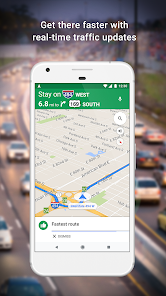
After using it for a while, the hands-on experience stands out for its reliability. I usually open it to type in an address, and within seconds it shows multiple routes with estimated times. The turn-by-turn voice guidance is clear, and I like how it automatically recalcs if I miss a turn. One confusing part is when it suggests a route with a toll road without warning, but you can adjust settings to avoid tolls—a small trick I learned later. The interface is mostly intuitive; tapping on a place gives you ratings, hours, and photos. I also use the traffic layer to avoid gridlock, which updates in real time. The only slightly annoying moment is when the app guzzles battery on long trips, but that's expected with constant GPS use.
Honestly, I think Google Maps is for almost everyone who drives, walks, or takes public transport. It's hard to imagine not having it installed because it's so deeply integrated with other Google services, like saving favorite places or sharing my ETA with friends. What makes it different from apps like Apple Maps is the sheer depth of local data—business info, reviews, and photos—that's usually more accurate. That said, I've met people who prefer Waze for its community-based traffic updates or its more social vibe, especially on daily commutes. For me, Google Maps stays on my phone because it's a one-stop shop for navigation, but I can see someone uninstalling it if they only need occasional directions or prefer a simpler interface without all the extra features.
features
- 🗺️ Real-time traffic updates: Google Maps uses live data from other drivers to show congestion, accidents, or road closures, helping me pick the fastest route. Unlike Waze, which focuses on community reports, Google Maps blends that with historical traffic patterns, so it's reliable even without many active users nearby.
- 📍 Street View and indoor maps: Being able to drop a virtual pin and see a 360-degree view of a location is a lifesaver when I'm checking out a new neighborhood or finding a specific entrance. Apple Maps has something similar, but Google's coverage is way more extensive, including indoor layouts for airports and malls.
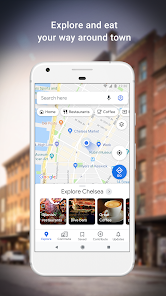
- 🔍 Local business integration: Searching for "coffee shop" pulls up ratings, menu photos, hours, and even wait times in some places. What sets it apart from Yelp is that Google ties this directly into navigation—I can see the place, read reviews, and get directions all in one flow without switching apps.
pros
- 🌟 Accuracy of location data: I've used this app in rural areas and foreign countries, and it rarely fails to pinpoint where I am. Compared to Apple Maps, which sometimes has a lag or misplaces addresses, Google Maps feels more grounded in real-world data, probably because of its massive user base and satellite imagery.
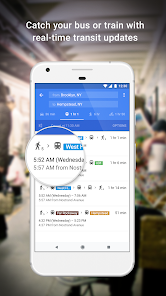
- 🔄 Multi-modal transport options: Whether I'm driving, biking, walking, or catching a bus, this app covers it all. Waze only focuses on cars, while Google Maps gives you integrated route planning across buses, trains, and even ride-share services like Uber, which is a huge time-saver when I'm out of gas or avoiding parking.
- 🔁 Frequent updates and corrections: I notice that if a road changes or a business closes, Google Maps updates within days, not weeks. Other navigation apps, like HERE WeGo, can be slower to reflect changes, so I trust Google's data to stay current without me having to manually report every little thing.
cons
- ⏳ Battery drain and data usage: Running Google Maps for an hour on a long trip eats up my phone battery noticeably faster than Waze, and it also chews through mobile data if I'm not on Wi-Fi. I've had to carry a power bank or turn off background refresh to cope, which isn't a problem with simpler offline maps like OsmAnd.
- 🔇 Overloaded interface at times: The screen can be cluttered with icons for nearby places, ads (yes, sometimes promoted pins), and multiple layers. For a quick glance while driving, I find Apple Maps' cleaner layout less distracting, especially if I'm just following directions without needing extra info.
- 📡 Occasional offline mode limitations: While Google Maps does allow downloading areas for offline use, I've run into issues where navigation without a signal fails to reroute or misses traffic updates. Waze doesn't even offer offline mode, but specialized apps like Sygic have more robust offline capabilities that work better during road trips with no coverage.
Recommended Apps
![]()
Daily Horoscope
KADO Apps4.4
![]()
FOX Sports: Watch Live Games
Fox Digital Services, LLC3.7
![]()
Fake Call from Santa Claus
ThunderClap4.2![]()
Google Maps
Google LLC4.2![]()
PhotoLayers-Superimpose,Eraser
handyCloset Inc.4.6![]()
Healthy Benefits+
Solutran, Inc.4.5![]()
SuperMe - Avatar Maker Creator
THE.DEMON3.7![]()
Air Horn
Tenoku4.8![]()
Football Wallpaper HD 4K
Orange Infotech Studio4.6![]()
Artplay - AI Photo & Video
Hideaway Technology Limited4.5![]()
Horoscopes – Daily Zodiac Horo
Mail.Ru Group4.1![]()
Passport Parking
Passport Labs, Inc.2.5![]()
ParkMobile: Park. Pay. Go.
Parkmobile, LLC4.3![]()
FestAI: Ghost Detector App
Now Tech3.2![]()
Photo Tool
COLIFER LAB4




























