

Pencil Sketch

50M+
Installs
Dumpling Sandwich Software Inc.
Developer
-
Video Players & Editors
Category
-
Rated for 3+
Content Rating
-
support@dumplingsandwich.com
Developer Email
-
https://dumplingsandwich.com/privacy-policy
Privacy Policy
Screenshots



editor reviews
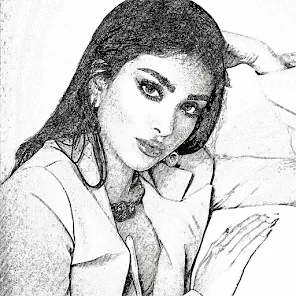
Pencil Sketch is a photo editing app that focuses on turning your regular pictures into hand-drawn style artworks. It's one of those creative tools you find on Google Play and the App Store when you're looking for something fun but not too complicated. I downloaded it because I wanted to see if it could really make my photos look like they were sketched with a real pencil, not just filtered through some cheap effect. The first impression after launching it was pretty straightforward: a clean interface with a big "Load Photo" button right in the middle, no annoying registration or forced sign-up. It has a decent install count for a niche app, and it's free to download, though you'll notice some in-app purchases and occasional ads if you want to unlock more styles or remove watermarks.
Once I loaded a photo, the app processed it quickly. The interface is simple: you choose a sketch style from a few options like "Pencil," "Charcoal," or "Colored Pencil," then adjust sliders for things like stroke intensity and background texture. The onboarding is minimal, just a quick tutorial pop-up that shows you the basics. In daily use, you'd typically load a photo, pick a style, tweak the settings until it looks right, and save it. One thing that threw me off was that the preview didn't always match the final output, so I had to export and re-check a few times. A small tip: use high-contrast photos for better results. The app is smooth for the most part, but it can lag a bit with larger images.
After using it for a while, I think Pencil Sketch is great for casual users who want a quick artistic touch without learning complex software. It's not for professional artists or anyone who needs fine control over every stroke. Compared to apps like Prisma or Adobe Photoshop Express, Pencil Sketch feels more focused on one specific effect rather than a full suite of filters. What makes it stand out is how it simulates the texture of real pencil on paper, which is rare for a free app. I kept it installed because it's fun for social media posts, but I could see uninstalling it if the ads become too intrusive or if I found a better alternative that offers more customization without the in-app purchases.
features
- 🎨 Automatic pencil sketch conversion with multiple styles like Pencil, Charcoal, and Colored Pencil. The app processes your photo with a few taps, unlike Prisma which focuses more on artistic filters rather than hand-drawn effects.
- ⚙️ Adjustable stroke intensity, background texture, and contrast sliders. This gives you some control over the final look, but it's not as deep as the manual editing you'd get in apps like Adobe Photoshop Sketch, which lets you draw from scratch.
- 🖼️ High-resolution export with watermark removal option. You can save images up to full resolution, but the free version adds a watermark unless you pay. Compared to Sketch Me!, Pencil Sketch offers better quality exports without forcing a subscription.
pros
- 👍 Simple and fast workflow. Load a photo, pick a style, and save in seconds. No learning curve, unlike Procreate which requires some skill to use effectively.
- 👍 Realistic pencil texture simulation. The app does a good job mimicking the look of graphite on paper, which is better than the cartoonish effects in ToonCamera.
- 👍 Free core features without mandatory sign-up. You can use the main function without creating an account, unlike many apps that push registration immediately.
cons
- 👎 Limited style variety. You get only a handful of sketch types, while apps like Prisma offer dozens of artistic styles for more creative variety.
- 👎 Preview not always accurate. The export often looks different from what you see on screen, which is frustrating compared to the real-time preview in Snapseed.
- 👎 Ads and watermark in free version. The ads pop up frequently, and the watermark ruins the image unless you pay. Sketchbook by Autodesk offers a cleaner free experience without similar restrictions.
Recommended Apps
![]()
Daily Horoscope
KADO Apps4.4
![]()
FOX Sports: Watch Live Games
Fox Digital Services, LLC3.7
![]()
Fake Call from Santa Claus
ThunderClap4.2![]()
Google Maps
Google LLC4.2![]()
PhotoLayers-Superimpose,Eraser
handyCloset Inc.4.6![]()
Healthy Benefits+
Solutran, Inc.4.5![]()
SuperMe - Avatar Maker Creator
THE.DEMON3.7![]()
Air Horn
Tenoku4.8![]()
Football Wallpaper HD 4K
Orange Infotech Studio4.6![]()
Artplay - AI Photo & Video
Hideaway Technology Limited4.5![]()
Horoscopes – Daily Zodiac Horo
Mail.Ru Group4.1![]()
Passport Parking
Passport Labs, Inc.2.5![]()
ParkMobile: Park. Pay. Go.
Parkmobile, LLC4.3![]()
FestAI: Ghost Detector App
Now Tech3.2![]()
Photo Tool
COLIFER LAB4





























