

GoFan: Buy Tickets to Events

500K+
Installs
GoFan
Developer
-
Sports
Category
-
Everyone
Content Rating
-
service@gofan.co
Developer Email
-
https://gofan.co/privacy-policy
Privacy Policy
Screenshots


editor reviews
GoFan is a mobile ticketing app specifically designed for high school and community sporting events in the United States. Instead of standing in line at the gate with cash, you buy your entry pass right from your phone. I first heard about it when my nephew's basketball games started requiring digital tickets, and honestly, my first thought was that it would be a hassle. But after downloading it from the App Store for free, I was surprised. There are no ads bombarding you during setup, and while you have to create an account to complete a purchase, the sign-up process is pretty quick. The install base seems solid for a niche app — plenty of schools use it — and you just scan your phone at the door.
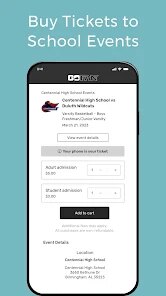
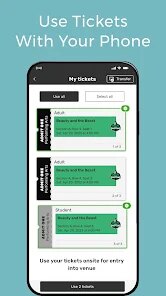
Opening the app for the first time, the interface is clean but feels very stripped down. You are greeted by a search bar and a list of upcoming games nearby. The main journey is straightforward: you search for your school, select the event, choose how many tickets you need, and pay. It supports Apple Pay and Google Pay, which makes checkout almost too fast. The tickets live inside the app as moving barcodes, which is smart for preventing screenshots. One practical tip is to add the ticket to your phone's wallet right away, because if the stadium wifi is spotty, you will be stuck staring at a loading spinner. The onboarding is not really a tutorial; it just expects you to figure it out, which is fine since the whole flow is only three or four screens deep.
After using it for a few weeks, I think GoFan solves a real problem for ticket takers and parents, but it is not something you keep on your home screen forever. It is great if you have kids in school sports or if you follow local high school leagues. Compared to something like Ticketmaster, GoFan is much simpler — there are no platinum seats or dynamic pricing, just a flat fee per ticket. But that simplicity is also a limitation. If you are not attending school events, there is zero reason to open it. The main reason someone would keep it installed is convenience, but the reason they might uninstall it is that they only open it a couple of times a year during playoffs.
features
- 🔍 The search feature is built around school names and event types, not venues. You type "Lincoln High" and the app pulls up all their upcoming games. Compared to Eventbrite, which is cluttered with every local workshop or food festival, GoFan is laser-focused on school sports. There is no noise.
- 🎟 Moving barcodes that refresh every few seconds prevent someone from using a screenshot of your ticket. Ticketmaster has similar tech, but for high school events, this level of fraud protection feels overengineered but welcome. It just works without you having to think about it.
- 📱 The wallet integration is seamless. Once you buy a ticket, one tap sends it to Apple Wallet or Google Pay. You never have to reopen the app at the gate. Compared to AXS, which sometimes requires you to open their app to hold the ticket, GoFan lets you rely on your phone's native wallet, which loads even on bad networks.
pros
- 👍 No fees confusing you at checkout. What you see on the event page is what you pay. Unlike Ticketmaster, where service fees can double the price, GoFan keeps it simple — a small district fee, and that is it.
- 👍 Schools control the tickets, not scalpers. You cannot resell tickets through the app, which means you are not competing with bots for your kid's playoff game. This is a huge plus compared to secondary markets like StubHub.
- 👍 The app is light and fast. It does not try to sell you merch, parking passes, or meal deals. It just sells tickets. For a parent rushing to get into the stadium, that focus is refreshing.
cons
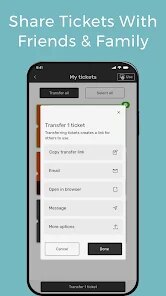
- 👎 No last-minute ticket gifting. If your friend texts you that they need a ticket but they are five minutes away, you cannot transfer your digital pass to them. You have to share a screenshot, which the moving barcode kills. SeatGeek lets you transfer instantly.
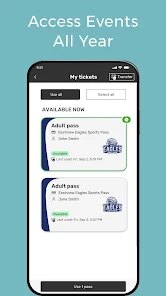
- 👎 The app feels abandoned between seasons. During summer, there are zero events listed in many areas. The app just sits there with an empty screen, unlike Gametime which always has something to browse.
- 👎 No ticket scanning at the door sometimes. I have been to schools where volunteers just shine a flashlight on your phone and wave you through. The barcode never gets scanned. So the whole "secure digital ticketing" pitch falls flat when real enforcement is inconsistent.
Recommended Apps
![]()
Daily Horoscope
KADO Apps4.4
![]()
FOX Sports: Watch Live Games
Fox Digital Services, LLC3.7
![]()
Fake Call from Santa Claus
ThunderClap4.2![]()
Google Maps
Google LLC4.2![]()
PhotoLayers-Superimpose,Eraser
handyCloset Inc.4.6![]()
Healthy Benefits+
Solutran, Inc.4.5![]()
SuperMe - Avatar Maker Creator
THE.DEMON3.7![]()
Air Horn
Tenoku4.8![]()
Football Wallpaper HD 4K
Orange Infotech Studio4.6![]()
Artplay - AI Photo & Video
Hideaway Technology Limited4.5![]()
Horoscopes – Daily Zodiac Horo
Mail.Ru Group4.1![]()
Passport Parking
Passport Labs, Inc.2.5![]()
ParkMobile: Park. Pay. Go.
Parkmobile, LLC4.3![]()
FestAI: Ghost Detector App
Now Tech3.2![]()
Photo Tool
COLIFER LAB4





























