

Hailuo Al: Image&Video Maker

Installs
MiniMax AI
Developer
-
Generative AI
Category
-
Teen
Content Rating
-
contact@hailuoai.com
Developer Email
-
https://hailuoai.video/doc/privacy-policy.html
Privacy Policy
Screenshots

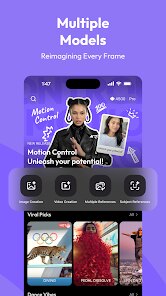
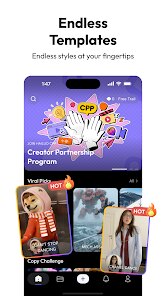
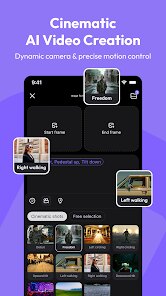

editor reviews
Hailuo AI is a media generation app developed by MiniMax, belonging to the image and video creation category. Users mainly rely on it to turn text descriptions or existing photos into short, AI-generated video clips. You might download this from the Google Play or App Store if you've seen those viral AI video demos and want to try it yourself without signing up for some complicated desktop software. Installation is fast and it's free to download, though there are in-app purchases once you hit usage limits. The first impression after launching is a clean, almost minimalist interface with a single text box staring back at you. It feels less intimidating than some competitors, which is nice for a casual user.
The actual hands-on experience is straightforward. After opening the app, you land on the creation screen, type in a short prompt like “a dog running on a sunny beach,” hit generate, and wait maybe twenty to thirty seconds. The app walks you through this with a brief onboarding pop-up. The main action is entering prompts, choosing an aspect ratio, and adjusting video length. While processing, the app shows a preview bar creeping across the screen. A small practical tip is to use simple, concrete language in your prompts—abstract phrases often produce shaky, confusing results. The interface stays mostly smooth, though it can lag slightly if you're switching between the creation page and the library of your past clips.
After a few days of messing around, my personal take is that this app nails it for quick, fun experiments but isn't a daily driver. People who enjoy showing friends weird AI creations or need rapid visual concepts for social media posts will get a kick out of it. But someone doing serious editing work will probably uninstall it pretty fast because the output quality can be inconsistent—sometimes you get a crisp clip, other times it looks like a watercolor painting that's melting. Compared to something like Pika Labs or Runway, Hailuo feels more mobile-native and polished for first-timers, but those rivals offer more fine-grained controls. I kept it installed because it's a nice party trick, but I can see others deleting it once the novelty wears off.
features
- 📽️ One-Click Video Generation: You type a short description and hit generate. That's it. No timeline editing, no keyframes. Compared to CapCut's text-to-video feature, Hailuo skips the heavy lifting completely, making it perfect for instant results.
- 🧠 Smart Prompt Adaptation: The AI rewrites vague inputs into something usable. If you type “cool car,” it stretches it into a full scene. In contrast, apps like InVideo often require you to be very specific or it glitches out.
- 📱 Mobile-First Design: The whole UI is built around a vertical phone screen. No pinching or zooming needed. Most similar tools from Kaiber or Runway feel like they were ported from desktop—this one doesn't.
pros
- 😌 Super Easy Learning Curve: You don't need to watch tutorials. The text box and generate button are everything. Pika Labs, for example, throws multiple modes at you from the start, which can feel overwhelming.
- ⏱️ Fast Rendering: Clips render in under 30 seconds usually. Runway often takes a minute or two for similar quality, so Hailuo saves time for casual creators.
- 🎨 Creative Freedom with Photos: You can upload an image and let the AI animate it. That's a strength over tools like Canva's video maker, which mostly only tweaks static images rather than generating motion.
cons
- 😕 Inconsistent Quality: About one in four clips come out blurry or with weird warping. In the same prompt, Pika Labs or Runway usually gives you more stable results across the board.
- 💸 Aggressive Free-Tier Limit: You get a handful of free generations, then it pushes hard for a subscription. CapCut offers a much bigger free allowance before hitting a paywall.
- ❌ No Editing After Generation: Once it's made, you can't tweak anything. Other apps like DaVinci Resolve or even basic tools let you adjust after export. Hailuo locks you into the raw output.
Recommended Apps
![]()
Daily Horoscope
KADO Apps4.4
![]()
FOX Sports: Watch Live Games
Fox Digital Services, LLC3.7
![]()
Fake Call from Santa Claus
ThunderClap4.2![]()
Google Maps
Google LLC4.2![]()
PhotoLayers-Superimpose,Eraser
handyCloset Inc.4.6![]()
Healthy Benefits+
Solutran, Inc.4.5![]()
SuperMe - Avatar Maker Creator
THE.DEMON3.7![]()
Air Horn
Tenoku4.8![]()
Football Wallpaper HD 4K
Orange Infotech Studio4.6![]()
Artplay - AI Photo & Video
Hideaway Technology Limited4.5![]()
Horoscopes – Daily Zodiac Horo
Mail.Ru Group4.1![]()
Passport Parking
Passport Labs, Inc.2.5![]()
ParkMobile: Park. Pay. Go.
Parkmobile, LLC4.3![]()
FestAI: Ghost Detector App
Now Tech3.2![]()
Photo Tool
COLIFER LAB4





























