

AI Mirror: AI Art Photo Editor

5M+
Installs
POLYVERSE INC.
Developer
-
Generative AI
Category
-
Rated for 18+
Content Rating
-
aimirror-support@polyversestudio.com
Developer Email
-
https://aimirror.fun/policy
Privacy Policy
Screenshots



editor reviews
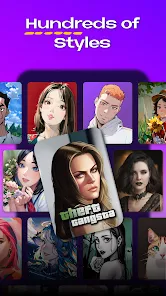
AI Mirror, from POLYVERSE INC., is a photo editing and art generation app that uses AI to turn regular pictures into stylized artworks. You can upload a selfie or any image and apply filters that mimic oil paintings, anime, 3D cartoons, or even Renaissance portraits. I downloaded it from the Google Play Store out of curiosity after seeing some impressive before-and-after shots online. The app is free to install, with over 10 million downloads, but it offers in-app purchases for premium styles and has occasional ads. Upon launching it, the interface feels slick and modern, with a clear “Create” button front and center, which immediately invites you to try something. Registration is optional, which is a relief, so you can jump right into making art without an account.
Actually using AI Mirror is pretty straightforward. After granting photo permissions, you pick an image from your gallery or snap a new one. In around five seconds, the AI processes it and shows you a preview with one of the default styles applied. You can scroll through a list of effects to see which one fits your photo best, and each style processes quickly. I found the cartoon filter to be surprisingly sharp, though some portrait effects can make your skin look a bit waxy if the lighting in the original photo was poor. You can adjust the intensity of each effect with a slider, which is a nice touch, and there's a tiny crop tool if your framing is off. Onboarding is minimal, just a quick tip overlay that explains how to navigate the style library. One small thing that annoyed me: the app sometimes takes a full second to load the preview for each style, which breaks the flow if you are trying to experiment quickly. Still, saving the final image to your gallery is one tap, and it retains a decent resolution for social media uploads.
After using AI Mirror for a few days, I think it is great for casual users who want to spice up their Instagram feed without learning Photoshop or paying for a subscription to something like Adobe Express. The variety of styles is impressive, and the free tier lets you test many of them before committing to the paid version. That said, if you are looking for precise photo editing tools like manual retouching or layer support, this app is not for you. It feels more like a toy than a professional tool, which is not a knock, but you should know what you are getting. I ended up keeping it installed because it is fun for quick transformations, but I can see someone uninstalling it if the novelty wears off or if the ads become too frequent. Compared to something like Remini, which focuses on enhancement, AI Mirror feels more creative and less utility-driven. For a free afternoon project or profile picture makeover, it does the job well.
features
- 🎨 Style variety: AI Mirror offers dozens of artistic filters, from watercolor to sci-fi, way more than apps like PicsArt's AI filters. The “Cartoon 3D” effect consistently produced crisp, Instagram-worthy results on my portraits, while the “Renaissance” style gave landscape shots a dramatic, painterly look that stood out.
- 🎨 Processing speed: Most styles render in under five seconds on a mid-range Android phone, which is faster than YouCam Perfect's AI tool that sometimes stutters. The app even handles batch processing if you want to apply a filter to multiple photos at once, a feature I did not expect from a free app.
- 🎨 One-tap sharing: Every save includes an option to directly post to Instagram or WhatsApp without leaving the app. This is smoother than in pricier editors like FaceApp, where you have to manually export and re-open social platforms. The integration feels native and saves time during quick edits.
pros
- ✅ Free core features: Unlike Prisma, which locks most styles behind a subscription, AI Mirror gives you a solid 20 styles for free. You can download the app, apply a cartoon filter, and save to your gallery without spending a dime, which is rare in this space.
- ✅ No account required: You can use almost all functionality without signing up or linking social media. Apps like Facetune require an account even for basic edits, and that friction makes me uninstall them quickly. Here, I just tapped “Allow” on permissions and started editing.
- ✅ Lightweight install: The APK is under 50 MB, so it does not bloat your device like Lensa AI, which takes up over 200 MB with its resource packs. On budget phones with limited storage, this makes a real difference in daily usability.
cons
- ❌ Inconsistent portrait results: When the original photo has harsh shadows or low light, the AI sometimes renders faces with a plasticky sheen. I noticed this particularly with the “Fantasy” style, which over-enhances skin texture. Apps like Remini handle low-light portraits much more naturally.
- ❌ Ad frequency: While the free version is usable, you get a full-screen video ad after every third export. This is more intrusive than YouCam Perfect, which only shows banners. It makes batch editing feel tedious because you have to wait through interruptions.
- ❌ No undo button: If you apply a style and then tweak the intensity slider, there is no way to revert to the original state without re-uploading the photo. Competitors like PicsArt have a history panel that lets you backtrack, which would save time here. This small omission frustrated me during a quick editing session.
Recommended Apps
![]()
Daily Horoscope
KADO Apps4.4
![]()
FOX Sports: Watch Live Games
Fox Digital Services, LLC3.7
![]()
Fake Call from Santa Claus
ThunderClap4.2![]()
Google Maps
Google LLC4.2![]()
PhotoLayers-Superimpose,Eraser
handyCloset Inc.4.6![]()
Healthy Benefits+
Solutran, Inc.4.5![]()
SuperMe - Avatar Maker Creator
THE.DEMON3.7![]()
Air Horn
Tenoku4.8![]()
Football Wallpaper HD 4K
Orange Infotech Studio4.6![]()
Artplay - AI Photo & Video
Hideaway Technology Limited4.5![]()
Horoscopes – Daily Zodiac Horo
Mail.Ru Group4.1![]()
Passport Parking
Passport Labs, Inc.2.5![]()
ParkMobile: Park. Pay. Go.
Parkmobile, LLC4.3![]()
FestAI: Ghost Detector App
Now Tech3.2![]()
Photo Tool
COLIFER LAB4





























