

Time Warp Scan : Face Scanner

10M+
Installs
Apps Resort - Daily Tool Apps
Developer
-
Entertainment
Category
-
Everyone
Content Rating
-
https://sites.google.com/view/time-warp-scanner-policy/home
Privacy Policy
Screenshots

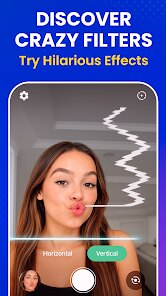

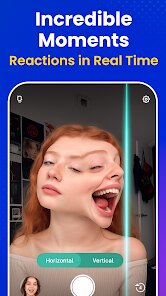

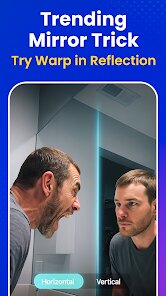
editor reviews
Time Warp Scan is one of those quirky face-altering apps that landed in the photo and video utility category. You can find it on both Google Play and the App Store, and it focuses entirely on a single gimmick: scanning your face with a moving line that creates surreal, stretched distortions in real time. I downloaded it for free after seeing someone use it on social media — the install count seems decent, and it doesn't require any registration to start playing. My first impression after launching it was that the interface feels almost too bare, like a forgotten prototype. There's no tutorial pop-up, just a camera view with a red line that slowly sweeps across your face. You either figure it out in two seconds or give up, which honestly fits the app's no-frills vibe.
Using Time Warp Scan is surprisingly straightforward once you get past the initial confusion. You open the app, point your phone at your face, and wait for that scanning line to move — whatever part of your face it passes gets stretched in whatever direction you choose before hitting record. I spent the first few minutes swiping the distortion speed slider and trying different angles just to understand how the effect maps onto my features. There's a subtle learning curve: tilting your head or moving too fast makes the warp look messy rather than funny, so you learn to stay still and let the line do the work. The app offers a few preset distortion styles, and you can save videos directly to your gallery. It's not smooth though — sometimes the lag between scanning and rendering breaks the magic, especially on older phones.
After a few days of messing around, I think this app works best for people who want a quick laugh with friends or a weird profile picture. It's less about serious photo editing and more about that one-trick-party effect. Compared to apps like Snapchat or FaceApp, Time Warp Scan lacks layers and polish — you won't find filters, backgrounds, or retouching tools here. But that simplicity also makes it addictive in short bursts. I can see someone keeping it installed purely for group moments or TikTok content, though I can also imagine uninstalling it once the novelty wears off, since there's no depth to explore. It's a fun toy, not a tool.
features
- 🧠 The scanning line effect sets Time Warp Scan apart from bigger apps like FaceApp or Snapchat by focusing solely on real-time face warping. Instead of applying static filters, it captures a moving distortion that reacts to your face shape, which feels fresh and unpredictable compared to preset adjustments found in Reface or YouCam Perfect.
- 🧠 The speed adjustment slider lets you control how fast the scan moves, which directly changes the intensity of the warp. This small tweak gives you more creative freedom than most quick-editing apps, where you just tap a button and get a fixed result. You can get slow, dramatic stretches or fast, chaotic shifts depending on your mood.
- 🧠 The no-registration, no-login design is a huge plus for casual users. You open the app, record, and leave — no account creation or permissions overload like what you face in many beauty camera apps. This lowers the barrier to entry significantly and makes it feel more like a toy than a data-collection tool.
pros
- ✨ The instant recording and save feature beats many similar apps like Motionleap or Picsart, where you often need to process effects after recording. Here, once the scan ends, the video is ready to save without any extra step, which keeps the experience fluid and immediate.
- ✨ The app's minimal size and light performance make it run better on older devices compared to heavier apps like Snapchat or Instagram, which pack layers of effects and background processes. It won't drain your battery or overheat your phone during short sessions.
- ✨ The straightforward one-button interface removes the learning curve entirely. Unlike YouCam or Reface, where you dig through menus and templates, Time Warp Scan puts the single effect front and center, making it accessible for anyone who just wants to film a quick weird video without thinking.
cons
- ⚠️ The app lacks any editing tools after recording — you can't trim, combine clips, or adjust colors like you can in CapCut or InShot. Once the warp is done, you have no control over the final output beyond accepting it as is, which limits its usefulness for polished content creation.
- ⚠️ The distortion effect feels repetitive after a few uses. Unlike Snapchat, which constantly updates with new lenses and community filters, Time Warp Scan offers just one core gimmick with minor variations. You'll likely cycle through all options within ten minutes and get bored.
- ⚠️ Stability issues are noticeable. On devices with low RAM, the scanning line stutters and the warping lags behind the movement, breaking the real-time illusion. Apps like FaceApp or Retrica handle similar processing much more smoothly across different hardware.
- ⚠️ There is no option to import existing photos or videos for warping. You have to use the live camera feed, which means you can't apply the effect to old media or edit someone else's photo, unlike Movavi or Photoshop Express which support batch file editing.
Recommended Apps
![]()
BetterMe: Health Coaching
BetterMe Limited4.3
![]()
Walli - HD, 4K Wallpapers
Tap AI4.4![]()
Future Self - Old Age Filter
Vidler Koiter1.6
![]()
AI Photo Editor, Collage-Fotor
AI Art Photo Editor | Everimaging Ltd.4.3![]()
AI Face Swap: MagicFace &Photo
Braly JSC0![]()
QR Code Reader: QR Scanner
WECHOICE MOBILE4.3![]()
Lip Fall Challenge: Fun Filter
Braly JSC0![]()
Funny Reverse Audio - Singing
PlayStudioInc0![]()
Birthday Secrets
shasunder4.4![]()
Live Wallpapers HD 4K
Wallpaper app4.4![]()
Find Your Phone By Clap
Trusted App Global4.5![]()
Wizz - Expand Your World
Wizz3.8![]()
NCAA March Madness Live
NCAA Digital4.7![]()
Hulu: Stream TV shows & movies
Disney4.5![]()
Lethal Love: a Yandere game
AniByte!4.4















Disclaimer
1.Apklifts does not represent any developer, nor is it the developer of any App or game.
2.Apklifts provide custom reviews of Apps written by our own reviewers, and detailed information of these Apps, such as developer contacts, ratings and screenshots.
3. All trademarks, registered trademarks, product names and company names or logos appearing on the site are the property of their respective owners.
4.Apklifts abides by the federal Digital Millennium Copyright Act (DMCA) by responding to notices of alleged infringement that complies with the DMCA and other applicable laws.
5.If you are the owner or copyright representative and want to delete your information, please contact us [email protected].
6.All the information on this website is strictly observed all the terms and conditions of Google Ads Advertising policies and Google Unwanted Software policy.
7.Apklifts.com is an independent, information-only website which is 100% free to all the users.













