

Voice Changer by Sound Effects

5M+
Installs
Lutech Ltd
Developer
-
Entertainment
Category
-
Rated for 3+
Content Rating
-
https://doc-hosting.flycricket.io/voice-changer-by-sound-effects-privacy-policy/530d0763-bb26-40ad-9eed-0941d18d92c2/privacy
Privacy Policy
Screenshots
editor reviews
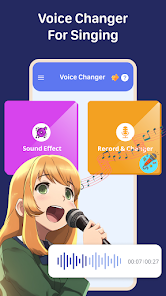
So, Voice Changer by Sound Effects is exactly what it sounds like – a fun little tool from Lutech Ltd that lets you record your voice and twist it into all sorts of silly or impressive versions. It's sits pretty comfortably in the entertainment and utility category on both Google Play and the App Store. You'd download it if you want to prank a friend, create a funny voiceover for a video, or just mess around during a boring afternoon. When you first open it up, it hits you with a clean, almost too-simple interface. No clutter, just a big record button and a list of effects staring back at you. It's a free download, and while you can start using it right away without signing up for anything, you'll quickly notice some effects are marked as premium and there are ads popping up after a few recordings. Still, that first impression is pretty smooth – it feels like a toy you can pick up and play with instantly, which is exactly what you want from an app like this.
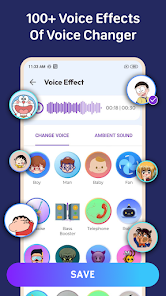
In actual use, the app is straightforward but has a few quirks. After hitting the record button, you speak into your phone, and then you get to pick from a long list of effects like alien, helium, robot, or deep voice. The effect kicks in pretty fast, but sometimes there's a slight delay when previewing it, which can break the flow. You can save the clip or share it directly to social media, which is handy. One minor annoyance is that the interface, while clean, doesn't always make it clear which effect you've selected, so you might end up scrolling back and forth a bit. A nice little detail is that you can adjust the pitch and speed manually, so you can fine-tune that perfect goblin voice. Overall, the experience is solid for quick bursts of fun, but if you're looking to create polished recordings, the processing can sometimes feel a bit rough.
After using it for a while, I'd say this app is for anyone who loves quick, silly fun or needs a fast voice changer for a short video. It's not for someone who wants professional-grade audio editing or seamless integration with other apps. Compared to something like Voicemod, which is more about real-time changes during calls or streaming, this one feels more like a standalone recording toy. What makes it different is its sheer simplicity – you don't need to learn anything to get started. I could see myself keeping it installed because it's fun to pull out at parties or for last-minute pranks. But if you use it daily, the ads and limited free effects might push you to uninstall and look for something more robust. It's a decent little app, just don't expect it to replace your main audio tools.
features
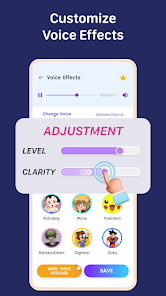
- 🎤 Real-time preview with pitch and speed sliders: Unlike many basic voice changers that just apply a preset and call it a day, this one lets you tweak the pitch and speed manually before you save. For example, in VoiceFX, you mostly get static effects. Here, you can turn a simple monster growl into a deep, slow roar or a chipmunk squeak into a fast, high-pitched giggle. It gives you that extra bit of creative control that makes the app feel less like a one-trick pony.
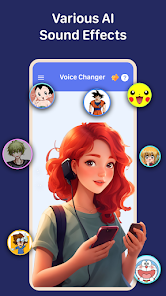
- 🎤 A wide variety of effects with a decent range: The app offers around 30 different effects, from standard ones like helium and robot to more niche ones like "space" or "underwater." Comparatively, an app like MagicCall focuses heavily on real-time call effects, but this one wins on sheer variety for recorded clips. You can go from sounding like a cartoon mouse to a horror movie villain without leaving the same screen, which is pretty cool for making quick skits.
- 🎤 Direct share integration with minimal steps: After you've created your masterpiece, you can share it directly to WhatsApp, Instagram, or just save it to your phone with two taps. Other apps like Snapchat's voice filters require you to be inside their ecosystem, but this one exports the file cleanly. It's a small thing, but it makes the app feel like a useful tool rather than a walled garden.
pros
- 👍 Super simple interface – It's one of the easiest apps to just open and start recording. No confusing menus or tutorials needed, unlike some apps like Clownfish that can be a bit messy to set up. This app respects your time.
- 👍 No account required – You can use the core features without signing up for anything. That's a big plus compared to apps like Voicemod Pro that push you to create an account right away. It feels less pushy and more respectful of your privacy.
- 👍 Manual pitch control – The ability to adjust pitch independently of other effects is a nice touch. Some apps like Voice Changer with Effects only let you choose a preset. Having that slider makes a big difference for customizing your output.
cons
- 👎 Frequent ads – After just a few recordings, an ad pops up. It's not a dealbreaker, but it gets annoying fast, especially compared to a paid alternative like Voicemod Pro that has zero ads. It makes quick usage feel slower than it should be.
- 👎 Limited free effects – A good chunk of the interesting effects are locked behind a paywall. While the free ones are decent, you'll run out of variety quickly. For example, VoiceFX gives you more free options right off the bat, so this app feels more stingy.
- 👎 Audio quality can be a bit rough – The processed audio sometimes sounds a bit tinny or has a slight echo. It's fine for a laugh, but if you're trying to make something sound clean, apps like Audacity are far better. It's a fun toy, not a quality production tool.
- 👎 No real-time call integration – Unlike MagicCall or some other apps, you can't just switch your voice on during a regular phone call. You have to record first and then share. That limits its usefulness if you wanted to prank someone live.
Recommended Apps
![]()
BetterMe: Health Coaching
BetterMe Limited4.3
![]()
Walli - HD, 4K Wallpapers
Tap AI4.4![]()
Future Self - Old Age Filter
Vidler Koiter1.6
![]()
AI Photo Editor, Collage-Fotor
AI Art Photo Editor | Everimaging Ltd.4.3![]()
AI Face Swap: MagicFace &Photo
Braly JSC0![]()
QR Code Reader: QR Scanner
WECHOICE MOBILE4.3![]()
Lip Fall Challenge: Fun Filter
Braly JSC0![]()
Funny Reverse Audio - Singing
PlayStudioInc0![]()
Birthday Secrets
shasunder4.4![]()
Live Wallpapers HD 4K
Wallpaper app4.4![]()
Find Your Phone By Clap
Trusted App Global4.5![]()
Wizz - Expand Your World
Wizz3.8![]()
NCAA March Madness Live
NCAA Digital4.7![]()
Hulu: Stream TV shows & movies
Disney4.5![]()
Lethal Love: a Yandere game
AniByte!4.4















Disclaimer
1.Apklifts does not represent any developer, nor is it the developer of any App or game.
2.Apklifts provide custom reviews of Apps written by our own reviewers, and detailed information of these Apps, such as developer contacts, ratings and screenshots.
3. All trademarks, registered trademarks, product names and company names or logos appearing on the site are the property of their respective owners.
4.Apklifts abides by the federal Digital Millennium Copyright Act (DMCA) by responding to notices of alleged infringement that complies with the DMCA and other applicable laws.
5.If you are the owner or copyright representative and want to delete your information, please contact us [email protected].
6.All the information on this website is strictly observed all the terms and conditions of Google Ads Advertising policies and Google Unwanted Software policy.
7.Apklifts.com is an independent, information-only website which is 100% free to all the users.













