

AI Photo Editor, Collage-Fotor

10M+
Installs
AI Art Photo Editor | Everimaging Ltd.
Developer
-
Video Players & Editors
Category
-
Rated for 3+
Content Rating
-
support@fotor.com
Developer Email
-
http://www.fotor.com/privacy.html
Privacy Policy
Screenshots
editor reviews
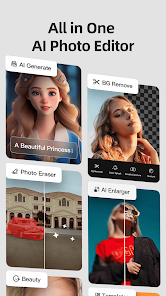
Fotor is an all-in-one photo editing and collage app developed by Everimaging Ltd. It's basically the kind of app you download when you want to do more than just slap a filter on a picture. You can edit colors, remove backgrounds, add text, and create collages all in one place. Over on Google Play and the App Store, it's been downloaded hundreds of millions of times, which gives you an idea of how many people rely on it for quick photo fixes. It's free to download, but you run into watermarks on some features if you don't buy the pro version. First time you open it, the layout hits you with a lot of options right away—editing tools, collage templates, and a "beauty" section. It felt a bit overwhelming at first, like walking into a busy store, but I got used to it after tapping around for a minute.
Getting into actual use, the interface is clean but packed. You pick a photo from your gallery, and you're taken to the main editing screen where the basic tools are at the bottom. Cropping, adjusting brightness, and applying filters are all easy to find. What surprised me was the background removal tool. It works pretty well for a free feature, though it sometimes messes up on hair edges. The collage maker is straightforward: you pick a template, arrange your photos, and adjust the spacing. I found myself using the "enhance" AI button a lot—it just brightens and sharpens the photo in one click. One thing I noticed is that loading times can drag a bit if you have a lot of photos in your gallery, but the actual editing process is smooth. There's no forced sign-up to use basic tools, which I appreciated. I just opened it, edited, and saved.
After using it for a couple of weeks, I think Fotor is a solid pick for casual editors who want a bunch of features without switching between apps. It's not as deep as something like Photoshop Express or Lightroom for raw editing, but it's way easier for someone who just wants to fix a photo fast or make a decent collage. The constant nudges to upgrade to the paid version are annoying, and some tools like the AI art generator require credits even if you pay. Still, if you're the type of person who Instagrams often and needs a quick edit tool, Fotor does the job. I kept it installed because the collage feature alone saves me time. Someone who only does basic cropping might not need it, but for the price (free), it's a handy backup editor.
features
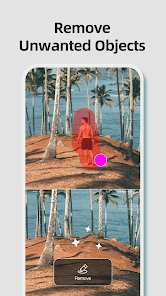
- 🎨 AI Background Removal: It detects subjects pretty well for a free tool. On PicsArt, the same feature often leaves a jagged outline, but Fotor's version handles complex edges better without asking for a subscription right away.
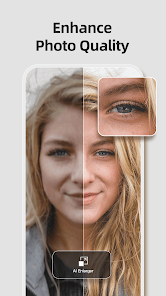
- 🎨 One-Tap Enhance: This is the standout for me. You click the "enhance" button, and it adjusts exposure, color, and sharpness in one go. Adobe Lightroom has a similar auto button, but Fotor's feels faster and works better on slightly underexposed shots.
- 🎨 Built-in Collage Maker: You don't need a separate app for collages. In Canva, you have to start from scratch with a blank canvas, while Fotor gives you actual photo slot templates that let you drop pictures in right from the edit screen.
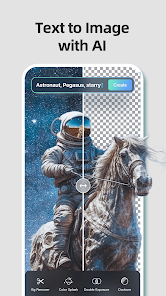
- 🎨 AI Art Generator: This is more of a novelty. You type a prompt, and it creates an image. It's not as refined as what you get in Midjourney or even Wombo Dream, but it's decent for a quick idea or meme.
pros
- ✅ Ease of Use: The tools are laid out in a way that feels natural. Compared to Snapseed, which hides some adjustments behind gestures, Fotor just shows buttons. New users can jump in without watching a tutorial.
- ✅ Versatility: It does editing, collage, and basic AI art. Adobe Express charges for many of these features separately, but Fotor bundles them in one free app.
- ✅ No Login Required for Basics: You can get a lot done without creating an account. PicsArt makes you sign up before you even see the tools, which is a major turn-off. Fotor stays open for quick one-off edits.
cons
- ❌ Aggressive Upselling: Almost every tool shows a pro badge or watermark preview. In Snapseed, everything is free. Here, you feel like you're constantly being pushed to pay, even for things that feel basic like saving in high resolution.
- ❌ AI Features Are Gimmicky: The AI art generator and some portrait retouching tools feel half-baked. In FaceApp, the results are much more realistic. Fotor's version adds weird artifacts to eyes and hair.
- ❌ Slow Load Times with Large Galleries: When you have a thousand plus photos, the app takes longer to load your library than Photos app or VSCO does. It's not a dealbreaker, but it adds friction.
Recommended Apps
![]()
Daily Horoscope
KADO Apps4.4
![]()
FOX Sports: Watch Live Games
Fox Digital Services, LLC3.7
![]()
Fake Call from Santa Claus
ThunderClap4.2![]()
Google Maps
Google LLC4.2![]()
PhotoLayers-Superimpose,Eraser
handyCloset Inc.4.6![]()
Healthy Benefits+
Solutran, Inc.4.5![]()
SuperMe - Avatar Maker Creator
THE.DEMON3.7![]()
Air Horn
Tenoku4.8![]()
Football Wallpaper HD 4K
Orange Infotech Studio4.6![]()
Artplay - AI Photo & Video
Hideaway Technology Limited4.5![]()
Horoscopes – Daily Zodiac Horo
Mail.Ru Group4.1![]()
Passport Parking
Passport Labs, Inc.2.5![]()
ParkMobile: Park. Pay. Go.
Parkmobile, LLC4.3![]()
FestAI: Ghost Detector App
Now Tech3.2![]()
Photo Tool
COLIFER LAB4





























