

AI Video - AI Video Generator

10M+
Installs
HubX
Developer
-
Video Players & Editors
Category
-
Teen
Content Rating
-
info@aivideoart.co
Developer Email
-
https://aivideoart.co/privacy
Privacy Policy
Screenshots


editor reviews
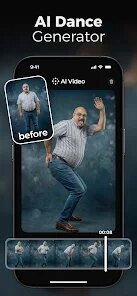
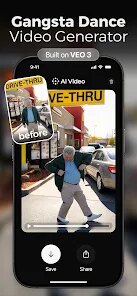
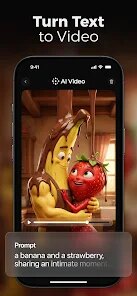
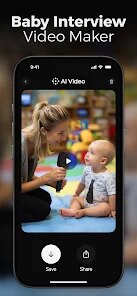
AI Video Generator by HubX is a mobile app that turns text prompts into short video clips. It falls into the category of AI content creation tools, and the main draw is that you can type a sentence and get a video back without needing any editing skills. I grabbed it from Google Play, and it had a few hundred thousand downloads at the time, which felt like a decent user base. The app is free to download, but you quickly realize that the best stuff is locked behind a subscription. Upon launching, the interface is clean and minimal, almost too simple, which made me wonder if it actually worked. The very first screen pushes you to choose a style or type a prompt, so the onboarding is basically non-existent, which is fine if you're tech-savvy but could throw off a total beginner.
Using the app is straightforward: you type a description, pick a video style from a handful of presets like cinematic or anime, and hit generate. The processing takes about 30 seconds to a minute, which is reasonable for a mobile device. The first video I made was a prompt about a cat in a cyberpunk city, and the output was surprisingly decent. It wasn't high-definition masterpiece material, but the motion was smooth and the colors popped. The interface is intuitive enough that you can jump between your gallery of past generations and try new ideas without getting lost. One small tip: the free tier only gives you a few credits, and those credits get eaten up fast if you test different prompts. I found myself rewording things to avoid wasting them. The app also lets you export the video without a watermark on the paid plan, which is a common frustration with free tools like this.
After spending a week with AI Video Generator, I think it's a solid pick for social media creators who need quick visuals for posts or stories. If you're someone who loves experimenting with AI tools just for fun, this app scratches that itch too, at least for a day or two. But if you're a professional video editor or someone who needs consistent, high-quality output, you'd probably be better off with something more established like Runway or Pika Labs, which offer more control and better resolution. What makes this app stand out is how low the barrier to entry is. No login is required, no complex settings. You just type and wait. That simplicity is why I kept it installed, even though I ran out of free credits quickly. I could see a casual user uninstalling it after the trial runs out unless they really commit to the subscription.
features
- 🖋️ Text-to-video generation with preset styles like cinematic, anime, and realistic, which is faster than competing apps like InVideo that require more manual timeline editing.
- 🎥 The app processes on-device AI, so you don't need a strong internet connection for basic clips, unlike Runway which streams processing from the cloud.
- 📱 The minimalist interface is a standout. There's no clutter, no timeline, no layers, just a text box and a generate button, which makes it much more approachable for beginners compared to CapCut's overwhelming dashboard.
- ⚡ Export quality is capped at 720p on the free plan, but the paid version unlocks 1080p, which is on par with Pika Labs but without the wait times for high-demand servers.
pros
- 👍 Free to download and try with zero commitment, unlike Synthesia which forces you into a paid demo before you even see a result.
- 👍 The video generation is genuinely fast, usually under a minute. That's a big plus over other mobile AI tools that can take several minutes for similar output.
- 👍 No account sign-up is needed at the start. You can jump in and start creating right away, which is more inviting than apps like Lumen5 that require email verification first.
cons
- 👎 The free credit system is very restrictive. You get maybe 3-4 generations before hitting a paywall, while alternative apps like Pika Labs offer more generous free daily allowances.
- 👎 Video resolution on the free plan maxes out at 720p, and even the paid plan only reaches 1080p. Competitors like Runway now support 4K exports for the same price.
- 👎 There's no video editing, no scene transitions, no audio tracks, or overlay options. If you want to tweak anything, you need another app entirely, unlike CapCut which bundles all of that together.
- 👎 The app's style presets are limited to a handful of options. Runway offers a much wider range of visual styles and more detailed control over the output's aesthetic.
Recommended Apps
![]()
Daily Horoscope
KADO Apps4.4
![]()
FOX Sports: Watch Live Games
Fox Digital Services, LLC3.7
![]()
Fake Call from Santa Claus
ThunderClap4.2![]()
Google Maps
Google LLC4.2![]()
PhotoLayers-Superimpose,Eraser
handyCloset Inc.4.6![]()
Healthy Benefits+
Solutran, Inc.4.5![]()
SuperMe - Avatar Maker Creator
THE.DEMON3.7![]()
Air Horn
Tenoku4.8![]()
Football Wallpaper HD 4K
Orange Infotech Studio4.6![]()
Artplay - AI Photo & Video
Hideaway Technology Limited4.5![]()
Horoscopes – Daily Zodiac Horo
Mail.Ru Group4.1![]()
Passport Parking
Passport Labs, Inc.2.5![]()
ParkMobile: Park. Pay. Go.
Parkmobile, LLC4.3![]()
FestAI: Ghost Detector App
Now Tech3.2![]()
Photo Tool
COLIFER LAB4





























