

Grok

10M+
Installs
xAI
Developer
-
Generative AI
Category
-
Teen
Content Rating
-
support@x.ai
Developer Email
-
https://x.ai/legal/privacy-policy
Privacy Policy
Screenshots

editor reviews
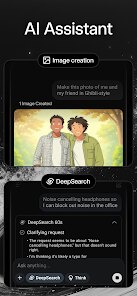
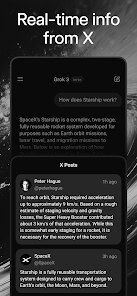
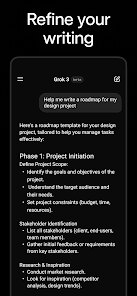
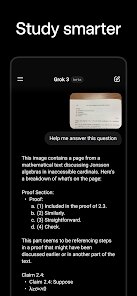
Grok is probably the most unique news aggregator and AI chatbot you'll run into on the market right now, baked by xAI. It's basically a smart, snarky assistant that pulls real-time info from X (formerly Twitter) to answer questions, break down trends, or just roast whatever you throw at it. A lot of people, including myself, initially downloaded Grok from Google Play and the App Store out of pure curiosity after hearing Elon Musk hype it up as an unfiltered alternative to stuff like ChatGPT. The install count has been climbing fast, and yeah, it's free to download, but you'll need an X subscription for full access. When I first launched it, the dark interface felt familiar yet edgy, like opening a messaging app that might insult your taste in sports teams. You quickly notice that there's no cluttered onboarding, just a text box and a disclaimer that this thing isn't afraid to touch controversial topics.
After using Grok for a couple of weeks, the experience is a mixed bag but mostly entertaining. The onboarding is smooth: you pick your vibe (more serious or more humorous), and then you just start typing. The main interface is a chat window with a panel showing trending stories from X, which is neat because you can ask Grok to "summarize why everyone is arguing about the Super Bowl halftime show" and it pulls live tweets. Common usage steps involve asking it to explain breaking news, compare political opinions, or even generate quick memes. One moment that stood out was when I asked it for a workout plan and it started with "Okay, but are you actually going to do it or should I suggest a Netflix marathon?" It's fast, though sometimes it gets a little stuck on obscure topics or relies too heavily on X's firehose, leading to weirdly niche answers. A practical tip: if you want straight facts, set it to "Serious" mode; "Fun" mode is great for late-night scrolling. The interface is clean, but the constant loading of live tweets can feel sluggish on a weaker connection.
Honestly, I think Grok is perfect for people who live on X and want an AI that matches that chaotic, opinionated energy. If you're looking for a calm, neutral assistant like you'd find with Google Assistant or Siri, you might feel overwhelmed by its sarcasm and lack of filter. What sets Grok apart is its real-time integration with X's feed, which makes it feel like you're asking a very online friend for gossip rather than a static database. Compared to ChatGPT or Claude, Grok is less polished but way more fun for current events. I could see myself keeping it installed for breaking news summaries and the occasional laugh, but I might uninstall it if I need a reliable tool for work, because its humor can get in the way of productivity. It's not for everyone, but if you enjoy a digital buddy that roasts your life choices, it's definitely worth a try.
features
- 🤖 Real-Time X Integration: Grok pulls live data straight from X, so when you ask about a trending topic, you get actual tweets and reactions, not just generic web summaries. ChatGPT and Bing Chat rely on older web crawls, so Grok feels more immediate and raw for breaking news or meme culture.
- 🎭 Dual Personality Modes: You can switch between "Fun" and "Serious" modes, which is rare in AI assistants. In Fun mode, Grok cracks jokes and uses slang; in Serious mode, it focuses on accuracy. Google Gemini and Claude don't offer a similar toggle for tone, making Grok more playful for casual users.
- 🔍 Unfiltered Q&A: Grok doesn't shy away from controversial or "politically sensitive" questions that other bots often dodge. While ChatGPT or Bard might give a generic "I can't answer that," Grok at least tries to explain the context from X's public discourse. This makes it a standout for users seeking raw, unfiltered opinions.
- 💬 X Account Linking: Your Grok chats can be tied to your X account, making it easy to share responses or follow up on breaking stories directly on the platform. Other bots like Copilot keep everything isolated in a separate window, so this seamless integration feels like a huge convenience for active X users.
pros
- 🚀 Instant Access to Trending News: Grok's biggest win is how fast it can grab real-time tweets during events like election nights or product launches. ChatGPT often needs a manual web search or plug-in, but Grok just works out of the box with X's firehose, saving you time.
- 🎉 Humor and Personality: Unlike the dry, corporate tone of Google Assistant or Siri, Grok actually has a sense of humor. It can roast your taste in movies or turn serious news into a funny summary, making it more engaging for everyday chit-chat.
- 🛡️ Minimal Filtering: For users frustrated by overly cautious bots like Claude or Bing Chat, Grok offers a breath of fresh air. It discusses controversial topics with nuance drawn from real conversations on X, rather than just blocking them entirely.
cons
- 🐌 X Subscription Lock: Grok isn't fully free; you need an X Premium subscription to use it extensively. ChatGPT offers a generous free tier without any social media tie-ins, so Grok feels more restrictive for casual users who don't want to pay.
- 🧠 Inconsistent Accuracy: Because Grok relies on X's often-unverified tweets, it can spread misinformation or weird takes. Google Gemini or Perplexity AI pull from vetted sources, so Grok feels less reliable for factual, serious homework.
- ⚡ Performance on Slow Connections: Grok's constant live data fetching can make it lag on slower networks, while offline-capable bots like Apple's ChatGPT app work smoothly even with spotty service. This is a real pain if you're traveling or have limited data.
- 😩 Over-the-Top Sarcasm: The default Fun mode can be too sarcastic for practical tasks. When I tried to get a simple recipe for pasta, it added "Wow, so original" which was funny once but annoying if you just need info. Other assistants like Alexa stay polite and straightforward.
Recommended Apps
![]()
Daily Horoscope
KADO Apps4.4
![]()
FOX Sports: Watch Live Games
Fox Digital Services, LLC3.7
![]()
Fake Call from Santa Claus
ThunderClap4.2![]()
Google Maps
Google LLC4.2![]()
PhotoLayers-Superimpose,Eraser
handyCloset Inc.4.6![]()
Healthy Benefits+
Solutran, Inc.4.5![]()
SuperMe - Avatar Maker Creator
THE.DEMON3.7![]()
Air Horn
Tenoku4.8![]()
Football Wallpaper HD 4K
Orange Infotech Studio4.6![]()
Artplay - AI Photo & Video
Hideaway Technology Limited4.5![]()
Horoscopes – Daily Zodiac Horo
Mail.Ru Group4.1![]()
Passport Parking
Passport Labs, Inc.2.5![]()
ParkMobile: Park. Pay. Go.
Parkmobile, LLC4.3![]()
FestAI: Ghost Detector App
Now Tech3.2![]()
Photo Tool
COLIFER LAB4





























