

Venmo

50,000,000+
Installs
PayPal, Inc.
Developer
-
Finance
Category
-
Rated for 3+
Content Rating
-
support+android@venmo.com
Developer Email
-
https://venmo.com/info/privacy-policy
Privacy Policy
Screenshots
editor reviews
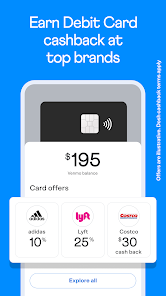
Venmo is a mobile payment app that lives somewhere between a banking tool and a social network. You link it to your bank account, debit card, or credit card, and then you can send or request money from anyone else on the app. People use it for all sorts of things—splitting dinner bills, paying rent to a roommate, or collecting money for a group gift. The first thing you notice after downloading it from Google Play or the App Store (it's free, by the way) is that it feels more like a social feed than a financial app. There's a public timeline of transactions with emoji-laden descriptions, which is either charming or a little weird depending on your taste. You do need to create an account and verify your identity, but the whole setup takes maybe five minutes. Instagram and ads exist—mostly for cash-back deals with certain brands—but they don't get in your way too much.
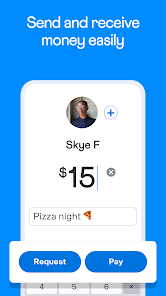
Once you're in, the main screen shows a big "Pay or Request" button at the bottom. Tapping that lets you pick a contact, type an amount, and add a note. The app suggests splitting evenly if you tap the split option, which saves mental math. You can also scan a QR code to pay someone in person. The social feed, oddly enough, becomes useful after a while because it shows you who owes whom and keeps a record of past payments. Onboarding is straightforward—no tutorial overload, just a few tooltips. One small tip: keep your transactions private by toggling the visibility to "Only Me" or "Friends" before hitting send, because by default they're public to your Venmo friends. I've had moments where the app felt slow when loading the feed, especially after a big update, but the actual payment process is snappy. You can also request money from someone who doesn't have Venmo yet—they'll get a text or email to sign up, which is handy.
After using Venmo for a few months, I can see why it stuck around for so long. It excels at making small, casual payments feel effortless, especially among friends who are already on the app. The social twist is actually its main draw—it's less intimidating than writing a check or using a bank transfer. That said, if privacy is a big deal for you, the public-by-default nature might annoy you. People who just want a no-frills payment tool might prefer Cash App or Zelle, which skip the social feed entirely. But Venmo's charm is in how it turns a boring chore into something slightly fun, like a mini status update every time you pay for pizza. I keep it installed because most of my friends and family use it, but I wouldn't miss the occasional spammy ad or the feed clutter. It's not for everyone, but for splitting tacos or collecting gift money, it's hard to beat.
features
- 😀 Venmo combines payments with a social feed, so you can see what friends are paying for and leave comments or reactions. Cash App focuses purely on transfers without any social layer, which feels more private but less engaging.
- 😀 Its split feature automatically divides a bill among multiple people, even if some don't owe the same amount. You can adjust shares manually too. Cash App requires you to calculate splits yourself, which is a bit more work.
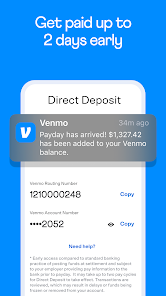
- 😀 Venmo lets you instantly transfer money to your bank account for a small fee (1.5% or $0.25 minimum), or wait one to three business days for free. Cash App offers instant transfers too, but at a slightly higher fee (1.5% with a $0.25 minimum as well, but the cap is different). The standout part is how Venmo ties these transfers into the social feed, making payments feel less transactional.
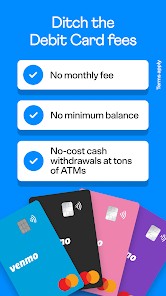
- 😀 A unique feature is the "Venmo Card" that acts like a debit card linked to your Venmo balance, and you can customize the card design with emoji or personal photos. Cash App has a similar card, but Venmo's card integrates directly with the feed, so purchases show up as transactions you can share or hide. This feels more flexible for people who like to document their spending.
pros
- 😀 The social feed is Venmo's biggest strength. Unlike Cash App or Zelle, it turns payments into a lighthearted, shareable moment. You can add emoji, write jokes, and see what friends are up to, which makes the app feel less like a chore and more like a tiny social network.
- 😀 The group-split function is genuinely useful. When you're out with friends, Venmo lets you split the bill evenly or by custom amounts, and each person gets a separate request. Cash App doesn't offer anything this integrated—you'd have to manually calculate and request from each person.
- 😀 Venmo is widely adopted, especially among younger people. If you're in a group of friends or roommates, chances are everyone already has it. Zelle is more common for bank-to-bank transfers but lacks the social ease. Cash App has a similar user base but feels more transactional.
cons
- 😐 The public-by-default setting is a privacy headache. Unless you manually change each transaction's visibility, anyone on Venmo can see your payments and notes. Cash App and Zelle keep everything private by default, so Venmo feels a bit exposed for people who value discretion.
- 😐 Fees for instant transfers can add up. If you're frequently moving small amounts (like $5 for coffee), the 1.5% fee stings. Cash App has similar fees but offers lower caps for larger amounts. Zelle is completely free for instant transfers, so Venmo lags behind there.
- 😐 The social feed can get cluttered with ads and irrelevant updates. You'll see promoted content from brands mixed in with friends' transactions, which feels intrusive. Cash App and Zelle keep their interfaces clean and ad-free, so Venmo's feed can be a distraction.
Recommended Apps
![]()
Daily Horoscope
KADO Apps4.4
![]()
FOX Sports: Watch Live Games
Fox Digital Services, LLC3.7
![]()
Fake Call from Santa Claus
ThunderClap4.2![]()
Google Maps
Google LLC4.2![]()
PhotoLayers-Superimpose,Eraser
handyCloset Inc.4.6![]()
Healthy Benefits+
Solutran, Inc.4.5![]()
SuperMe - Avatar Maker Creator
THE.DEMON3.7![]()
Air Horn
Tenoku4.8![]()
Football Wallpaper HD 4K
Orange Infotech Studio4.6![]()
Artplay - AI Photo & Video
Hideaway Technology Limited4.5![]()
Horoscopes – Daily Zodiac Horo
Mail.Ru Group4.1![]()
Passport Parking
Passport Labs, Inc.2.5![]()
ParkMobile: Park. Pay. Go.
Parkmobile, LLC4.3![]()
FestAI: Ghost Detector App
Now Tech3.2![]()
Photo Tool
COLIFER LAB4





























