

Google Home

500,000,000+
Installs
Google LLC
Developer
-
Lifestyle
Category
-
Rated for 3+
Content Rating
-
https://policies.google.com/privacy
Privacy Policy
Screenshots
editor reviews
I recently picked up the Google Home app, which acts as the central hub for controlling all your Google smart home devices. It's a smart home controller app, essentially the remote control for any Google Nest or compatible gadgets you have scattered around the house. You'd download and install it from the Google Play Store or App Store for free, and the setup is pretty straightforward once you log in with your Google account. My first impression after launching it was that it felt clean and minimal, but also a bit overwhelming because it tries to manage everything from lights and thermostats to speakers and cameras. The app has a lot of potential, but you can tell it's built for a whole ecosystem, not just a single device.
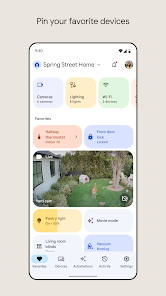
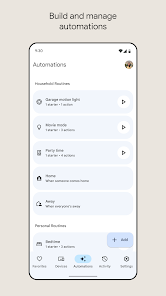
Once I started poking around, the real hands-on experience began. The main dashboard shows your devices grouped by room, so moving through the app feels like walking through your house. Setting up a new speaker was smooth—it automatically detected the device and walked me through connecting to Wi-Fi. But I hit a confusing moment when I tried to set up a routine. The steps felt buried in menus, and I had to fumble through a few screens to get 'Good Morning' to turn on the lights and play the news. A small tip I picked up is that you can tap the plus icon to add a device or start a routine, but the voice commands through the app are actually faster for simple actions like dimming a light.
After using it for a few weeks, I think it's perfect for someone already invested in Google's ecosystem, like having a Nest Hub or a bunch of Chromecasts. But if you're just looking for a basic timer or a quick way to play music, you might not need it. What sets it apart from something like the Amazon Alexa app is the seamless integration with Google services—maps, calendar, YouTube Music all just connect without extra logins. Still, I've found it a bit sluggish compared to controlling devices directly with voice on a smart speaker, and the app's layout sometimes hides useful features. I'll probably keep it installed because it's essential for managing my setup, but I can see why someone with just one smart bulb might uninstall it out of frustration with the clutter.
features
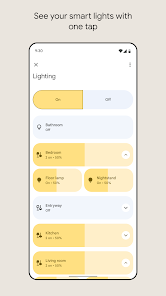
- 🏠 Smart Home Hub: The app serves as a unified control center for all Google-compatible devices, from lights to thermostats, which is a step ahead of the Apple Home app's more limited device support. You can manage everything from one screen rather than jumping between multiple brand-specific apps.
- 🎤 Voice Command Integration: You can use Assistant voice commands directly within the app to control devices, set reminders, or ask questions. This is more seamless than the Amazon Alexa app, which often requires a separate voice skills setup for basic tasks.
- 📅 Routine Automation: The app allows you to create custom routines that trigger multiple actions with a single command. Compared to the Samsung SmartThings app, the Google Home routine builder feels more intuitive for beginners, though it lacks some advanced automation options for power users.
- 📺 Device Sharing: You can easily share device control with family members through the app, which is simpler than the complex permission settings in the Eve for HomeKit app. It just requires adding their Google accounts, making it great for households.
pros
- 🔄 Seamless Google Sync: The app integrates flawlessly with other Google services like Calendar, Maps, and YouTube Music. This is a huge plus over the Amazon Alexa app, which feels more fragmented and requires extra logins for basic service connections.
- 🔍 Device Discovery: Adding new smart devices is mostly automatic—the app detects and pairs them quickly. This is less frustrating than the Philips Hue app, which often requires manual serial number entry for initial setup.
- 👨👩👧👦 Family Management: Sharing access with everyone in your home is straightforward and secure. You don't need to create separate accounts or manage complex permissions like you sometimes have to do with the SmartThings app.
cons
- 🐢 Performance Issues: The app can feel sluggish, especially when loading the device list or routines. The Amazon Alexa app is noticeably snappier in this regard, making quick adjustments feel less tedious.
- 🧩 Cluttered Interface: Navigating to basic settings like Wi-Fi or guest access is buried under multiple menus. The Apple Home app is much cleaner and more intuitive for simple device management, though it offers less control.
- 🔌 Limited Third-Party Support: Not all smart home brands work seamlessly out of the box. The Samsung SmartThings app has broader compatibility with random brands, while Google Home often requires workarounds or specific hubs for niche devices.
Recommended Apps
![]()
BetterMe: Health Coaching
BetterMe Limited4.3
![]()
Walli - HD, 4K Wallpapers
Tap AI4.4![]()
Future Self - Old Age Filter
Vidler Koiter1.6
![]()
AI Photo Editor, Collage-Fotor
AI Art Photo Editor | Everimaging Ltd.4.3![]()
AI Face Swap: MagicFace &Photo
Braly JSC0![]()
QR Code Reader: QR Scanner
WECHOICE MOBILE4.3![]()
Lip Fall Challenge: Fun Filter
Braly JSC0![]()
Funny Reverse Audio - Singing
PlayStudioInc0![]()
Birthday Secrets
shasunder4.4![]()
Live Wallpapers HD 4K
Wallpaper app4.4![]()
Find Your Phone By Clap
Trusted App Global4.5![]()
Wizz - Expand Your World
Wizz3.8![]()
NCAA March Madness Live
NCAA Digital4.7![]()
Hulu: Stream TV shows & movies
Disney4.5![]()
Lethal Love: a Yandere game
AniByte!4.4















Disclaimer
1.Apklifts does not represent any developer, nor is it the developer of any App or game.
2.Apklifts provide custom reviews of Apps written by our own reviewers, and detailed information of these Apps, such as developer contacts, ratings and screenshots.
3. All trademarks, registered trademarks, product names and company names or logos appearing on the site are the property of their respective owners.
4.Apklifts abides by the federal Digital Millennium Copyright Act (DMCA) by responding to notices of alleged infringement that complies with the DMCA and other applicable laws.
5.If you are the owner or copyright representative and want to delete your information, please contact us [email protected].
6.All the information on this website is strictly observed all the terms and conditions of Google Ads Advertising policies and Google Unwanted Software policy.
7.Apklifts.com is an independent, information-only website which is 100% free to all the users.














