

Pandora - Music & Podcasts

100,000,000+
Installs
Pandora
Developer
-
Entertainment
Category
-
Rated for 12+
Content Rating
-
http://www.pandora.com/privacy
Privacy Policy
Screenshots
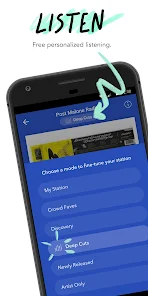
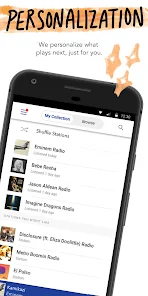
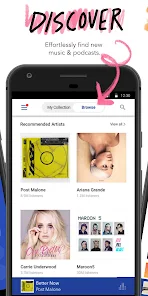
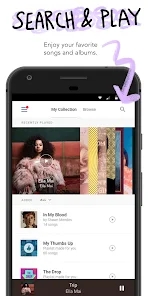
editor reviews
I've been using Pandora for music and podcasts for a while now, and it's one of those apps that feels like it's been around forever. It's a personalized radio and on-demand streaming service, so instead of picking exact songs to play, you usually start with a station based on an artist, genre, or song you like. The main draw for most people is that it learns your taste over time through thumbs up and thumbs down, which makes the listening experience feel pretty tailored without much effort. When you first download and install it from Google Play or the App Store—it's free to start, though there are in-app purchases and ads on the free tier—the initial launch asks you to pick a few favorite artists to kick things off. Right away, the interface throws you into a music feed that looks modern and clean, but honestly, the first impression can be a bit overwhelming because there's a lot of tabs and options popping up. Still, once you start a station, the simplicity kicks in, and that's where it shines.
After using it for a bit, the hands-on experience becomes pretty smooth once you get past the setup. The home screen shows your recent stations and some curated playlists, and the main way to interact is by hitting the thumbs up or thumbs down on whatever's playing. I found that the more you rate songs, the better the recommendations get—it's almost spooky how it picks up on your mood after a few sessions. Creating a new station is easy: just type in an artist or song, and it starts playing similar tracks right away. The podcast section is tucked away in a separate tab, and it works similarly—you can follow shows and get new episodes automatically. One small tip I picked up is to use the “Add Variety” feature to mix two stations together, which keeps things from getting repetitive. The app runs smoothly most of the time, though I've noticed that skipping too many songs in a row on the free version hits a limit, which can be annoying during a long commute.
After spending a few weeks with Pandora, I'd say it's best for people who like a laid-back, “set it and forget it” way to discover music without constantly curating playlists. Someone who loves fine-tuning every track like in Spotify might find it too passive, but for casual listeners or those who enjoy radio-style surprises, it's hard to beat. Compared to services like iHeartRadio or Apple Music, Pandora's Music Genome Project really stands out because the recommendations feel more intuitive and less based on popular hits. I've kept it installed mainly for mornings when I just want background music, but I can see power users uninstalling it after a while if the free tier's ad volume or skip limits bother them. It's not perfect, but for what it does, it's a solid companion.
features
- 🎵 Pandora uses its Music Genome Project to analyze songs across hundreds of musical attributes, which makes its recommendations feel more nuanced compared to Spotify's algorithm that leans heavily on listening history and playlist trends. Instead of just suggesting what's popular, it digs into the actual composition, so you might hear a lesser-known track that fits perfectly.
- 🎵 The “Thumbprint Radio” feature automatically builds a station from every song you've ever liked, which is a standout convenience. You don't have to manually compile a playlist like in Apple Music—it just gathers your favorites into one endless stream that updates as you rate more tracks.
- 🎵 Pandora's offline mode on the paid tier allows you to download stations for later listening, but unlike Spotify's download system that locks you into specific playlists, here you can save entire stations, making it easier to grab fresh content before a flight without fussing over individual songs.
pros
- 🌟 Pandora excels at getting you started quickly—no need to create complex playlists like on Tidal or Amazon Music. You just punch in an artist and boom, you've got a station playing, which is perfect for someone who wants music in seconds without overthinking.
- 🌟 The free tier is more generous with station creation compared to iHeartRadio, where free users face more restrictions on customizing stations. Pandora lets you create unlimited stations without paying a dime.
- 🌟 Its podcast integration feels natural because it personalizes episode suggestions based on your listening habits, similar to how Spotify works but with less clutter, making discovery feel smoother and less ad-heavy in the podcast section.
cons
- ⚠️ Pandora's free version has a hard skip limit per hour—usually six—which feels tight compared to Spotify's free tier, where you can skip more unless you're on mobile. This can kill the flow if you're in a picky mood or trying to avoid a bad song.
- ⚠️ The on-demand search for specific songs is locked behind the paid subscription, while Apple Music offers full on-demand access even on its free trial. For people who want to play a exact track, Pandora feels restrictive unless you upgrade.
- ⚠️ The app doesn't have lossless audio options like Tidal does, so audiophiles will notice a slight dip in sound quality, especially on high-end headphones. It's fine for casual listening, but not for critical ears.
Recommended Apps
![]()
BetterMe: Health Coaching
BetterMe Limited4.3
![]()
Walli - HD, 4K Wallpapers
Tap AI4.4![]()
Future Self - Old Age Filter
Vidler Koiter1.6
![]()
AI Photo Editor, Collage-Fotor
AI Art Photo Editor | Everimaging Ltd.4.3![]()
AI Face Swap: MagicFace &Photo
Braly JSC0![]()
QR Code Reader: QR Scanner
WECHOICE MOBILE4.3![]()
Lip Fall Challenge: Fun Filter
Braly JSC0![]()
Funny Reverse Audio - Singing
PlayStudioInc0![]()
Birthday Secrets
shasunder4.4![]()
Live Wallpapers HD 4K
Wallpaper app4.4![]()
Find Your Phone By Clap
Trusted App Global4.5![]()
Wizz - Expand Your World
Wizz3.8![]()
NCAA March Madness Live
NCAA Digital4.7![]()
Hulu: Stream TV shows & movies
Disney4.5![]()
Lethal Love: a Yandere game
AniByte!4.4















Disclaimer
1.Apklifts does not represent any developer, nor is it the developer of any App or game.
2.Apklifts provide custom reviews of Apps written by our own reviewers, and detailed information of these Apps, such as developer contacts, ratings and screenshots.
3. All trademarks, registered trademarks, product names and company names or logos appearing on the site are the property of their respective owners.
4.Apklifts abides by the federal Digital Millennium Copyright Act (DMCA) by responding to notices of alleged infringement that complies with the DMCA and other applicable laws.
5.If you are the owner or copyright representative and want to delete your information, please contact us [email protected].
6.All the information on this website is strictly observed all the terms and conditions of Google Ads Advertising policies and Google Unwanted Software policy.
7.Apklifts.com is an independent, information-only website which is 100% free to all the users.














