

iHeart: Music, Radio, Podcasts

50,000,000+
Installs
iHeartMedia, Inc.
Developer
-
Entertainment
Category
-
Rated for 12+
Content Rating
-
https://www.iheart.com/privacy
Privacy Policy
Screenshots

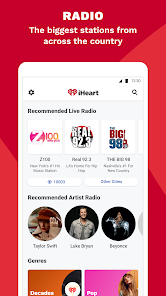
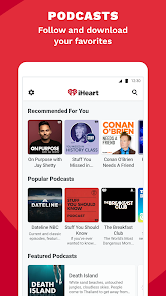
editor reviews
iHeart is basically a one-stop shop for all things audio, pulling together live radio, podcast episodes, and curated music stations into a single app. It's not a typical on-demand streaming service like Spotify where you pick any song you want; instead, it's more about lean-back listening with a huge variety of human-curated and algorithm-driven channels. Most people download it because they want access to their local FM stations on the go without the static, or because they're hooked on a specific podcast that's exclusive to the platform. The first time you open it, the interface feels a bit busy — there's a lot of tiles, categories, and suggestions vying for your attention, but the core tabs at the bottom make it clear you can jump right into your favorites or discover something new. Registration is free, and while there are no forced sign-ups to browse, you'll want an account to save stations and follow shows.
After you log in, the app walks you through a quick interest picker that asks what kind of music or podcasts you like, which helps tailor the home screen. Honestly, the real hands-on experience is pretty fluid once you settle in. You can tap a live radio station and it starts playing instantly, with a clean player showing album art, station info, and a skip button — which surprised me, since you usually can't skip on live radio. There's also this neat feature where you can rewind live broadcasts for up to an hour, which saved me when I missed the intro to a call-in show. For podcasts, the library tab lets you organize episodes into playlists, and the app remembers where you left off across devices. One small but appreciated detail: the sleep timer is right on the player screen, so I could set it before bed without digging through menus. The ads, however, are noticeable — every few songs on the free tier — but they feel less intrusive than on some other radio apps.
After using iHeart for a few weeks, I think it's a solid pick for anyone who loves traditional radio personalities but wants the convenience of streaming. If you're the type who spends hours browsing vinyl records or building meticulous playlists, this app will probably feel too passive and constrained. Compared to TuneIn Radio, iHeart has a sharper focus on U.S. content and iHeart-exclusive podcasts, which makes it more niche in that sense. What really sets it apart is the integration between live radio and on-demand podcasting — you're not jumping between two separate ecosystems. That said, the free version's ad load might push some heavy listeners toward a subscription, and the search function sometimes struggles to find older podcast episodes. I ended up keeping it installed mainly for the live sports talk shows and the seamless way it switches from a music station to a podcast without lag.
features
- 🎧 Live radio rewind — You can pause and go back up to an hour on live broadcasts, which is something you just don't get with standard radio apps like TuneIn Radio. It's a lifesaver when you walk into the middle of a segment.
- 🎧 Custom artist stations — Instead of picking a single genre, you type in an artist name and iHeart builds a station around that sound. Spotify's radio feature does this too, but iHeart's version feels more human-curated and less robotic.
- 🎧 Podcast exclusives — Shows like "The Bobby Bones Show" and "Stuff You Should Know" have content here that isn't on Apple Podcasts or Google Podcasts. For fans of those creators, this alone is a reason to keep the app installed.
- 🎧 Unified listening history — Your recently played radio stations and podcast episodes appear together in one timeline, so you never lose track of what you were into earlier. No other major audio app blends these two formats that seamlessly.
pros
- 💪 Massive library of live stations — iHeart has over 1,500 live AM and FM stations, which dwarfs what you'll find on simple music streamers like Pandora. If you crave local news, traffic, or sports commentary, this is unmatched.
- 💪 Cross-device syncing — Start a podcast on your phone during the commute, then pick up exactly where you left off on your tablet at home. TuneIn Radio doesn't offer this level of sync without a premium plan.
- 💪 No forced shuffle on free tier — Unlike Spotify's free version that locks you into shuffle mode on playlists, iHeart's stations play in a normal, curated order, making the listening experience feel less gimmicky.
- 💪 Strong offline capability — You can download podcast episodes for offline listening without needing a paid subscription, which is a win over services like Apple Podcasts that require manual management.
cons
- 🪫 Heavy ad frequency on free tier — You'll hear a commercial break every 10-15 minutes on music stations, which is more aggressive than what you get on Pandora's free tier. It can break the mood during a relaxing drive.
- 🪫 No true on-demand music streaming — You can't search for a specific song and play it like on Spotify or Apple Music. If you're in the mood for a particular track, this app won't deliver unless it happens to be playing live.
- 🪫 Cluttered interface — The home screen bombards you with tiles for trending podcasts, local stations, and promoted shows all at once. New users often feel overwhelmed compared to the cleaner layouts of TuneIn Radio.
- 🪫 Limited international content — If you're outside the U.S., the station and podcast selection drops off sharply. BBC Sounds or global radio apps offer much better coverage for listeners in Europe or Asia.
Recommended Apps
![]()
BetterMe: Health Coaching
BetterMe Limited4.3
![]()
Walli - HD, 4K Wallpapers
Tap AI4.4![]()
Future Self - Old Age Filter
Vidler Koiter1.6
![]()
AI Photo Editor, Collage-Fotor
AI Art Photo Editor | Everimaging Ltd.4.3![]()
AI Face Swap: MagicFace &Photo
Braly JSC0![]()
QR Code Reader: QR Scanner
WECHOICE MOBILE4.3![]()
Lip Fall Challenge: Fun Filter
Braly JSC0![]()
Funny Reverse Audio - Singing
PlayStudioInc0![]()
Birthday Secrets
shasunder4.4![]()
Live Wallpapers HD 4K
Wallpaper app4.4![]()
Find Your Phone By Clap
Trusted App Global4.5![]()
Wizz - Expand Your World
Wizz3.8![]()
NCAA March Madness Live
NCAA Digital4.7![]()
Hulu: Stream TV shows & movies
Disney4.5![]()
Lethal Love: a Yandere game
AniByte!4.4















Disclaimer
1.Apklifts does not represent any developer, nor is it the developer of any App or game.
2.Apklifts provide custom reviews of Apps written by our own reviewers, and detailed information of these Apps, such as developer contacts, ratings and screenshots.
3. All trademarks, registered trademarks, product names and company names or logos appearing on the site are the property of their respective owners.
4.Apklifts abides by the federal Digital Millennium Copyright Act (DMCA) by responding to notices of alleged infringement that complies with the DMCA and other applicable laws.
5.If you are the owner or copyright representative and want to delete your information, please contact us [email protected].
6.All the information on this website is strictly observed all the terms and conditions of Google Ads Advertising policies and Google Unwanted Software policy.
7.Apklifts.com is an independent, information-only website which is 100% free to all the users.














