

Spotify: Music and Podcasts

1,000,000,000+
Installs
Spotify AB
Developer
-
Entertainment
Category
-
Rated for 12+
Content Rating
-
https://www.spotify.com/legal/privacy-policy/
Privacy Policy
Screenshots
editor reviews
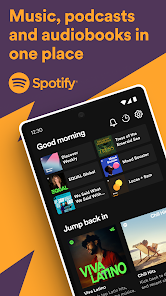
So, Spotify. It's basically the go-to app for music and podcast streaming. You can pretty much find any song you want, from the latest hits to some obscure album from the 70s. I'm on Android, so I grabbed it from Google Play like everyone else. It's been downloaded billions of times, which tells you something. Opening it for the first time, the thing that hits you is how personalized it feels right away. It asks what artists you like, and then boom, that home screen is full of recommendations. It's free to download and install, but to actually listen without ads and pick any song on demand, you gotta pay for Premium. The initial impression is slick, dark, and very image-heavy, which can feel a bit overwhelming, but it also screams "discovery."
Jumping into daily use, the interface is mostly intuitive. You have your "Home" for picks, "Search" for finding stuff, and your "Library" for your saved songs. One thing that's a bit confusing at first is the difference between saving a song to your "Liked Songs" and actually putting it in a playlist. You just kinda figure it out. The real joy is the smoothness; you start playing a track, and the app basically takes over. It queues up songs that fit, and before you know it, you've discovered ten new bands while making dinner. For podcasts, it's the same deal, but the discovery there isn't as strong. I do wish the free version let you skip more ads, because hitting "skip" every 20 minutes gets old. A practical tip? Download your playlists for offline listening if you're a Premium user—it saves a ton of data.
After using it for a while, you realize Spotify has this "stickiness" to it. If you love finding new music without trying hard, you'll keep it. But if you just want to listen to your own collection of MP3s, you might find it overkill. Compared to Apple Music, I think Spotify's social features and collaborative playlists are way better. Sharing a playlist with friends for a road trip feels seamless. YouTube Music feels more chaotic, whereas Spotify feels curated. The main reason someone might uninstall it? If they're on a budget, the ad-free experience is a must, but the monthly fee can be a pain. For me, I keep it because the algorithm just gets me. It finds those weird, niche genres I love that I wouldn't have found on my own. It's not perfect, but for the price of a coffee a month, it's a solid part of my day.
features
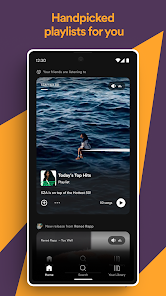
- ✨ Algorithmic Playlists: This is the killer feature. Spotify's auto-generated playlists like "Discover Weekly" and "Release Radar" are uncannily good. Apple Music tries, but Spotify's picks are just way more relevant to your actual listening habits, not just the most popular song in a genre.
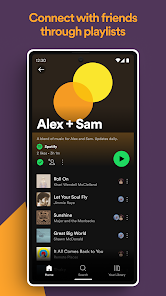
- ✨ Social Sharing & Collaboration: You can make a playlist and let friends add songs to it in real-time. This is huge for parties or road trips. YouTube Music technically has shared playlists, but it's clunky and nobody really uses it. Spotify made it a core part of the experience.
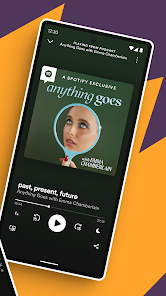
- ✨ Podcast Integration (It's a double-edged sword): Having everything in one app is convenient. You don't need a separate app like Pocket Casts. The selection is massive, and the "Your Library" handles both music and shows cleanly. The drawback is that the UI sometimes feels crammed mixing both, but the convenience wins for most people.
pros
- 🎧 Cross-Platform Sync: This is a biggie for me. I can start a podcast on my phone, then pause it and pick it up on my laptop or PS5 without skipping a beat. Apple Music is better on Apple devices, but Spotify's flexibility on Windows, Android, and game consoles is unmatched.
- 🎧 Discoverability: The "Radio" feature from a song or artist is basically magic. On Deezer, the similar feature feels random. On Spotify, it builds a perfect, continuous vibe that keeps you listening.
- 🎧 Audio Quality Choice: Unlike Tidal which pushes high-res as standard, Spotify lets you choose from Low to Very High. It saves data on mobile and still sounds great on Wi-Fi. It respects your data cap without forcing a specific plan.
cons
- ❌ Free Tier Limitations: The free ad-supported plan is brutal. You can't pick specific songs on mobile, you get shuffle only, and ads are frequent. YouTube Music's free tier is slightly more generous with on-demand playback, making Spotify feel stingy.
- ❌ UI Clutter: The home screen is a wall of tiles. Podcasts, audiobooks, and music are all mixed together. Apple Music keeps things more separated by media type, so Spotify's layout can feel like a firehose of content.
- ❌ Podcast UI Hiccups: The player controls for podcasts are weird. If you accidentally tap a music track while listening to a show, you lose your place in the podcast. Pocket Casts handles this way better with a persistent queue that doesn't overwrite easily.
- ❌ Battery Drain: It's a known issue. Compared to Apple Music or even Amazon Music, Spotify can chew through your phone battery faster, especially with downloaded playlists and Bluetooth streaming running at the same time.
Recommended Apps
![]()
BetterMe: Health Coaching
BetterMe Limited4.3
![]()
Walli - HD, 4K Wallpapers
Tap AI4.4![]()
Future Self - Old Age Filter
Vidler Koiter1.6
![]()
AI Photo Editor, Collage-Fotor
AI Art Photo Editor | Everimaging Ltd.4.3![]()
AI Face Swap: MagicFace &Photo
Braly JSC0![]()
QR Code Reader: QR Scanner
WECHOICE MOBILE4.3![]()
Lip Fall Challenge: Fun Filter
Braly JSC0![]()
Funny Reverse Audio - Singing
PlayStudioInc0![]()
Birthday Secrets
shasunder4.4![]()
Live Wallpapers HD 4K
Wallpaper app4.4![]()
Find Your Phone By Clap
Trusted App Global4.5![]()
Wizz - Expand Your World
Wizz3.8![]()
NCAA March Madness Live
NCAA Digital4.7![]()
Hulu: Stream TV shows & movies
Disney4.5![]()
Lethal Love: a Yandere game
AniByte!4.4















Disclaimer
1.Apklifts does not represent any developer, nor is it the developer of any App or game.
2.Apklifts provide custom reviews of Apps written by our own reviewers, and detailed information of these Apps, such as developer contacts, ratings and screenshots.
3. All trademarks, registered trademarks, product names and company names or logos appearing on the site are the property of their respective owners.
4.Apklifts abides by the federal Digital Millennium Copyright Act (DMCA) by responding to notices of alleged infringement that complies with the DMCA and other applicable laws.
5.If you are the owner or copyright representative and want to delete your information, please contact us [email protected].
6.All the information on this website is strictly observed all the terms and conditions of Google Ads Advertising policies and Google Unwanted Software policy.
7.Apklifts.com is an independent, information-only website which is 100% free to all the users.














