

MyFitnessPal: Calorie Counter

100,000,000+
Installs
MyFitnessPal, Inc.
Developer
-
Health & Fitness
Category
-
Rated for 3+
Content Rating
-
https://www.myfitnesspal.com/privacy-policy
Privacy Policy
Screenshots

editor reviews
You know when you're trying to get a handle on what you're actually eating all day, not just guessing? That's exactly where MyFitnessPal comes in. It's a calorie counting and nutrition tracking app, probably the most well-known one out there on both Google Play and App Store. After you download and install it, the first impression is pretty straightforward—it asks about your goals, like losing weight or building muscle, then spits out a daily calorie target. There's a free version, which is what most people stick with, though they do push the premium subscription and the occasional ad. The sheer amount of data in their food database is what hits you first; you can scan a barcode and it's right there.
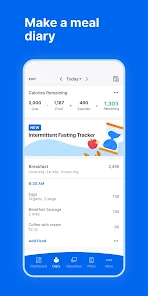
Once you start actually using it day to day, the experience is a mixed bag. The interface isn't flashy but it's functional. The main action is logging everything—breakfast, lunch, dinner, snacks. You tap the 'Add Food' button, search or scan, and pick the portion size. It's smooth most of the time, especially with common items like a banana or a slice of bread. But sometimes you run into a confusing moment: the portion sizes from user-submitted entries can be way off, so you have to double-check the nutritional info matches the package. A small practical tip I picked up is to favorite your regularly eaten meals to speed things up. The daily dashboard shows your remaining calories, macros, and even exercise, which makes you feel in control, even if logging every single bite gets tedious after a while.
After using MyFitnessPal for a solid month, my personal take is this: it's a powerful tool if you're patient and detail-oriented. People who like data and seeing progress in numbers will probably keep it installed for ages. But if you find calorie counting stressful or borderline obsessive, this app might not be for you. What makes it different from something like Lose It! is the sheer size of its food database and the barcode scanner—it's incredibly hard to find a food that isn't already in there. Still, I've thought about uninstalling it because the free version has gotten more pushy with ads lately, and they hide some useful features, like macro breakdown by meal, behind a paywall. Compared to Cronometer, which feels cleaner and more accurate, MyFitnessPal can feel cluttered and slightly dated, but the community and the sheer volume of logged foods make it hard to replace.
features
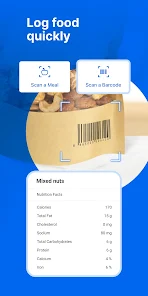
- 📲 The standout here is the barcode scanner. You just point your phone camera at any packaged food, and it pulls up the nutrition facts instantly from their massive database. It makes logging a can of soup or a bag of chips feel like magic compared to apps like Lifesum, where you often have to manually type in info from scratch.
- 📲 The macro tracking is incredibly granular. You can set custom goals for protein, carbs, and fat, and the app shows a colorful pie chart of your daily intake. Other apps like FatSecret let you track macros too, but MyFitnessPal lets you adjust them down to the gram for each meal if you want.
- 📲 The food database is honestly the biggest I've seen. It's built over years by millions of users, so even that weird local snack from a small brand is in there. In contrast, apps like Yazio have a much smaller library, so you're stuck manually creating entries more often.
- 📲 The ability to connect with fitness trackers like Fitbit or Apple Health is seamless. Your steps sync automatically, and it adjusts your calorie budget for the day. Not many free apps do this as reliably without a subscription.
pros
- ✅ Free version is genuinely usable. Unlike many top health apps that lock core features behind a monthly fee, MyFitnessPal's free tier still offers barcode scanning, macro tracking, and a huge food database without making you pay. Even Lose It! restricts the scanner to premium users.
- ✅ The community is massive. When you look up a food, hundreds of user-verified entries exist, so you can pick the exact portion or brand. This crowdsourced accuracy beats out apps like Noom, where the database feels curated but thinner.
- ✅ It supports recipes. You can paste in a link or type ingredients, and it calculates the calories per serving. This is a huge time-saver compared to manually adding each ingredient in apps like Chronometer.
cons
- ❌ The ads in the free version are getting aggressive. After every few loggings, a full-screen ad pops up. Lifesum's free version is much less intrusive in comparison.
- ❌ User-submitted entries can be inaccurate. You'll sometimes find a food labeled 'chicken breast' that has wildly different calorie counts. Cronometer sources data from verified labs, so it feels more reliable, but its database is smaller.
- ❌ The premium upsells are constant. They pop up a banner saying 'Unlock Better Macros' or something similar every time you open the app. Yazio's free interface feels more respectful of your attention without nagging.
- ❌ The recipe importer can be buggy. Sometimes it misinterprets ingredient amounts from websites, which forces you to manually correct everything. It's a great idea, but execution stumbles more often than it should.
Recommended Apps
![]()
BetterMe: Health Coaching
BetterMe Limited4.3
![]()
Walli - HD, 4K Wallpapers
Tap AI4.4![]()
Future Self - Old Age Filter
Vidler Koiter1.6
![]()
AI Photo Editor, Collage-Fotor
AI Art Photo Editor | Everimaging Ltd.4.3![]()
AI Face Swap: MagicFace &Photo
Braly JSC0![]()
QR Code Reader: QR Scanner
WECHOICE MOBILE4.3![]()
Lip Fall Challenge: Fun Filter
Braly JSC0![]()
Funny Reverse Audio - Singing
PlayStudioInc0![]()
Birthday Secrets
shasunder4.4![]()
Live Wallpapers HD 4K
Wallpaper app4.4![]()
Find Your Phone By Clap
Trusted App Global4.5![]()
Wizz - Expand Your World
Wizz3.8![]()
NCAA March Madness Live
NCAA Digital4.7![]()
Hulu: Stream TV shows & movies
Disney4.5![]()
Lethal Love: a Yandere game
AniByte!4.4















Disclaimer
1.Apklifts does not represent any developer, nor is it the developer of any App or game.
2.Apklifts provide custom reviews of Apps written by our own reviewers, and detailed information of these Apps, such as developer contacts, ratings and screenshots.
3. All trademarks, registered trademarks, product names and company names or logos appearing on the site are the property of their respective owners.
4.Apklifts abides by the federal Digital Millennium Copyright Act (DMCA) by responding to notices of alleged infringement that complies with the DMCA and other applicable laws.
5.If you are the owner or copyright representative and want to delete your information, please contact us [email protected].
6.All the information on this website is strictly observed all the terms and conditions of Google Ads Advertising policies and Google Unwanted Software policy.
7.Apklifts.com is an independent, information-only website which is 100% free to all the users.














