


5B+
Installs
Instagram
Developer
-
Social
Category
-
Teen
Content Rating
-
http://instagram.com/legal/privacy/
Privacy Policy
Screenshots
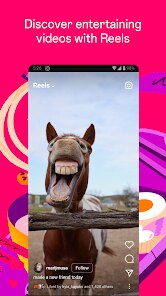
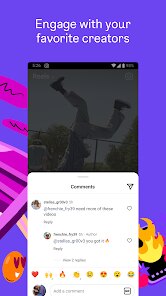

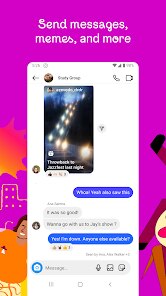

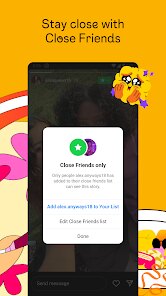
editor reviews
You've probably heard of Instagram, or maybe you already have it on your phone. It's essentially a photo- and video-sharing social network, but over time, it's grown into something much bigger. People use it for everything from keeping up with friends and following celebrities to discovering new products and getting news. If you're thinking about downloading it from Google Play or the App Store, you're looking at one of the most popular apps out there, with well over a billion installs. It's free to download, and you can browse public content without an account, but to actually post, like, comment, or message, you'll need to register with a phone number or email. The first time you launch it, the feed pops up immediately, and it can feel a bit overwhelming. There's a lot going on between Stories, the main scroll, Reels, and direct messages. Honestly, the initial impression is that you're stepping into a fast-moving stream of content, which can be either exciting or a little chaotic depending on what you're looking for.
Once you get past the initial sign-up, the interface is actually quite straightforward. Your home screen is the main feed, where posts from people you follow appear in reverse chronological order, though ads and suggested posts are mixed in. To share something, you tap the plus icon at the bottom, and you can either snap a new photo or upload one from your gallery. You can apply filters, crop, adjust brightness, and even add a location. Instagram recently added the ability to edit alt text for accessibility, which is a small touch I appreciate. There's also the Explore tab, which suggests content based on what you've liked before. It's a double-edged sword because you can find cool new accounts, but half the time it's just pushing stuff you don't care about. One tip: you can mute accounts or keywords from your feed without unfollowing, which makes the experience way less annoying. Notifications can pile up fast, so turning off everything except direct messages helps you stay sane while still feeling connected.
After using it for a few weeks, I can see why people either love it or delete it within a month. If you enjoy visual sharing and like seeing short video clips, Stories (which disappear after 24 hours), or Reels (short looping videos), then Instagram is ideal. But if you're someone who prefers text-heavy platforms like Twitter or Reddit, you might feel out of place. What makes it different from Snapchat is that Instagram has that broader network feel; it's less about ephemeral private messages and more about building a curated public identity. I find myself keeping it mostly to check messages from close friends and to save references using the bookmark feature. However, the app can be a time sink. It's easy to scroll for 20 minutes and realize you've just been looking at ads and random video loops. I've seen friends uninstall it because they couldn't stop comparing themselves to the filtered lives of others. Personally, I think it's worth keeping if you set boundaries, maybe put a timer on it, because the core functionality for connecting people through images is still solid.
features
- ✏️ Instagram's best feature is the combination of Stories and Reels. Stories let you share everyday moments that disappear in 24 hours, making them feel low-pressure. Reels, similar to TikTok's short videos, are perfect for quick entertainment and discovery. TikTok is better for pure video discovery and algorithm-driven virality, but Instagram integrates these features into your existing social circle, so your friends' content and random viral clips appear side by side. This mix saves you from switching between two apps if you want both personal updates and entertainment.
- ✏️ Another standout is its direct messaging system. It's more than just text; you can send photos, voice messages, and even posts or Reels from the feed directly. While WhatsApp is more private and end-to-end encrypted (Instagram DM has encryption but limited by default), Instagram's chat feels more lightweight and integrated with your social graph. You can react with almost any emoji, reply to specific messages, and even broadcast to close friends only.
- ✏️ The editing tools for photos and videos are good enough that many people skip desktop software. You can adjust brightness, contrast, saturation, and apply a huge library of filters. VSCO gives you more fine-grained control, but Instagram's trimming, cropping, and speed controls for Reels are easier for a quick edit. The app isn't meant for professional-grade work, but for sharing moments without extra apps, it works well.
pros
- ⭐ Instagram's user base is massive and diverse. You can find anything from a local bakery's daily specials to a museum's exhibit preview. Pinterest is more organized for idea boards, but Instagram feels alive and current because content is tied to real-time updates. The sheer variety means you're never bored, though you often have to dig through noise.
- ⭐ The Explore page adapts quickly. Within a few days of liking travel photos, it started suggesting small hotels and hiking routes. TikTok's For You page is famously addictive, but Instagram's version feels more connected to your real-life interests, not just what's trending. It's like having a magazine curated just for your hobbies.
- ⭐ You can manage two accounts without logging out. For anyone juggling a personal profile and a business or hobby page, this is invaluable. Twitter and Facebook require switching manually, but Instagram's seamless toggle keeps the flow going. Plus, you can set notifications per account, which helps keep work separate from personal scrolling.
cons
- ⚠️ The algorithm can push too many ads and suggested posts. You follow 200 people but your feed might show 50% strangers and ads. Twitter allows a chronological option, but Instagram removed full chronological following in the main feed. It makes the experience feel less personal and more like you're being sold products you don't need.
- ⚠️ Video quality can be inconsistent. When you upload a high-resolution clip, Instagram often compresses it to grainy or pixelated versions, especially in Stories. YouTube or even TikTok handle video compression better for standard uploads. It's frustrating when you spend time filming something and it looks soft after posting.
- ⚠️ There is no native scheduling feature for posts. You have to rely on third-party tools like Later or Buffer to queue up content. LinkedIn and Facebook have built-in scheduling, but Instagram only added it for professional accounts very recently, and it's still basic. For casual users who want to plan a week of posts, this means extra hassle.
- ⚠️ The app can drain battery and data quickly. Autoplay videos, constant loading of high-res images, and background refresh make it a hog. Compared to text-first apps like Discord or Telegram, Instagram uses a lot more resources. If you're on a limited data plan or your phone is older, you might notice a slowdown even when doing simple tasks.
Recommended Apps
![]()
BetterMe: Health Coaching
BetterMe Limited4.3
![]()
Walli - HD, 4K Wallpapers
Tap AI4.4![]()
Future Self - Old Age Filter
Vidler Koiter1.6
![]()
AI Photo Editor, Collage-Fotor
AI Art Photo Editor | Everimaging Ltd.4.3![]()
AI Face Swap: MagicFace &Photo
Braly JSC0![]()
QR Code Reader: QR Scanner
WECHOICE MOBILE4.3![]()
Lip Fall Challenge: Fun Filter
Braly JSC0![]()
Funny Reverse Audio - Singing
PlayStudioInc0![]()
Birthday Secrets
shasunder4.4![]()
Live Wallpapers HD 4K
Wallpaper app4.4![]()
Find Your Phone By Clap
Trusted App Global4.5![]()
Wizz - Expand Your World
Wizz3.8![]()
NCAA March Madness Live
NCAA Digital4.7![]()
Hulu: Stream TV shows & movies
Disney4.5![]()
Lethal Love: a Yandere game
AniByte!4.4















Disclaimer
1.Apklifts does not represent any developer, nor is it the developer of any App or game.
2.Apklifts provide custom reviews of Apps written by our own reviewers, and detailed information of these Apps, such as developer contacts, ratings and screenshots.
3. All trademarks, registered trademarks, product names and company names or logos appearing on the site are the property of their respective owners.
4.Apklifts abides by the federal Digital Millennium Copyright Act (DMCA) by responding to notices of alleged infringement that complies with the DMCA and other applicable laws.
5.If you are the owner or copyright representative and want to delete your information, please contact us [email protected].
6.All the information on this website is strictly observed all the terms and conditions of Google Ads Advertising policies and Google Unwanted Software policy.
7.Apklifts.com is an independent, information-only website which is 100% free to all the users.














