

Amazon Fire TV

10,000,000+
Installs
Amazon Mobile LLC
Developer
-
Productivity
Category
-
Rated for 3+
Content Rating
-
http://www.amazon.com/gp/help/customer/display.html/?nodeId=468496
Privacy Policy
Screenshots
editor reviews
Amazon Fire TV is a media streaming platform developed by Amazon Mobile LLC that turns your television into a smart hub for movies, shows, music, and games. It's not an app you download from Google Play or the App Store in the traditional sense — instead, if you purchase a Fire TV Stick or buy a TV with Fire OS built in, the interface is already there when you first plug it in and turn it on. For normal users, the main draw is having a unified place to browse Netflix, Prime Video, Hulu, Disney+, and hundreds of other channels without juggling multiple remotes or cables. After powering it up for the first time, the homescreen feels clean and familiar if you've used any other streaming box: a top row of recently used apps, followed by recommendations and search. You do need to sign in with an Amazon account during setup, but the process is straightforward, takes maybe two minutes, and there's no subscription fee to use the system itself. Amazon Freevee is baked in, so you get ad-supported movies and shows for free without any extra signups.
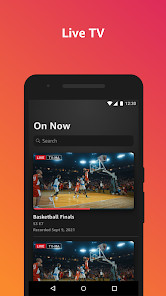
Once you're past the initial setup, using Fire TV day-to-day is pretty intuitive. The main screen is built around a horizontal scrolling layout, and you can jump between sections like Home, Live, Your Apps, and Find. If you have Amazon Prime, Prime Video content gets pushed front and center, but you can hide those rows in settings if they annoy you. The search function works surprisingly well — you can type or use the voice button on the remote, and it pulls results from across all your installed apps at once. For example, I searched for "The Office" once, and it showed me where to watch it across Peacock and Prime Video without needing to open each app separately. One small tip: holding down the home button for a few seconds brings up a quick settings menu where you can switch between apps, adjust display settings, or put the device to sleep. Navigation isn't always buttery smooth — occasionally there's a noticeable half-second lag when scrolling through a big library, but it's never bad enough to ruin the experience.
After a few weeks with Fire TV, I can see why it's one of the most popular streaming sticks out there. The interface is fast enough for casual browsing, and the voice remote makes hunting for something to watch much less tedious. The price point is hard to argue with — you're often paying less than fifty bucks for a device that does almost everything a smart TV does. That said, if you're heavily invested in the Apple ecosystem, you might prefer the Apple TV box for its tighter integration with iCloud and Apple One subscriptions. Roku also has a cleaner, less advertisement-heavy homescreen, which some people swear by. For me, what really sets Fire TV apart is how well it plugs into Amazon's world: Alexa voice controls feel natural, you can set up routines like "Goodnight" to turn off the TV and lights together, and if you already buy a lot from Amazon, the shopping suggestions and one-click rentals feel effortless. I could see someone who hates ads or wants absolute simplicity uninstalling it (or switching to an Apple TV), but for the price, most people will be perfectly happy keeping Fire TV around.
features
- 📺 Cross-app universal search — Fire TV searches across all your installed streaming apps at once, so you can find where a specific movie or show is available without opening each app individually. Roku does this too, but Fire TV's results are often faster and show pricing for rentals upfront.
- 🔊 Alexa voice remote built-in — You can press one button and say "Find comedies from the 90s" or "Open Netflix," and it just works. Apple TV's Siri remote is similar, but Alexa is better at handling multi-step commands like "Turn down the volume and show me action movies."
- 🎮 Casual gaming without extra hardware — Fire TV supports a decent library of Android games that you can play with a compatible remote or gamepad. Not as deep as a dedicated console, but it's a nice bonus that Roku doesn't even try to offer.
- 🛒 Tight Amazon ecosystem integration — If you already use Prime, buy from Amazon, or own Echo devices, Fire TV syncs your watchlist, shopping list, and smart home controls automatically. Apple TV does this well for Apple users, but Fire TV is cheaper and more widely compatible with non-Apple gadgets.
pros
- 💰 Low barrier to entry — Fire TV sticks regularly go on sale for under $20 during Prime Day or Black Friday, making it one of the most affordable ways to turn any HDMI TV into a smart TV. Roku sticks are comparable in price but rarely hit those same deep discounts.
- 🔋 Thoughtful remote design — The latest Fire TV remote has dedicated buttons for Prime Video, Netflix, and app shortcuts, plus a volume rocker and mute switch. The Apple TV remote is smaller but easier to misplace and harder to hold comfortably.
- 🔄 Regular software updates — Amazon pushes updates consistently, adding new features like Matter support and picture-in-picture mode without requiring new hardware. Roku updates less frequently, and some older Roku models stop receiving new features altogether.
- 📶 Good Wi-Fi handling — Fire TV handles weaker signals better than Chromecast with Google TV, especially when streaming 4K HDR content. Fewer buffering issues in my experience when my router is in another room.
cons
- 📢 Heavy ad placement — The homescreen is packed with promoted content and sponsored rows, which can feel intrusive compared to Roku's more minimalist approach. You cannot fully remove these ads, only hide some categories in settings.
- 🔒 Amazon-heavy bias — Even if you rarely use Amazon services, Prime Video rows and buy buttons take up a lot of screen space. Apple TV lets you customize the top row completely, while Fire TV always pushes Amazon content first.
- 🕒 Occasional performance drops — After several months of use, some users report the interface feeling slower or apps crashing more often. A factory reset usually fixes it, but Roku tends to stay snappier for longer without intervention.
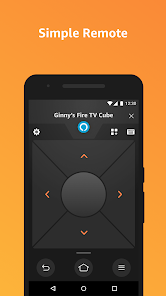
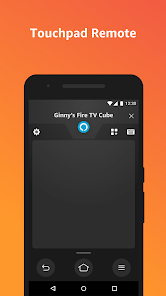
- 📱 Limited phone integration — The Fire TV app on Android or iPhone is functional but basic compared to Chromecast's deep Google Home app integration. You cannot easily mirror your phone screen or cast from random apps without extra steps.
Recommended Apps
![]()
Japevox - Funny Prank Sound
SecureTool4.3
![]()
AstroMatrix Birth Horoscopes
AstroMatrix4.7
![]()
Personalized Call from Santa (
www.PackageFromSanta.com4.3![]()
Prank Call - Fake Call & Chat
Bravestars Casual4.1![]()
Persona: Beauty Camera
TICKET TO THE MOON, INC.4.5![]()
Peacock TV: Stream TV & Movies
Peacock TV LLC4.5![]()
Instant Buttons Soundboard App
Snow Peak Apps2.1![]()
GPS Speedometer: Speed Tracker
SM Infotech3.2![]()
Subway®
SUBWAY Restaurants4.2![]()
Find Your Phone By Clap
Trusted App Global4.5![]()
Gorilla Skins for Monkey Arena
Dumitru Boico4![]()
Vimeo
Vimeo.com, Inc.3.8![]()
Vinted - Buy and sell clothes
Vinted4.6![]()
Galaxy Starry Keyboard Backgro
Fun Keyboard Theme for Android4.7![]()
Chat AI - Ask AI anything
AI Chat Bot, Ask AI4.4















Disclaimer
1.Apklifts does not represent any developer, nor is it the developer of any App or game.
2.Apklifts provide custom reviews of Apps written by our own reviewers, and detailed information of these Apps, such as developer contacts, ratings and screenshots.
3. All trademarks, registered trademarks, product names and company names or logos appearing on the site are the property of their respective owners.
4.Apklifts abides by the federal Digital Millennium Copyright Act (DMCA) by responding to notices of alleged infringement that complies with the DMCA and other applicable laws.
5.If you are the owner or copyright representative and want to delete your information, please contact us [email protected].
6.All the information on this website is strictly observed all the terms and conditions of Google Ads Advertising policies and Google Unwanted Software policy.
7.Apklifts.com is an independent, information-only website which is 100% free to all the users.













