

Yahoo Mail – Organized Email

100,000,000+
Installs
Yahoo
Developer
-
Social
Category
-
Rated for 3+
Content Rating
-
https://policies.yahoo.com/xw/en/yahoo/privacy/directory/international/index.htm
Privacy Policy
Screenshots
editor reviews
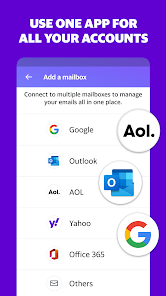
Yahoo Mail is a long-standing email service that tries to act more like a productivity hub than just an inbox. You can download and install it for free on both Google Play and the App Store, and it has over 500 million installs, which tells you how many people still rely on it. I grabbed it because my old inbox was a mess, and I wanted something that could sort things automatically without me having to set up a dozen rules. The first impression after launching is surprisingly clean — the app asks you to pick a theme right away, and the default purple interface feels modern, not like a dusty relic from the 90s. There's no mandatory sign-up if you already have a Yahoo account, but you can add Gmail or Outlook accounts too, which is handy. It does have ads if you use the free version, and they pop up in the folder list, which is a bit annoying, but not deal-breaking.
Once you start using it, the experience is mostly about letting the app do the sorting. The inbox automatically separates emails into categories like Travel, Shopping, and Finance, and this actually works fairly well — my flight confirmations and Amazon receipts never get buried. You swipe left to delete or archive, and swipe right to flag, which feels natural after a day or two. The search function is fast, and you can filter by attachments or dates, which saved me when I needed an old hotel reservation. One small thing I figured out: you can pinch on the inbox to switch between single-line and double-line previews, which sounds minor but makes a difference when you're scanning through dozens of emails. The onboarding is quick, but the app does nudge you to turn on notifications for every single folder, so I suggest disabling those unless you want your phone buzzing all day.
After a few weeks, I think Yahoo Mail is a solid choice if you get a ton of automated emails and want them filed away without lifting a finger. It's not for power users who need deep custom filters or complex rules — Gmail still wins there. What makes it stick for me is the disposable email addresses feature, which lets you create throwaway addresses to avoid spam, and the 1TB of storage, which means I never think about deleting old messages. On the flip side, the app feels a bit bloated on older phones, and the ad placement in the folder list makes you accidentally tap them more often than I'd like. I wouldn't uninstall it because it handles my shopping and travel emails so cleanly, but I still keep Gmail around for work stuff. It's like having a personal assistant that only organizes your mail and asks nothing in return — except your attention for those occasional ads.
features
- 📧 Yahoo Mail's disposable email addresses let you create temporary aliases right inside the app, which Gmail doesn't offer natively. You can use one for newsletters or sketchy sign-ups, and if spam starts flowing, you just delete that alias. Your real inbox stays clean without any effort.
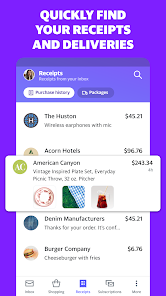
- 📧 The automatic inbox sorting into categories like Travel and Finance is more aggressive than what you get in Outlook or Gmail. It actually pulls receipts and booking confirmations into their own tabs, and it's done on-device so it feels instant. I opened the app after a trip and found my boarding passes already sitting in the Travel folder.
- 📧 The 1TB of free storage is hard to ignore. Gmail gives you 15GB shared with Drive, and Outlook gives you 15GB too. Yahoo Mail hands you a full terabyte just for emails, so you never have to delete a single old message or attachment. It's a massive differentiator for anyone who hoards emails like I do.
pros
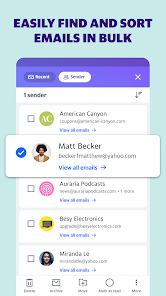
- ✅ The search filters are actually useful — you can narrow down by date range, attachment type, or sender without digging into menus. Outlook's search feels slower and less precise, while Gmail requires you to remember operator syntax. This app just lets you tap a few icons.
- ✅ The swipe gestures are consistent and customizable. You can set left swipe to archive and right swipe to flag, which is more flexible than Gmail's limited swipe options. It feels like the app respects muscle memory.
- ✅ The disposable email feature is unique among the big three — Gmail uses plus addressing, but spammers have caught on to that trick. Yahoo's aliases are actual random addresses, so they work better for dodging spam long-term.
cons
- ❌ The ads sit directly in the folder list, and they look like real emails at a glance. I've accidentally tapped on ads for loans and clothing sales more times than I'd admit. Gmail's ads are limited to the Promotions tab and are clearly marked, which is less intrusive.
- ❌ The app feels sluggish on older devices, especially when you have thousands of emails cached. Outlook and Gmail both handle large archives more smoothly, and scrolling through a dense inbox stutters on Yahoo Mail after a few minutes.
- ❌ The notification controls are overly pushy — the app asks you to enable alerts for every folder during setup, and if you tap yes by mistake, you'll get a ping for every single spam message. You have to manually dig into settings to turn them off, which is a poor design choice.
Recommended Apps
![]()
BetterMe: Health Coaching
BetterMe Limited4.3
![]()
Walli - HD, 4K Wallpapers
Tap AI4.4![]()
Future Self - Old Age Filter
Vidler Koiter1.6
![]()
AI Photo Editor, Collage-Fotor
AI Art Photo Editor | Everimaging Ltd.4.3![]()
AI Face Swap: MagicFace &Photo
Braly JSC0![]()
QR Code Reader: QR Scanner
WECHOICE MOBILE4.3![]()
Lip Fall Challenge: Fun Filter
Braly JSC0![]()
Funny Reverse Audio - Singing
PlayStudioInc0![]()
Birthday Secrets
shasunder4.4![]()
Live Wallpapers HD 4K
Wallpaper app4.4![]()
Find Your Phone By Clap
Trusted App Global4.5![]()
Wizz - Expand Your World
Wizz3.8![]()
NCAA March Madness Live
NCAA Digital4.7![]()
Hulu: Stream TV shows & movies
Disney4.5![]()
Lethal Love: a Yandere game
AniByte!4.4















Disclaimer
1.Apklifts does not represent any developer, nor is it the developer of any App or game.
2.Apklifts provide custom reviews of Apps written by our own reviewers, and detailed information of these Apps, such as developer contacts, ratings and screenshots.
3. All trademarks, registered trademarks, product names and company names or logos appearing on the site are the property of their respective owners.
4.Apklifts abides by the federal Digital Millennium Copyright Act (DMCA) by responding to notices of alleged infringement that complies with the DMCA and other applicable laws.
5.If you are the owner or copyright representative and want to delete your information, please contact us [email protected].
6.All the information on this website is strictly observed all the terms and conditions of Google Ads Advertising policies and Google Unwanted Software policy.
7.Apklifts.com is an independent, information-only website which is 100% free to all the users.














