

Google Voice

10,000,000+
Installs
Google LLC
Developer
-
Social
Category
-
Rated for 3+
Content Rating
-
http://www.google.com/policies/privacy
Privacy Policy
Screenshots
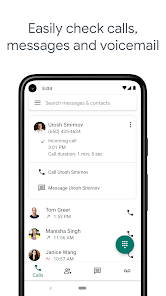
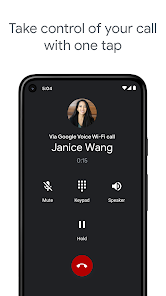
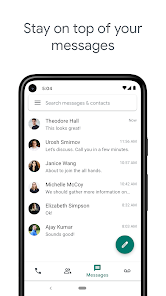
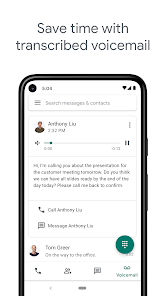
editor reviews
Google Voice is a telephony service that sits somewhere between a second phone number app and a full-blown unified communications tool. It's not really an instant messaging app like WhatsApp, nor is it a traditional dialer. Instead, it gives you a single US phone number that rings all your devices at once. People download it mainly to separate work calls from personal ones, keep a permanent number that follows them through moves, or get free US calling without a cellular plan. The first impression after launch is a bit underwhelming – the interface looks like it hasn't changed much since 2012. You can download it for free from Google Play and the App Store, and it has over 10 million installs on Android. No registration fee, but there are in-app purchases for calling credit to non-US numbers. Ads appear in the app, but they're fairly subtle.
Using Google Voice day to day is straightforward once you get past the slightly dated layout. After signing in with your Google account, the app asks you to pick a number from available area codes. The main screen has three tabs: Calls, Messages, and Voicemail. To make a call, you tap the dial pad icon, enter a number, and the app routes it through Google's servers, so your carrier minutes aren't used. The messaging tab works like any SMS app, but texts sync across all devices – you can start a conversation on your phone and continue on a PC. Voicemail transcription is the hidden gem here: it transcribes messages into text, and the accuracy is decent for English, though names still get mangled. A practical tip is to enable “Do Not Disturb” within the app for weekends – it silences work calls without touching your main phone settings. The most confusing moment for newcomers is realizing that forwarding to your carrier number is off by default, so missed calls go straight to voicemail unless you toggle that in settings.
After using Google Voice for a few months, it feels like a tool built for specific lifestyles. Students living in dorms with weak cell reception love it because it works over Wi-Fi. Freelancers who want a business number without a second SIM find it indispensable. But heavy users of FaceTime or iMessage will find the lack of rich media support frustrating – sending a photo feels like stepping back to 2010. What sets it apart from competitors like TextNow or Sideline is the deep Google integration: voicemails appear in Gmail, calls can be screened with custom greetings, and spam filtering is actually effective. I ended up keeping it installed for the voicemail transcription alone, but I know people who uninstalled it because the call quality over cellular forwarding is noticeably worse than a direct call. It's not perfect, but for a free service, it fills a very specific gap that carriers ignore.
features
- 📞 Google Voice gives you a real US phone number that rings on every device you own – phone, tablet, laptop, even a desk phone if you set up SIP. Unlike TextNow, which ties your number to a single device, Voice syncs calls and texts instantly across all platforms through your Google account. You can start a call on your phone and pick it up on your computer without missing a beat.
- 💬 Voicemail transcription is the standout feature. It converts spoken messages into readable text and emails them to your Gmail inbox. Google Voice's transcription is noticeably better than what you get with Sideline or Burner – fewer gibberish words and better handling of background noise. You can even set custom greetings for specific contacts.
- 🔇 Spam filtering is aggressive and effective. Google Voice automatically flags known spam numbers, sends them straight to voicemail, and even transcribes the spam call so you can check it without answering. In my experience, it catches about 95% of robocalls, while TextNow's filter misses at least half of them
pros
- 💲 It costs nothing for US and Canadian calls, which is unbeatable compared to Sideline's $9.99/month or Burner's pay-per-number model.
- 🔄 Number porting is simple and free – you can move your existing cell number into Google Voice for a one-time $20 fee, whereas TextNow charges $4.99 just to unlock porting.
- 🔗 Deep Google integration means voicemails appear in Gmail, call logs show up in Google Contacts, and everything backs up to Drive automatically.
cons
- 📷 Multimedia messaging is stuck in 2010 – sending photos or videos compresses them so badly they look like pixel art, and group MMS often fails to deliver to non-Voice users.
- 🌐 It only works with a US or Canadian phone number for setup, so international users are locked out unless they have a way to receive a verification SMS.
- 🗣️ Call quality over cellular forwarding is worse than a direct call – there's a noticeable delay and occasional robotic distortion that I never experience with Sideline or even Skype.
Recommended Apps
![]()
BetterMe: Health Coaching
BetterMe Limited4.3
![]()
Walli - HD, 4K Wallpapers
Tap AI4.4![]()
Future Self - Old Age Filter
Vidler Koiter1.6
![]()
AI Photo Editor, Collage-Fotor
AI Art Photo Editor | Everimaging Ltd.4.3![]()
AI Face Swap: MagicFace &Photo
Braly JSC0![]()
QR Code Reader: QR Scanner
WECHOICE MOBILE4.3![]()
Lip Fall Challenge: Fun Filter
Braly JSC0![]()
Funny Reverse Audio - Singing
PlayStudioInc0![]()
Birthday Secrets
shasunder4.4![]()
Live Wallpapers HD 4K
Wallpaper app4.4![]()
Find Your Phone By Clap
Trusted App Global4.5![]()
Wizz - Expand Your World
Wizz3.8![]()
NCAA March Madness Live
NCAA Digital4.7![]()
Hulu: Stream TV shows & movies
Disney4.5![]()
Lethal Love: a Yandere game
AniByte!4.4















Disclaimer
1.Apklifts does not represent any developer, nor is it the developer of any App or game.
2.Apklifts provide custom reviews of Apps written by our own reviewers, and detailed information of these Apps, such as developer contacts, ratings and screenshots.
3. All trademarks, registered trademarks, product names and company names or logos appearing on the site are the property of their respective owners.
4.Apklifts abides by the federal Digital Millennium Copyright Act (DMCA) by responding to notices of alleged infringement that complies with the DMCA and other applicable laws.
5.If you are the owner or copyright representative and want to delete your information, please contact us [email protected].
6.All the information on this website is strictly observed all the terms and conditions of Google Ads Advertising policies and Google Unwanted Software policy.
7.Apklifts.com is an independent, information-only website which is 100% free to all the users.














