

GroupMe

10,000,000+
Installs
GroupMe
Developer
-
Social
Category
-
Rated for 12+
Content Rating
-
http://groupme.com/privacy
Privacy Policy
Screenshots
editor reviews
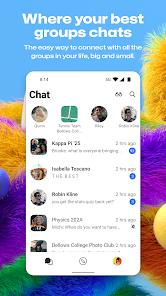
GroupMe is a group messaging app that started as a simple way to keep friend circles and family clusters in one chat thread. It's not trying to be another WhatsApp or Telegram for one-on-one chats; instead, it leans heavily into group coordination. You'd download it from the Google Play or App Store mostly because someone invited you to a group—like a sports team, a book club, or a trip planning committee. The first impression after launching is clean and a bit basic: a white background with your groups listed like a row of tickets. It's free to install, no registration walls at first, but you'll need a phone number or email to get started. There aren't any in-app purchases pushing at you, and ads are minimal, which feels nice for a free tool.
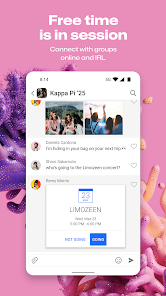
Once you're inside, the hands-on experience is where GroupMe shines for its target crowd. The interface is dead simple: you see your groups, tap one, and start typing. Onboarding is almost nonexistent—you just join an existing chat and go. The main actions are sending text, images, and those little "likes" that pop up as hearts. A common usage step is someone posting an event time and everyone hitting the thumbs-up emoji to confirm. It's smooth for quick back-and-forth, but it can get confusing when a group gets loud, because there's no threaded replies—everything is just one flowing river of messages. A practical tip is to mute groups you don't need right then, otherwise your phone buzzes constantly. The "mention" feature, where you @ someone, helps cut through noise, but it's not as polished as Slack's version.
After using it for a while, I think GroupMe is perfect for people who manage multiple casual groups—like a parent organizing a soccer team or a group of friends planning a trip. It's less ideal if you need serious collaboration tools or privacy, since it's owned by Microsoft and data handling feels loose. Compared to WhatsApp, GroupMe lacks end-to-end encryption and that "everyone uses it" feel, but it wins on simplicity for large group chats because it doesn't push you to add contacts. I'd keep it installed if I had active groups, but I'd uninstall it once the trip ended or the season was over. It's a disposable bridge, not a permanent home for your chats.
features
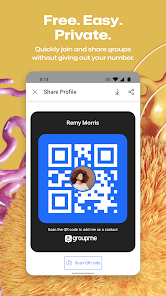
- 🚀 GroupMe makes creating and joining groups effortless. You just start a new group with a name and invite people via a link or their phone number. There's no approval needed, no admin overhead—it works instantly. In contrast, Slack requires you to set up a workspace, channels, and permissions before you can really start chatting. Telegram is closer, but GroupMe's whole identity is about getting groups up and running in under a minute, which suits event planners or temporary teams perfectly.
- 🔔 The "like" and "heart" reaction system is built right into the chat bar. You can tap a message to like it without typing a reply, which keeps the conversation from getting cluttered with "okay" or "got it" messages. WhatsApp only added reactions recently, and they're still clunkier—you have to long-press and pick an emoji. GroupMe's is faster and feels more natural for quick acknowledgment.
- 📸 Image sharing is straightforward with a built-in gallery view. When you send multiple photos, GroupMe arranges them into a scrollable strip that everyone can flip through without leaving the chat. Telegram does this well too, but GroupMe's version is lighter and less distracting. It's not a standout feature alone, but combined with the simple group creation, it makes the app feel purpose-built for sharing moments among friends.
pros
- 🔄 No app fatigue: GroupMe doesn't force you to download yet another messaging app for personal chats. It's a "one group, one app" approach, which beats having to juggle multiple Slack workspaces or Discord servers for different friend circles. It's more focused than Discord, which is heavy on servers and roles.
- 📱 Works without a phone book: GroupMe doesn't need access to your contacts to function. You can join a group anonymously with just a link. WhatsApp and Signal demand your phone number and sync your address book, which can be a privacy concern. GroupMe's looser structure is a strength for temporary or public groups.
- ⏱ No storage guilt: Since GroupMe is cloud-based and not tied to your phone's local storage like WhatsApp, it doesn't eat up space with endless backups. You can leave a group and all the history vanishes from your device. That's a relief if you're the type who hates seeing "cleaning up storage" notifications.
cons
- 🔒 No end-to-end encryption is a deal-breaker for privacy-conscious users. WhatsApp and Signal encrypt every message, but GroupMe stores everything on Microsoft's servers. If you're discussing sensitive topics or sharing personal details, this app is not for you. I've seen people accidentally share addresses in GroupMe groups without thinking twice.
- ⚠️ The app can be buggy on older phones or slow connections. Notifications sometimes arrive late or not at all, which can cause you to miss important messages. Telegram and WhatsApp are more reliable in this regard, especially for real-time coordination. I've had situations where I showed up late to an event because GroupMe delayed a message by 20 minutes.
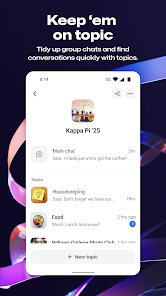
- 🧹 Group management is messy. There's no way to mute a single person or limit who can post. If someone spams the chat, you either have to leave the group or ask the admin to remove them. Discord and Slack let you set permissions per user, which is far more controllable. GroupMe's "everyone can talk" model works for small groups but fails when groups exceed 50 people.
Recommended Apps
![]()
BetterMe: Health Coaching
BetterMe Limited4.3
![]()
Walli - HD, 4K Wallpapers
Tap AI4.4![]()
Future Self - Old Age Filter
Vidler Koiter1.6
![]()
AI Photo Editor, Collage-Fotor
AI Art Photo Editor | Everimaging Ltd.4.3![]()
AI Face Swap: MagicFace &Photo
Braly JSC0![]()
QR Code Reader: QR Scanner
WECHOICE MOBILE4.3![]()
Lip Fall Challenge: Fun Filter
Braly JSC0![]()
Funny Reverse Audio - Singing
PlayStudioInc0![]()
Birthday Secrets
shasunder4.4![]()
Live Wallpapers HD 4K
Wallpaper app4.4![]()
Find Your Phone By Clap
Trusted App Global4.5![]()
Wizz - Expand Your World
Wizz3.8![]()
NCAA March Madness Live
NCAA Digital4.7![]()
Hulu: Stream TV shows & movies
Disney4.5![]()
Lethal Love: a Yandere game
AniByte!4.4















Disclaimer
1.Apklifts does not represent any developer, nor is it the developer of any App or game.
2.Apklifts provide custom reviews of Apps written by our own reviewers, and detailed information of these Apps, such as developer contacts, ratings and screenshots.
3. All trademarks, registered trademarks, product names and company names or logos appearing on the site are the property of their respective owners.
4.Apklifts abides by the federal Digital Millennium Copyright Act (DMCA) by responding to notices of alleged infringement that complies with the DMCA and other applicable laws.
5.If you are the owner or copyright representative and want to delete your information, please contact us [email protected].
6.All the information on this website is strictly observed all the terms and conditions of Google Ads Advertising policies and Google Unwanted Software policy.
7.Apklifts.com is an independent, information-only website which is 100% free to all the users.














