
Amazon Prime Video

500,000,000+
Installs
Amazon Mobile LLC
Developer
-
Entertainment
Category
-
Rated for 12+
Content Rating
-
http://www.amazon.com/gp/help/customer/display.html?nodeId=468496
Privacy Policy
Screenshots

editor reviews
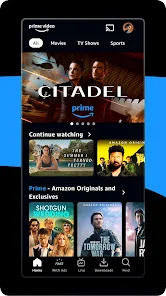
Amazon Prime Video is basically Amazon's streaming service, bundled with your Prime subscription. It's available on both Google Play and the App Store, and if you're already a Prime member, the app itself is free to download and install. I think it comes pre-installed on some Fire devices, but on my Android phone, I had to grab it from the Play Store. The install count is in the billions, which makes sense given how many Prime members exist. After launching it for the first time, you're greeted with a pretty standard layout—rows of thumbnails featuring popular movies, TV shows, and Amazon Originals. It felt familiar right away, like Netflix or Hulu, so there wasn't much of a learning curve. Registration is automatic if you're already signed into your Amazon account on the device, which saved time. There are in-app purchases for renting or buying specific titles that aren't included with Prime, and you'll see some ads for their free ad-supported content, but the main Prime Video library is ad-free.
Actually using the app day-to-day is straightforward. The home screen organizes content into categories like "Watch Next," "Trending," and "Prime Originals," so it's easy to find something based on what you've already watched. The search function works well, letting you filter by genre, year, or even by actor. Downloading movies for offline viewing is a nice touch—just tap the download icon, and it saves to your device. Onboarding was smooth; it suggested a few shows based on my past purchases on Amazon, which felt personalized. One thing I found a bit clunky was the navigation between the "Home," "Store," and "Library" tabs. Sometimes I'd accidentally tap the Store tab when I just wanted to browse my saved list. The video playback itself is solid, with good streaming quality as long as your internet doesn't lag. Subtitles are easy to toggle, and you can customize them. A practical tip: if you're sharing an account, set up individual profiles so your watch history doesn't get mixed up with your roommate's binge-watching habits.
After sticking with it for a while, I think it's a decent option if you're already in the Amazon ecosystem, but I wouldn't sign up for Prime just for the video library alone. The real strength is for people who love exclusive shows like "The Boys" or "The Marvelous Mrs. Maisel," or who enjoy having access to a rotating selection of older movies. However, the interface can feel a bit bloated compared to something like Netflix, which feels more curated. The search for content outside the main Prime library is messy—you end up seeing a ton of stuff you have to pay extra for, which is annoying. I could see someone keeping it installed if they watch a lot of Prime Originals or use the frequent sales to rent new releases. On the flip side, if you're not into their exclusives, you might uninstall it because the general library feels thin next to apps like Disney+ or Hulu. It's a solid backup streaming app, but not my main go-to.
features
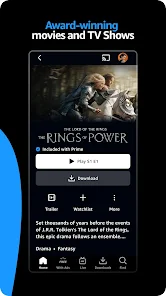
- 📺 Download for Offline Viewing: This is a big one for me. Unlike Netflix or Disney+, Prime Video lets you download almost any title in the Prime library directly to your device. No internet? No problem. I use this all the time on flights or during commutes. Netflix has this too, but Prime's downloads seem to take up less space somehow.
- 🎬 X-Ray Feature: This is Prime's standout feature. While watching a movie or show, you can tap the screen to see info about the actors, the soundtrack playing, or even trivia about the scene. It's like having IMDb built right in. No other streaming app I've used does this as seamlessly.
- 🛒 Rent or Buy Missing Titles: If something isn't in the Prime library, you can still rent or buy it through the same app. This is handy for new releases or obscure movies. Apps like Hulu don't offer this, so you're stuck searching elsewhere. It keeps everything in one place.
- 👥 Family Sharing with Profiles: You can create up to six profiles under one account, each with their own watch history and recommendations. It's similar to Netflix's profiles, but Prime ties it into your Amazon Household, which also shares other Prime benefits. Setting up a kids' profile with parental controls is easy.
pros
- 🌟 Better Integration with Amazon: If you already use Amazon for shopping or Alexa, Prime Video feels like a natural extension. You can ask Alexa to play a show, and your watch history syncs across devices. Netflix doesn't have this kind of ecosystem.
- 🌟 Occasional Free Add-Ons: Sometimes you get access to premium channels like HBO or Showtime for a free trial week through Prime Video Channels. It's a nice perk compared to something like Hulu, which rarely offers such trials.
- 🌟 No Extra Cost for Prime Members: Since it's bundled with your Prime subscription, you're not paying separately for the service. For heavy Amazon shoppers, this is a no-brainer. Apps like Apple TV+ require a separate fee.
cons
- ⚠️ Clunky User Interface: The layout feels dated and crowded compared to Netflix or Disney+. There are too many rows advertising paid content mixed with free stuff, making it hard to find what's actually included with Prime.
- ⚠️ Limited New Release Selection: For a company this big, the library of recent blockbuster movies is pretty weak. Netflix gets more new releases faster, while Prime's catalog relies heavily on older films and Originals.
- ⚠️ Confusing Navigation Between Tabs: Switching between the Library, Store, and Home tabs is clunky. I often tap the wrong one, which breaks the flow. Disney+ has a much cleaner interface that avoids this frustration.
- ⚠️ Inconsistent Streaming Quality: Sometimes the video stutters or drops in resolution even with a good internet connection. I've noticed this more often than with YouTube TV or even Netflix, which feels more stable.
Recommended Apps
![]()
BetterMe: Health Coaching
BetterMe Limited4.3
![]()
Walli - HD, 4K Wallpapers
Tap AI4.4![]()
Future Self - Old Age Filter
Vidler Koiter1.6
![]()
AI Photo Editor, Collage-Fotor
AI Art Photo Editor | Everimaging Ltd.4.3![]()
AI Face Swap: MagicFace &Photo
Braly JSC0![]()
QR Code Reader: QR Scanner
WECHOICE MOBILE4.3![]()
Lip Fall Challenge: Fun Filter
Braly JSC0![]()
Funny Reverse Audio - Singing
PlayStudioInc0![]()
Birthday Secrets
shasunder4.4![]()
Live Wallpapers HD 4K
Wallpaper app4.4![]()
Find Your Phone By Clap
Trusted App Global4.5![]()
Wizz - Expand Your World
Wizz3.8![]()
NCAA March Madness Live
NCAA Digital4.7![]()
Hulu: Stream TV shows & movies
Disney4.5![]()
Lethal Love: a Yandere game
AniByte!4.4















Disclaimer
1.Apklifts does not represent any developer, nor is it the developer of any App or game.
2.Apklifts provide custom reviews of Apps written by our own reviewers, and detailed information of these Apps, such as developer contacts, ratings and screenshots.
3. All trademarks, registered trademarks, product names and company names or logos appearing on the site are the property of their respective owners.
4.Apklifts abides by the federal Digital Millennium Copyright Act (DMCA) by responding to notices of alleged infringement that complies with the DMCA and other applicable laws.
5.If you are the owner or copyright representative and want to delete your information, please contact us [email protected].
6.All the information on this website is strictly observed all the terms and conditions of Google Ads Advertising policies and Google Unwanted Software policy.
7.Apklifts.com is an independent, information-only website which is 100% free to all the users.














